
List your ticket product on ticket.tickmi.com
Besides selling through your own link, you can put your ticket product on the home page and search results of ticket.tickmi.com so new buyers can find it. This guide explains the requirements, how to submit for review, what each status means and how to prepare your information so your product stands out.
On this page
Link-only sales vs. public listing
When you put a ticket type on sale (see turn on sales for a ticket type), your ticket product immediately gets a purchase page on ticket.tickmi.com. There are two visibility levels:
| Link-only sales (default) | Public listing | |
|---|---|---|
| Who can see it | People who have the link to the purchase page | Everyone who visits ticket.tickmi.com |
| Appears on the home page and in search | No | Yes |
| Needs Tickmi's approval | No, any organization can sell | Yes (except organizations that are approved automatically) |
| Best when | You are testing, selling to a private group or to corporate customers | You want to reach new buyers |
Whichever level you choose, buyers order, hold tickets and pay the same way, and tickets are managed together with all other attendees of the ticket product.
Requirements for public listing
The List publicly on Tickmi switch can only be turned on when the ticket product meets all 5 requirements. Anything missing appears in the list Complete these items to enable public listing, with a Set up button that takes you to where it can be fixed.
| Requirement | Where to fix it |
|---|---|
| Has a cover image | Setup → Details → General, in the cover image field. We recommend 1920 × 1080 px and keeping text and logos in the middle area, because the image is cropped into a vertical frame (the card in lists) and a wide frame (the featured banner). |
| Description of at least 100 characters | The same screen. Counted by visible text, not formatting. |
| Has an event date that hasn't ended | The start and end time in General. |
| At least 1 ticket type sold online at a price above zero | Setup → Ticket types → Sales tab. A ticket product that has only free tickets cannot be listed publicly. |
| Payout bank account set up | Settlements menu → Payout account; see the setup guide. |
In addition, the ticket product must be active: a hidden ticket product does not appear on the sales page.
Turn on public listing
- Open the ticket product → Setup → Details → the Ticket sales sub-tab (visible only to the organization owner and admins).
- In the Sales channel group, turn on List publicly on Tickmi.
- Click Save settings. If your organization has not agreed to the current terms, the Agree to ticket sales terms dialog appears; tick the boxes for the Ticket sales policy for organizers and the Operating Rules, click Agree and continue, and your settings are saved right after.
Below the switch, Tickmi Studio tells you whether your organization is approved automatically or has to wait for review. Organizations that Tickmi has marked as trusted, or that are on or have bought a prepaid plan, are approved automatically and listed right away. Other organizations wait for Tickmi's review, usually within 1 business day.
When content contains keywords that need review
When you turn on public listing, and every time you edit the content (name, description, location and so on) of a ticket product that is listed or awaiting review, Tickmi checks the content automatically. If it finds a keyword that needs review, the ticket product moves to waiting for Tickmi's review (even for organizations that are approved automatically) and is not listed publicly yet. On the Ticket sales tab, Studio shows exactly which words were detected. You can edit the content and save again, or wait for Tickmi to take a look. Selling through your own link is not affected.
Review statuses
| Status | What it means and what to do |
|---|---|
| Waiting for Tickmi review | Submitted but not listed yet. You can keep selling through your link as usual while you wait. |
| Listed publicly | The ticket product is on the home page and in search. |
| Rejected | Read the Reason shown below, fix the issue, then turn the switch off and on again to resubmit. |
| Hidden by Tickmi | Tickmi has removed it from the public list. Turn the switch off and on again to resubmit; this time it is always reviewed manually. |
If you turn the switch off, the ticket product leaves the home page and search immediately, but the purchase page link keeps working. After the end date, the ticket product leaves the public list automatically.
How buyers find your ticket product
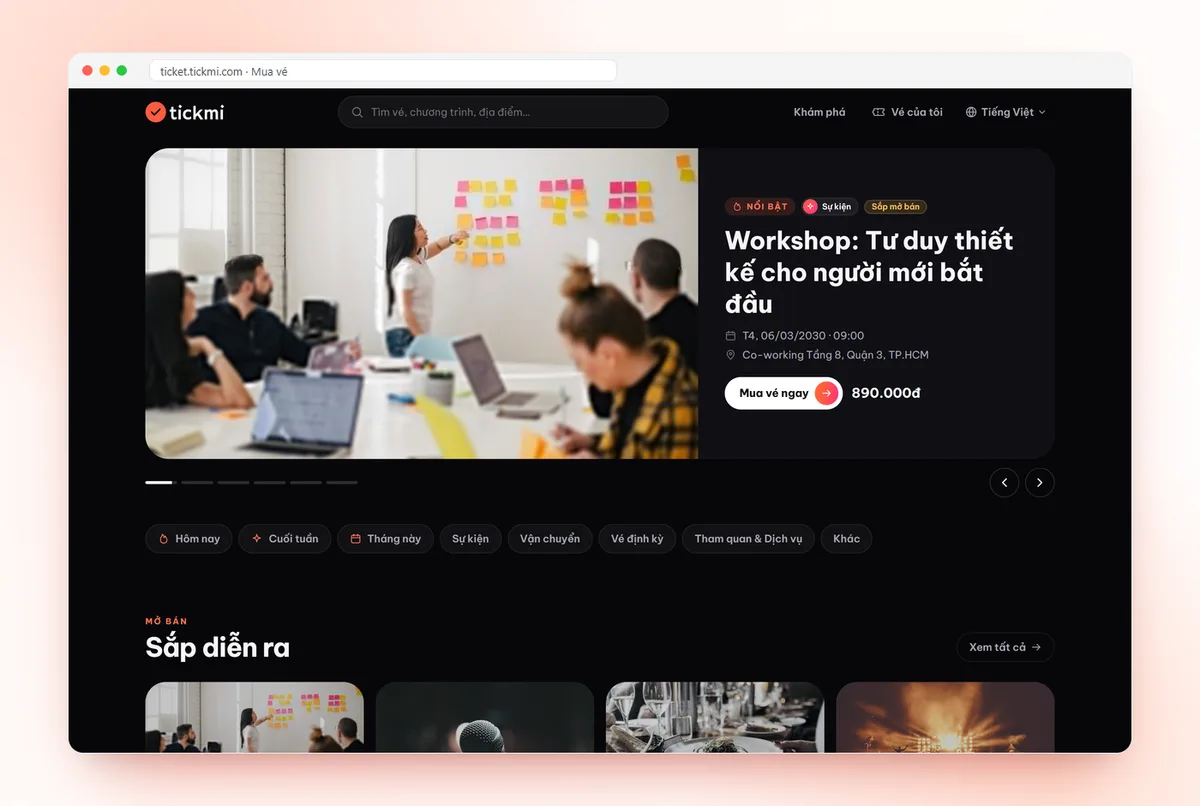
- Home page: the Featured block, the Happening in the next 7 days block, the Upcoming block and the By category section. Ticket products that Tickmi picks as featured always come first; the rest are sorted by the nearest event date.
- Search: buyers type a keyword, and Tickmi searches by ticket product name, location and organizer name. There are time filters (Today, This weekend, This month) and a category filter.
- Ticket product cards show the cover image, name, time, location, lowest price and a status of On sale, Coming soon, Sold out or Ended.
That is why a clear name, an accurate location and the right organizer name make it easier for buyers to find you.
Ticket product type and "What is this?"
When you create a ticket product, you choose two different kinds of classification:
- Ticket product type (for example Events, Attractions & Services): this is the category buyers see on ticket.tickmi.com, used for the By category section on the home page and the category filter in search. It also decides which ticket templates and email templates are suggested to you.
- What is this? (for example Seminar / Conference, Training, Concert / Entertainment, Sports, Exhibition): required when you create the product, and you can change it later. It helps Tickmi suggest suitable templates and figures; it is not shown to buyers.
Product profile
The Complete product profile (30 seconds) card appears inside the ticket product while information is missing, covering What is this?, Who is it for?, Expected size and Format. The last three are optional; click Save profile or Later. To edit it again, open Setup → Details, where the Product profile card sits below. The profile does not affect the public listing review.
Tips for preparing your sales page
- Your description should answer the essentials: what the program is, who it is for, the schedule, what each ticket type includes, how to get in and your own exchange and refund policy if you have one.
- Set a Thumbnail & description for each ticket type so buyers can tell them apart quickly.
- If you expect many buyers at the same time, turn on the virtual queue before sales open.
- Turn on the Q&A assistant for buyers and fill in opening hours, parking and entry rules so buyers can ask right away in the Ask the organizer box.
- Open the purchase page link on your phone to preview the cover image, description and ticket types before you turn on public listing.
Learn more about selling tickets online with Tickmi and see the buyer's side in buy tickets on ticket.tickmi.com.
Frequently asked questions
Can I sell tickets without turning on public listing?
Yes. Every organization can sell through the purchase page link without Tickmi's approval. Public listing only makes the ticket product appear on the home page and in search on ticket.tickmi.com.
Why is the List publicly switch greyed out?
The ticket product does not meet all 5 requirements yet: a cover image, a description of at least 100 characters, an event date that has not ended, at least 1 priced ticket type sold online and a payout account. The list of missing items appears right below the switch.
Can a ticket product with only free tickets appear on the home page?
No. Public listing needs at least 1 priced ticket type sold online. Free tickets can still be claimed through the purchase page link.
Does the What is this? field affect buyers?
No. Buyers filter by Ticket product type. The What is this? field and the product profile only help Tickmi suggest suitable templates and figures for you.
The Tickmi team is here to help on hotline 0349 632 920, or try Tickmi for free and follow along.