
Fairs & expos
Check-in for study abroad, admissions and job fairs and expos
Checking in attendees at a study abroad fair, admissions day, job fair or expo with Tickmi works in three layers: attendees register online and receive a QR ticket; staff scan tickets at the gate; and every seminar session and every advisory booth has its own scanner account, so after the event you know who joined which session and visited which booth to follow up.
- 100 free ticket issuance quota
- One ticket, many scans: gate, session, booth
- Scan with a phone, no special device needed
Trusted by
- Viettel
- VNPT
- MobiFone
- FPT
- CMC
What goes wrong at a crowded fair?
- Attendees register online but still fill in paper forms on arrival
- You do not know how many people really came, or how many joined each seminar
- Schools and booths have no list of the visitors who stopped by to follow up with
- Paper forms are only collected after the event and typed in by hand over several days
One QR ticket for the whole fair journey
Online registration page
Collect full name, phone number, school, grade, field of interest and more with your own custom fields.
QR tickets sent instantly
Attendees receive a QR ticket by email as soon as they register, plus a reminder before the event.
Gate check-in
Scan on several lanes with phones, or use self check-in kiosks when it gets crowded.
Per-session attendance
Set "Check-ins per ticket" so a ticket can be scanned again at each seminar, or create one ticket product per session for separate reports.
Scanning at advisory booths
Each booth uses its own staff scanner account; the scan history records who scanned, so you know which booths a visitor stopped at.
Stats by hour and by scanner
Check-in counts by hour, by source and by scanner, exportable to Excel after the event.
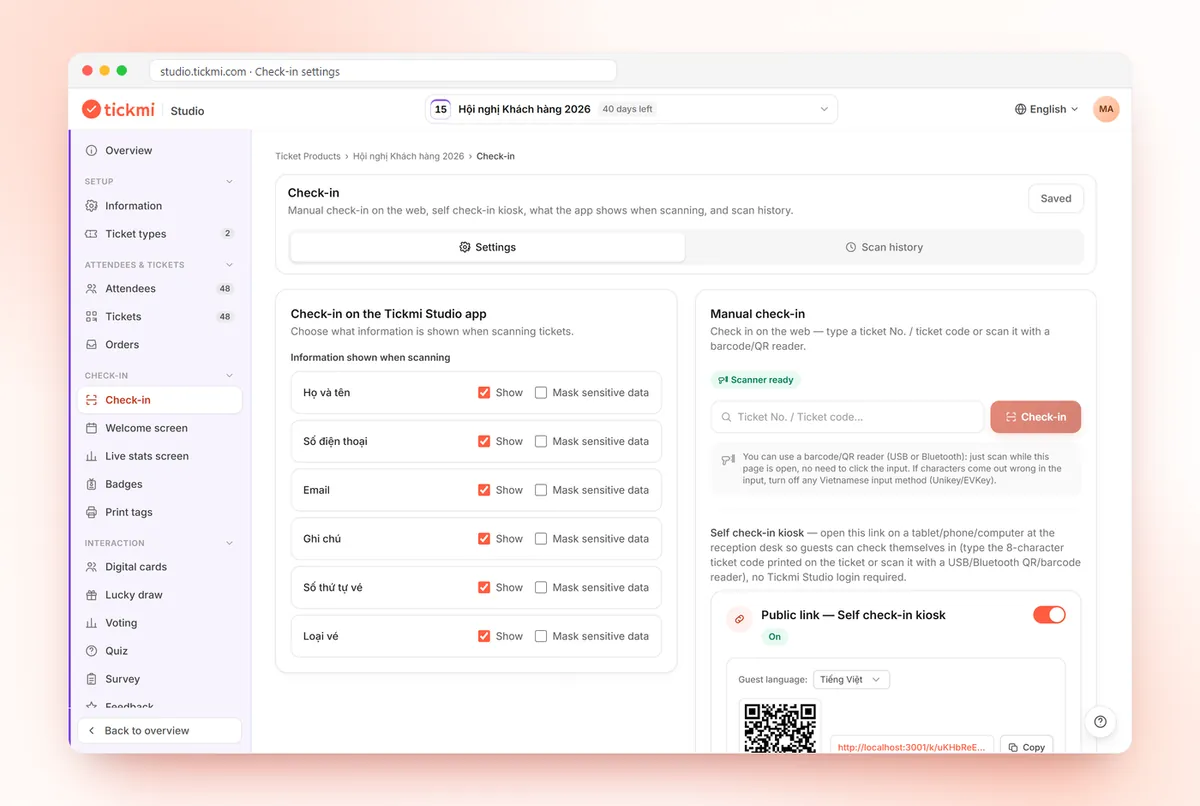
Real screens from Tickmi
Screenshots from the Tickmi Studio app and the built-in template library.
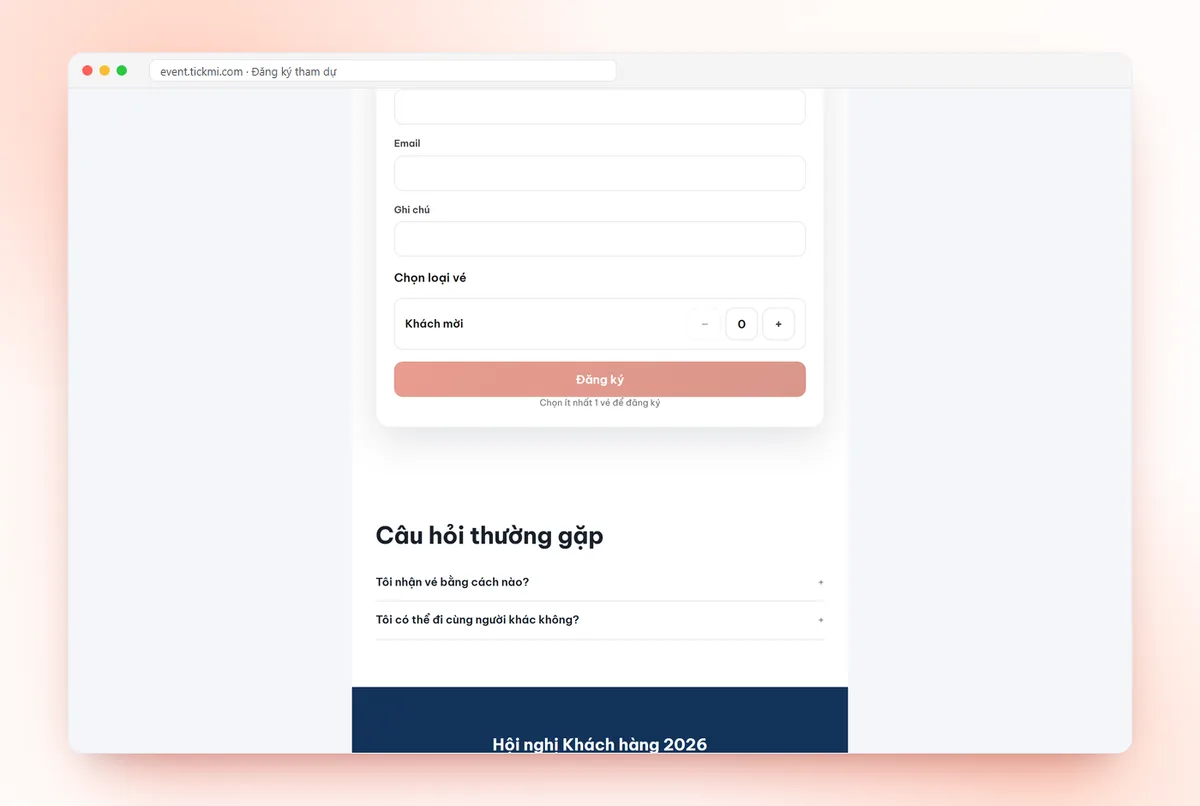
Registration form: details and ticket type 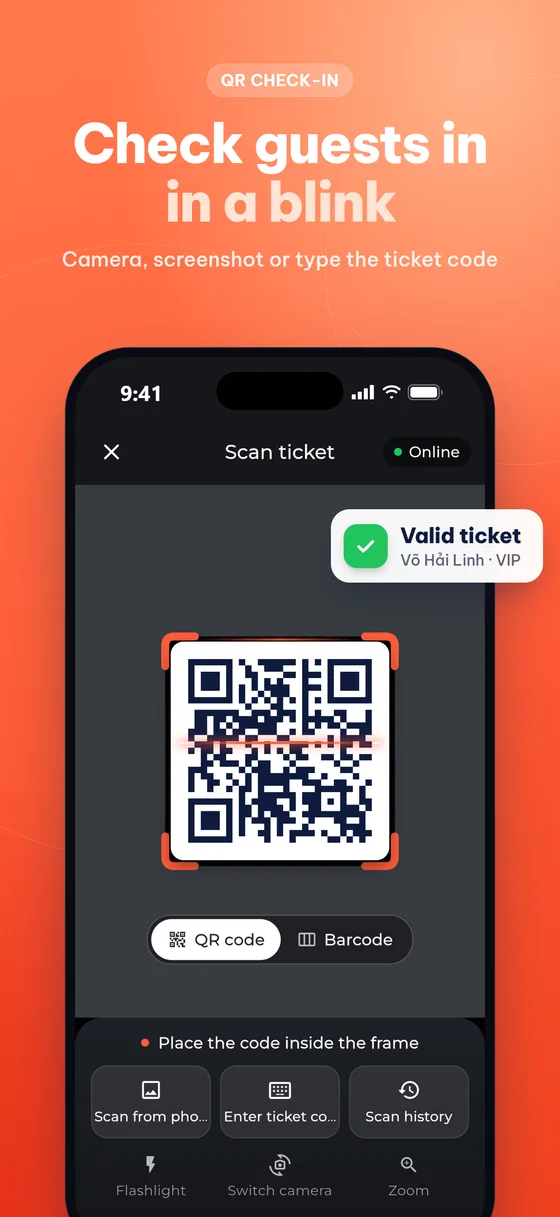
Scanning a QR ticket in the Tickmi Studio app — valid result shown instantly 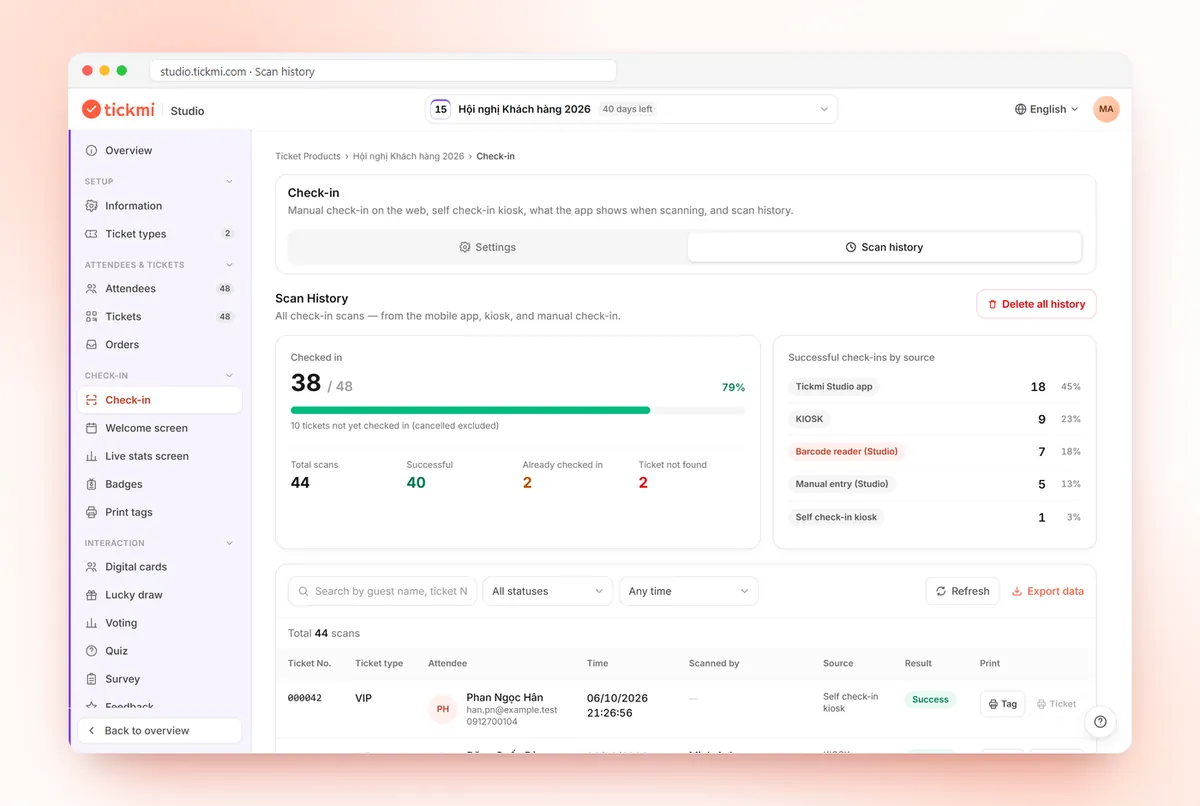
Scan history and check-ins by source: app, kiosk, barcode reader 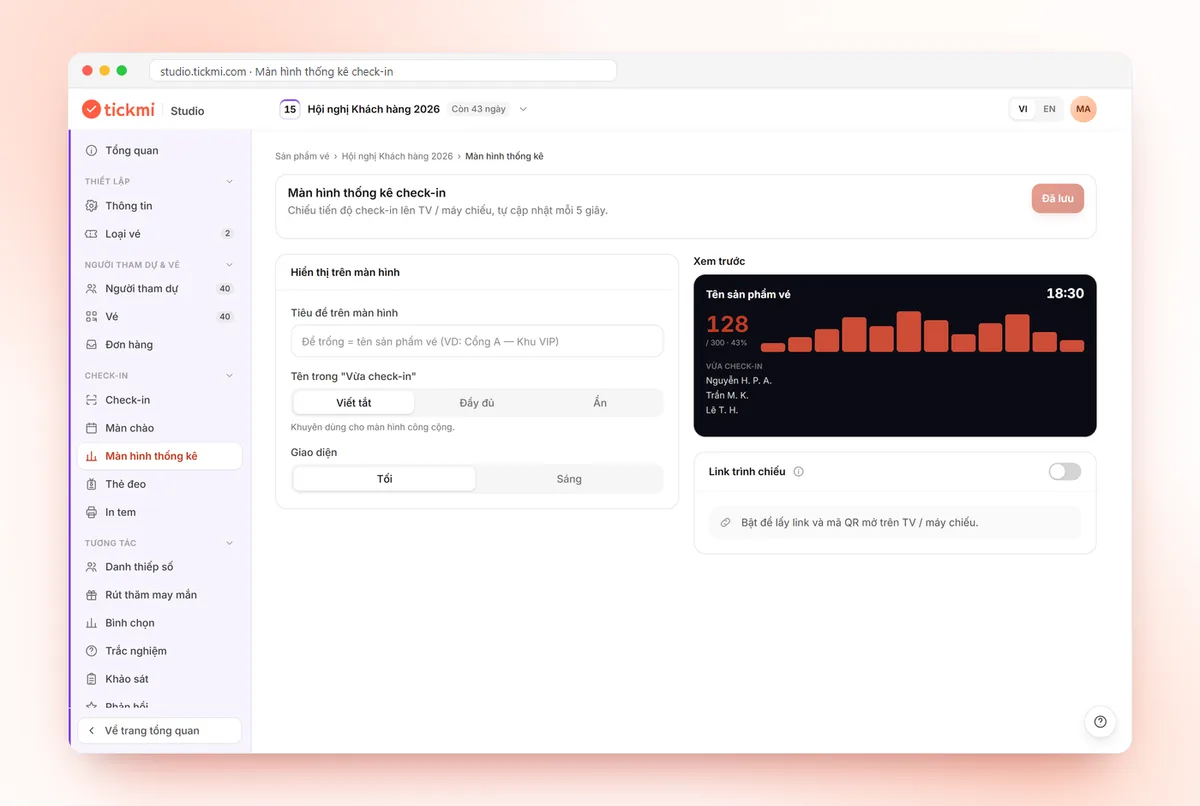
Check-in statistics screen settings: title, name display, projection link and QR
Get started in 3 steps
- 01
Open registration
Create the ticket product, the registration page and the fields you need to collect.
- 02
Assign scanning staff
Gate, seminar rooms and every advisory booth: one person per spot scanning with the app.
- 03
Export the list after the fair
Who came, which sessions they joined and which booths they visited, ready for follow-up.
The manual way vs. Tickmi
| Criteria | Manual | With Tickmi |
|---|---|---|
| Check-in time | Searching names on paper lists or Excel | QR scan in under 1 second per ticket |
| Sending tickets & invitations | Printing, couriers or one-by-one emails | Bulk email, a unique QR ticket per person |
| Fraud prevention | Hard to spot copied or reused tickets | Each ticket works once, reuse flagged instantly |
| Entrance staff | Many people, needs careful briefing | A phone or a self-service kiosk |
| Attendance data | Compiled by hand after the programme | Real time, one-click Excel export |
Clear pricing, pick how you pay
Event packages: pay once for one ticket product that does not sell tickets. Ticket credits: buy ticket issues and use them across every ticket product.
Pick a package by the maximum number of attendees for one ticket product. Every package includes the full Tickmi Studio feature set.
Basic
Workshops, small seminars
1,990,000 VND
Up to 500 attendees
- All Tickmi Studio features
- Attendees, registration forms and RSVP
- Ticket delivery by email and Zalo ZBS
- Check-in, engagement and reports
- One-day events, set up and run by you
Standard
Corporate events
2,990,000 VND
Up to 1,000 attendees
- All Tickmi Studio features
- Attendees, registration forms and RSVP
- Ticket delivery by email and Zalo ZBS
- Check-in, engagement and reports
- One-day events, set up and run by you
Enterprise Event
Large events needing technical consulting
From4,990,000 VND
Up to 10,000 attendees
- All Tickmi Studio features
- Attendees, registration forms and RSVP
- Ticket delivery by email and Zalo ZBS
- Dedicated onboarding and technical support
- One-day events, set up and run by you
Per-event pricing is being updated. Contact Tickmi for a quote for your ticket product.
Note: packages are for events that do not sell tickets (invitations, free registration) and cover 01 ticket product. Each attendee added counts as 01, with 01 ticket issue included. Need more? Buy another package to add to your limit. Tickets sold via Tickmi do not count. Prices exclude VAT, Zalo ZBS fees, devices and on-site staff.
Ticket credits: pay per ticket issued, credits never expire. Shared across all your ticket products, no device fees, no per-staff fees. Sign up and get 100 free ticket credits right away.
Free
0 VND 100 tickets issued
Your first 100 tickets issued free — enough to fully try the core workflow.
Pay as you go
7,900 VND / ticket issued
Buy exactly the tickets you need, minimum 50 — ideal for small events and occasional needs.
Starter
3,450,000 VND / package of 500 tickets
Equivalent to 6,900 VND / ticket
500 tickets issued, shared across multiple ticket products.
- Most popular
Pro
5,900,000 VND / package of 1,000 tickets
Equivalent to 5,900 VND / ticket
1,000 tickets issued — suited for mid-size events.
Business
14,700,000 VND / package of 3,000 tickets
Equivalent to 4,900 VND / ticket
3,000 tickets issued — great rate for organizations running many events a year.
Business+
21,500,000 VND / package of 5,000 tickets
Equivalent to 4,300 VND / ticket
5,000 tickets issued — high volume, priority support.
Enterprise
Contact us volume-based quote
From 10,000 tickets issued · volume-based quote, SLA on demand.
Frequently asked questions
How should I prepare check-in for a study abroad fair?
Open a registration page so students and parents receive QR tickets in advance; set "Check-ins per ticket" high enough for the gate, the sessions and the booths; create a separate Check-in staff account for each session and booth; and run a test the day before. After the event, filter the scan history by scanner and send each school its list.
How do I record which employer booths students visited at a job fair?
Each booth uses its own scanner account in the Tickmi Studio app and scans the QR tickets of the students who stop by. The scan history can be filtered by scanner, so every employer gets the list of students who visited its booth.
Can one person check in several times (gate, seminar, booth)?
Yes. Set "Check-ins per ticket" for the ticket type. Every scan is saved in the history with its time and the person who scanned.
How do I know which advisory booths a visitor stopped at?
Each booth uses its own staff scanner account. The scan history records who scanned, and can be filtered and summarized by scanner and exported to Excel so each booth can follow up.
What if a student has no email address?
Tickets have an 8-character ticket code and a personal ticket page; at the gate you can look an attendee up by name or phone number to check them in.
Do I need to buy scanners?
No. Staff scan with the Tickmi Studio app on their phones. You can add barcode readers or self check-in kiosks when the gate gets busy.
Ready to try Tickmi?
Create an account in a minute and get 100 free ticket credits with every feature included. When you need more, pick an event package or ticket credits.
Leave your number, Tickmi will call you back
Tell us briefly what you need and the Tickmi team will get in touch to suggest a setup that fits your size.
- Advice on issuing tickets and check-in for your attendee count
- Quotes by package or per programme
- A guided trial of Tickmi Studio
Or contact us directly: 0349 632 920 · Zalo · compedia.vn@gmail.com
Request sent
Thank you. Tickmi will call you back on the number you left.