
Create tickets online
Create tickets online with a unique QR code for every attendee
Pick a ticket template or design your own, import your attendee list, and Tickmi issues and emails a QR ticket to each person. On the day, just scan tickets with a phone.
- 100 free tickets
- Nothing to install on your computer
- Ready-made ticket templates
Trusted by
- Viettel
- VNPT
- MobiFone
- FPT
- CMC
Where manual ticket making wastes time
- Designing in a graphics app, then editing every name by hand
- Generating QR codes, pasting them in, exporting and emailing one by one
- No way to tell real tickets from screenshots reused several times
- Still searching paper lists at the entrance
Create, issue and scan tickets in one place
Drag-and-drop ticket design
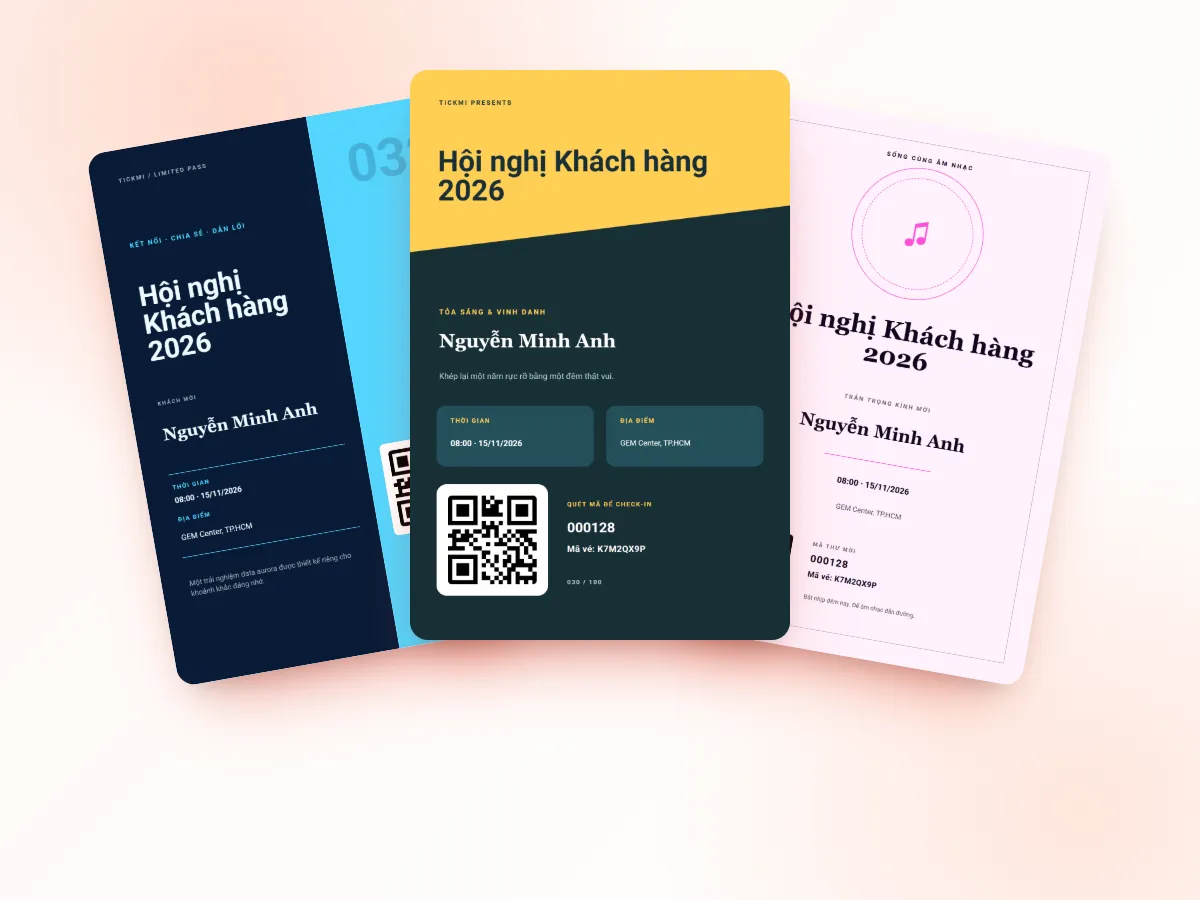
Start from the template library or design your own: logo, background, attendee name, ticket type, QR.
Import from Excel
Upload your attendee list once and add custom fields to print on tickets.
A unique QR per ticket
Every ticket has its own QR and ticket code — no duplicates, not guessable.
Bulk ticket emails
Design the ticket email, send it to the whole list and track delivery per person.
Personal ticket page
Attendees open their ticket on their phone, add it to their calendar and get directions.
Scan with a phone
The Tickmi Studio app scans in under a second, flags reused tickets and works offline.
Real screens from Tickmi
Screenshots from the Tickmi Studio app and the built-in template library.
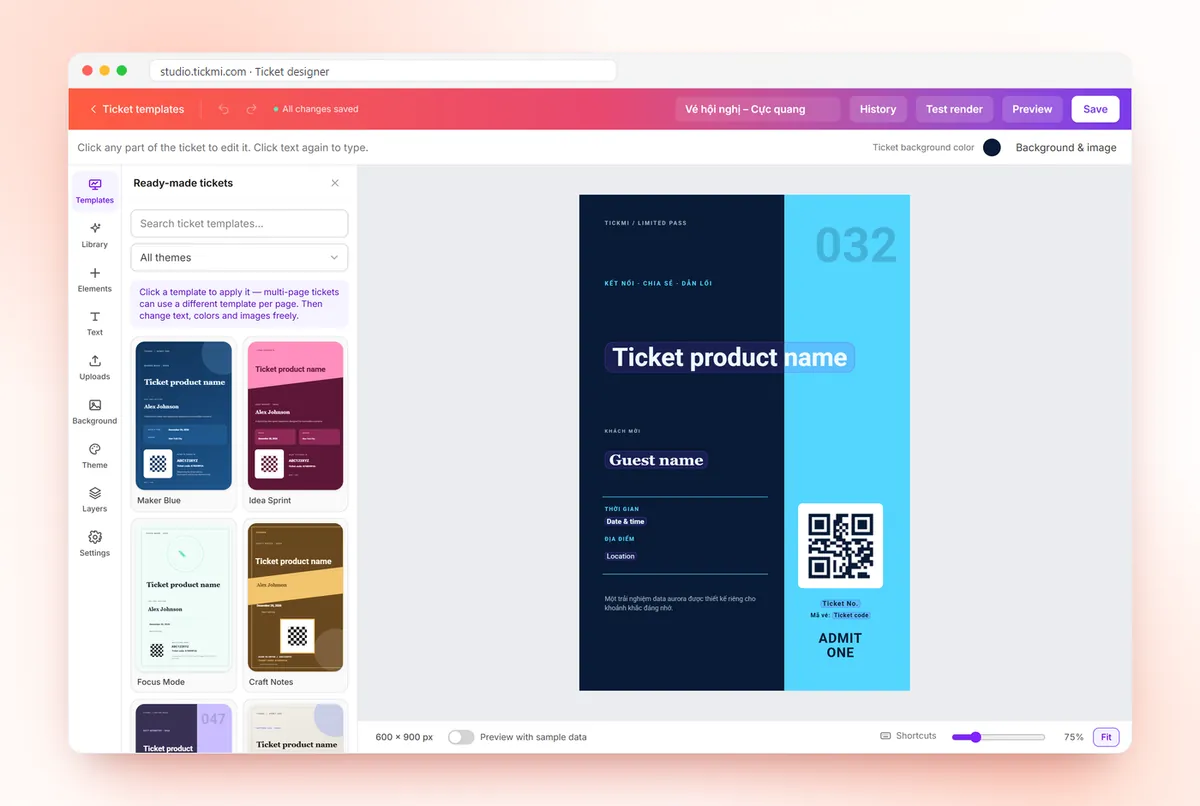
Drag-and-drop ticket designer with templates 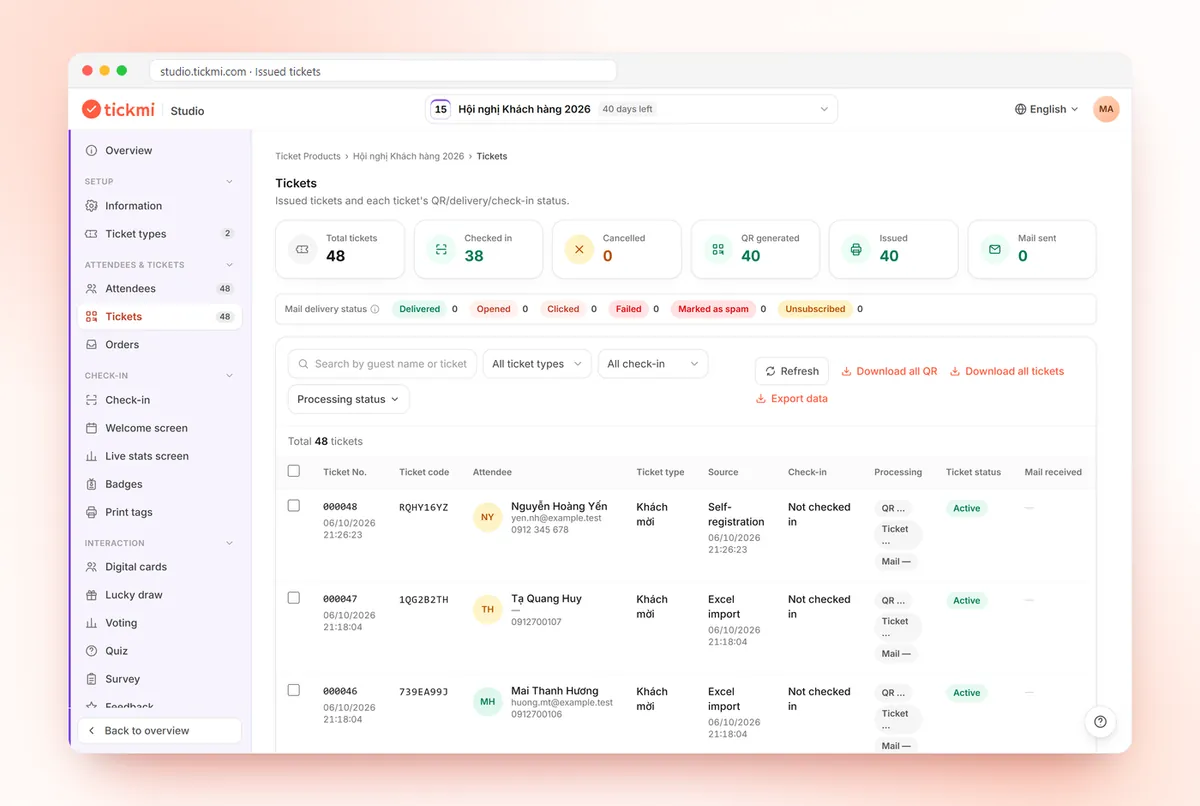
Issued tickets with ticket codes and check-in status 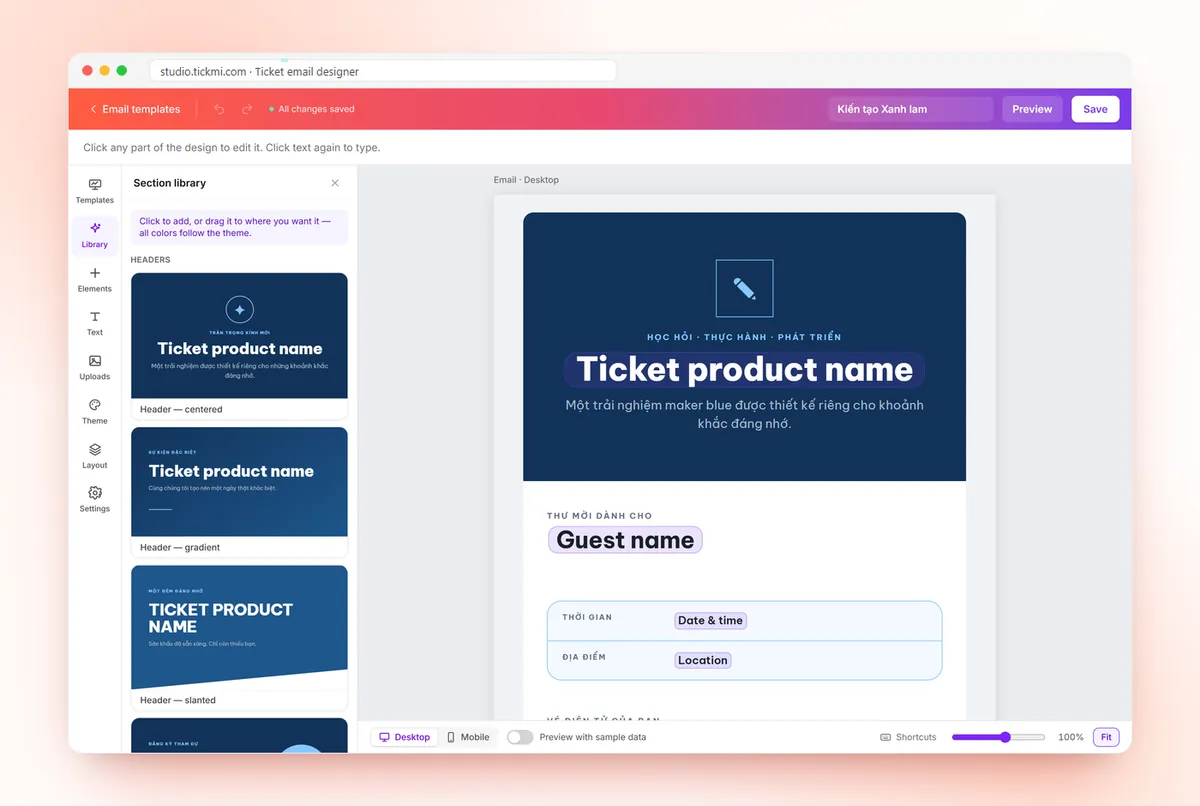
Drag-and-drop ticket email designer 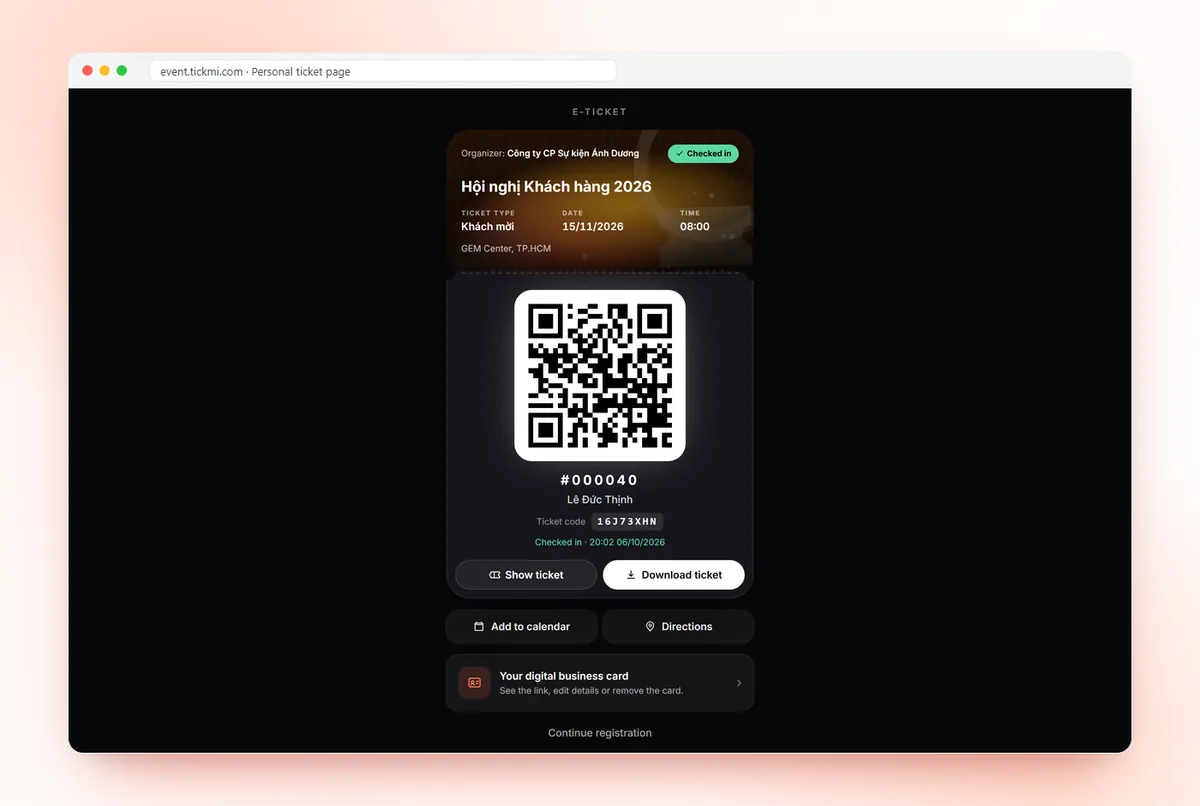
Personal ticket page with QR, add to calendar, directions
Get started in 3 steps
- 01
Create a ticket product
Set the name, time and ticket types, then choose a template.
- 02
Add attendees, issue tickets
Import from Excel or open a registration page; everyone gets their own QR ticket.
- 03
Email tickets, scan at the door
Send tickets in bulk and scan them with the Tickmi Studio app on the day.
Making tickets by hand vs. creating them in Tickmi
| Task | By hand | With Tickmi |
|---|---|---|
| Ticket design | Editing every name in a graphics app | One template, name and QR filled in per attendee |
| QR codes | Generating codes one by one and pasting them in | A unique QR and ticket code generated on issue |
| Sending | Attaching images to individual emails | Send to the whole list at once, track delivery per person |
| Fake tickets | No way to spot reused screenshots | A second scan is flagged as already used |
| Fixing mistakes | Redo the image and resend by hand | Edit the attendee and regenerate the ticket |
Clear pricing, pick how you pay
Event packages: pay once for one ticket product that does not sell tickets. Ticket credits: buy ticket issues and use them across every ticket product.
Pick a package by the maximum number of attendees for one ticket product. Every package includes the full Tickmi Studio feature set.
Basic
Workshops, small seminars
1,990,000 VND
Up to 500 attendees
- Đầy đủ tính năng Tickmi Studio
- Người tham dự, form đăng ký & RSVP
- Gửi vé qua Email & Zalo ZBS (ZNS cũ)
- Check-in, tương tác & báo cáo
- Sự kiện 1 ngày, tự thiết lập và vận hành
Standard
Corporate events
2,990,000 VND
Up to 1,000 attendees
- Đầy đủ tính năng Tickmi Studio
- Người tham dự, form đăng ký & RSVP
- Gửi vé qua Email & Zalo ZBS (ZNS cũ)
- Check-in, tương tác & báo cáo
- Sự kiện 1 ngày, tự thiết lập và vận hành
Enterprise Event
Large events needing technical consulting
From4,990,000 VND
Up to 10,000 attendees
- Đầy đủ tính năng Tickmi Studio
- Người tham dự, form đăng ký & RSVP
- Gửi vé qua Email & Zalo ZBS (ZNS cũ)
- Tư vấn triển khai & hỗ trợ kỹ thuật riêng
- Sự kiện 1 ngày, tự thiết lập và vận hành
Per-event pricing is being updated. Contact Tickmi for a quote for your ticket product.
Note: packages are for events that do not sell tickets (invitations, free registration) and cover 01 ticket product. Each attendee added counts as 01, with 01 ticket issue included. Need more? Buy another package to add to your limit. Tickets sold via Tickmi do not count. Prices exclude VAT, Zalo ZBS fees, devices and on-site staff.
Ticket credits: pay per ticket issued, credits never expire. Shared across all your ticket products, no device fees, no per-staff fees. Sign up and get 100 free ticket credits right away.
Free
0 VND 100 tickets issued
Your first 100 tickets issued free — enough to fully try the core workflow.
Pay as you go
7,900 VND / ticket issued
Buy exactly the tickets you need, minimum 50 — ideal for small events and occasional needs.
Starter
3,450,000 VND / package of 500 tickets
Equivalent to 6,900 VND / ticket
500 tickets issued, shared across multiple ticket products.
- Most popular
Pro
5,900,000 VND / package of 1,000 tickets
Equivalent to 5,900 VND / ticket
1,000 tickets issued — suited for mid-size events.
Business
14,700,000 VND / package of 3,000 tickets
Equivalent to 4,900 VND / ticket
3,000 tickets issued — great rate for organizations running many events a year.
Business+
21,500,000 VND / package of 5,000 tickets
Equivalent to 4,300 VND / ticket
5,000 tickets issued — high volume, priority support.
Enterprise
Contact us volume-based quote
From 10,000 tickets issued · volume-based quote, SLA on demand.
Frequently asked questions
Is creating tickets on Tickmi free?
New accounts get 100 free ticket credits with every feature. After that pick an event package (pay once for one ticket product without ticket sales, from 1,990,000 VND for up to 500 attendees) or ticket credits (from 7,900 VND each, never expire). See tickmi.com/en/pricing. Prices exclude VAT.
Do I need design skills?
No. The library has many themed ticket templates; just change the logo, colours and text.
Can tickets be printed?
Yes. Printed tickets scan just as well, and you can download ticket images in bulk for printing.
How do I stop tickets being reused?
Every ticket has its own QR code. Once checked in, any later scan is flagged as already used, with the earlier scan time.
Ready to try Tickmi?
Create an account in a minute and get 100 free ticket credits with every feature included. When you need more, pick an event package or ticket credits.