
FREE ONLINE LUCKY DRAWLUCKY DRAW
- No limit on people
- Many prizes, exact quantities
- Exclusion list
- Only people in the room
- A stage with your brand
- Announce the right details
- History saved in the system
- More for the whole programme
How to use the online lucky draw
- 1
Paste your list
Open Settings and paste names — one per line, or copy 2 columns from Excel to show a team or ticket number too.
- 2
Set up the draw
Name the prize, choose how many winners per draw, the spin time, music and stage colour.
- 3
Press START
Go fullscreen on a projector or LED wall. Winners are removed from later draws; download the winner list when you are done.
Where people use it
Year-end parties
Draw prizes for staff round by round, on the big screen for the whole room.
Customer & partner meetings
Give away thank-you gifts — paste names with company to announce clearly.
Classes & training
Pick a random name, split groups or choose who answers next — fairly.
Mini games & livestreams
Choose winners from commenters or participants in the open.
What the free lucky draw does
- Two styles: the classic spinning wheel or a name roller that draws several winners at once
- Several winners per draw (results revealed one by one in a grid)
- Winners removed automatically — nobody wins twice
- Two lines per person: name + team / ticket no.
- Countdown, 6 spin tracks, 4 stage colours, fullscreen
- Draw history, download winners as CSV (opens in Excel)
- Runs in your browser, no sign-up; your list stays on your device
Lucky draw in Tickmi Studio: from your list to checked-in attendees
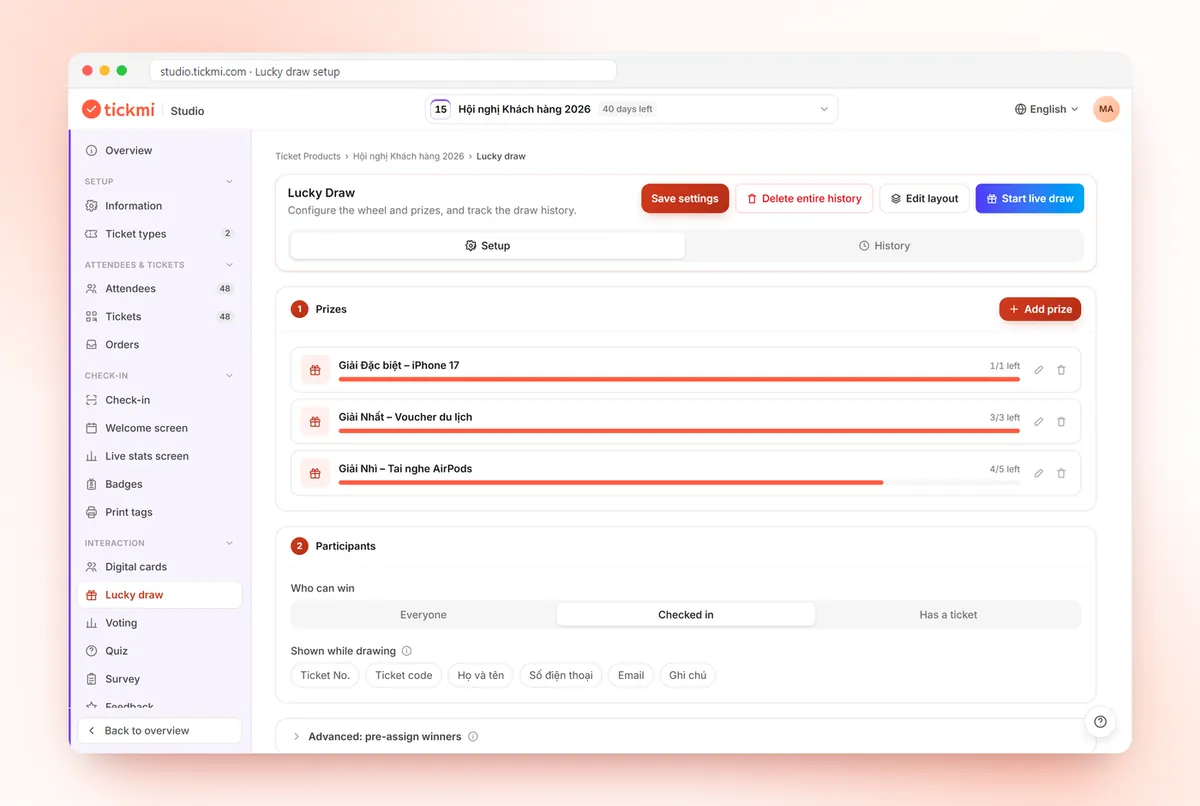
Click "Draw in Tickmi Studio" to take the list and settings you are using to Studio. Studio sets up the draw, gives everyone a QR draw ticket and opens the draw screen. When prizes must only go to people in the room, let everyone check in with their ticket and draw from checked-in people.
What Tickmi Studio adds to the free wheel
No limit on people
Draw 300, 1,000 or 3,000 people. Paste, import Excel or add over time; edit and remove right in the list.
Many prizes, exact quantities
Set up each prize with its quantity and winners per draw (up to 50), then draw from the smallest prize to the grand prize.
Exclusion list
Organisers, staff and honoured guests never win. Exclude by person, ticket type or team.
Only people in the room
Everyone gets a QR draw ticket. Check in at the door and draw only checked-in people, so no prize goes to someone absent.
A stage with your brand
Logo, background, custom title, 4 stage colours, drag-and-drop layout, upload your own draw music.
Announce the right details
Pick 2 lines to show for a winner: name, ticket number, ticket code, team… so winners come up fast.
History saved in the system
Not lost when you switch devices or clear the browser. Export winners to Excel for prize hand-out and reports.
More for the whole programme
Welcome screen, voting, quiz, surveys, badge printing, all from the same participant list.
| Free lucky draw | Tickmi Studio | |
|---|---|---|
| Participant source | Pasted names, up to 100 people | Bring this list over, add people any time; draw ticket holders or checked-in people |
| List size | Up to 100 | First 100 people free; lucky draw packages for 300, 500, 1,000, 3,000 people |
| Exclusions | — | Exclusion list: organisers, staff… never win |
| Prizes | Name the prize when drawing | Set up many prizes, quantities and winners per draw in advance |
| Branding | 4 stage colours | Logo, background, custom title, drag-and-drop layout |
| Fields shown | Name + 1 extra line | Any field: ticket no., ticket code, organisation… |
| History | Saved in the browser | Saved in the system, exportable for prize hand-out |
| Before & after the draw | — | QR tickets, check-in, welcome screen, polls, surveys |
Frequently asked questions
Is this lucky draw free?
Yes. It runs in your browser with no account and no limit on draws. Each list can have up to 100 people.
What if my list has more than 100 people?
Click "Draw in Tickmi Studio" in Settings. Your list and settings move to Tickmi Studio and everyone gets a draw ticket. New accounts can draw 100 people free; bigger lists buy a lucky draw package for 300, 500, 1,000 or 3,000 people inside Studio.
Is the result truly random?
Yes. Winners are picked with the browser's secure random generator (crypto.getRandomValues); everyone left in the list has an equal chance.
Is my list sent anywhere?
No. Your list, settings and results stay in your browser on your device; Tickmi does not receive them.
Is there a spinning wheel?
Yes. The Wheel style is the default: each name or number is a slice and the pointer at the top stops on the winner. For several winners per draw the wheel spins one winner after another (up to 10); for more, or all at once, pick the Roller style in the top-left corner.
Can I draw several winners at once?
Yes, with the Roller style. Set "Winners per draw" in Settings; results appear in a grid and are revealed one by one. The Wheel picks 1 winner per spin.
How do I stop someone winning twice?
Keep "Remove winners from later draws" on (default). To start again, press "Start over".
How can I draw only among people who are present?
Use the lucky draw in Tickmi Studio: attendees check in with QR tickets and the draw only uses checked-in people. See tickmi.com/en/lucky-draw-software.