
Guest list management
Guest list management: one tidy list, from invitation to check-in
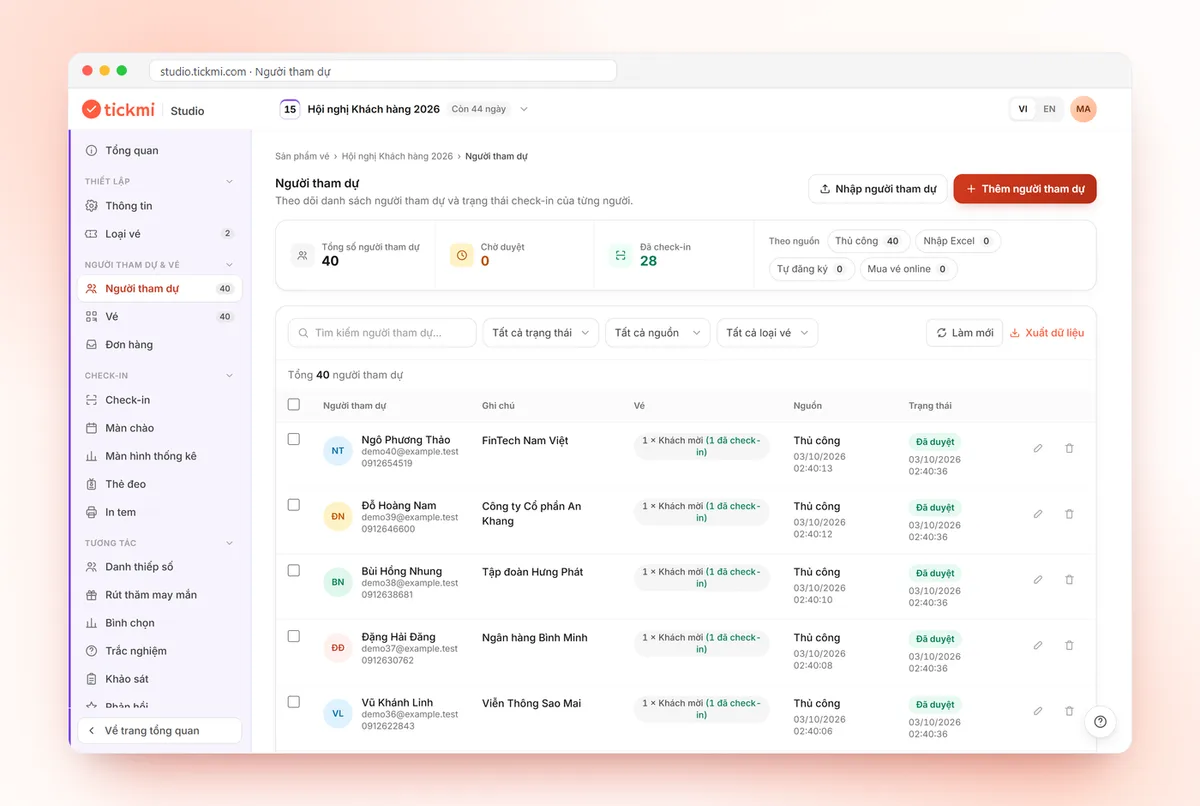
Good guest list management means keeping a single list, knowing who received a ticket and who showed up. With Tickmi, you import your list from Excel or Google Sheets, add custom fields such as company, job title and guest tier, send each person a QR ticket and see check-in status right in the list.
- 100 free ticket credits
- Excel import from a template, with error rows reported
- Export your data any time
Trusted by
- Viettel
- VNPT
- MobiFone
- FPT
- CMC
What goes wrong when you manage guests in scattered Excel files?
- Many Excel versions passed back and forth, with no idea which is the latest
- Duplicate names and wrong emails only found when you send the invitations
- No idea who received a ticket, who confirmed and who is still awaiting approval
- On the day you scan paper lists to find out whether a guest has arrived
All guest information in one list
Import from Excel or Google Sheets
Download the template with the right columns and import once; error rows come back in an error file so you can fix them and import again.
Custom information fields
Text, a list of choices or a portrait photo, reused for printing on tickets and badges.
Approve registrants
Filter Pending, approve one by one or in bulk; approved people receive their ticket right away.
By ticket type
Each guest gets a ticket type: VIP, guest, press and more; filter the list by ticket type.
Send each person a QR ticket
Individual QR tickets sent by email, with a send history to show who has not received theirs.
Check-in status
Scan tickets at the gate and the list updates instantly with who has arrived and who has not.
Search, filter, export
Search by guest details, filter by ticket type and status, and export the list to Excel.
Member permissions
Invite colleagues to manage the list and scan tickets with you.
Real screens from Tickmi
Screenshots from the Tickmi Studio app and the built-in template library.
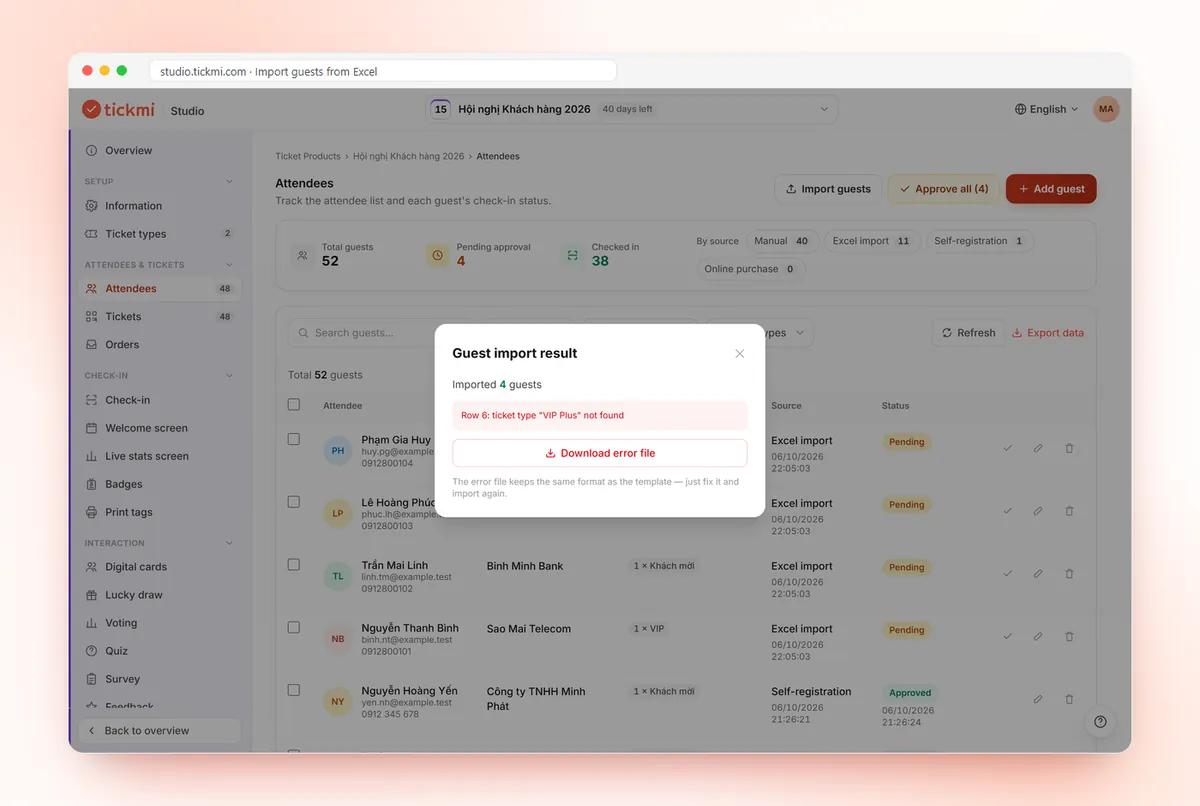
Excel import result: rows imported, row errors and an error file to download 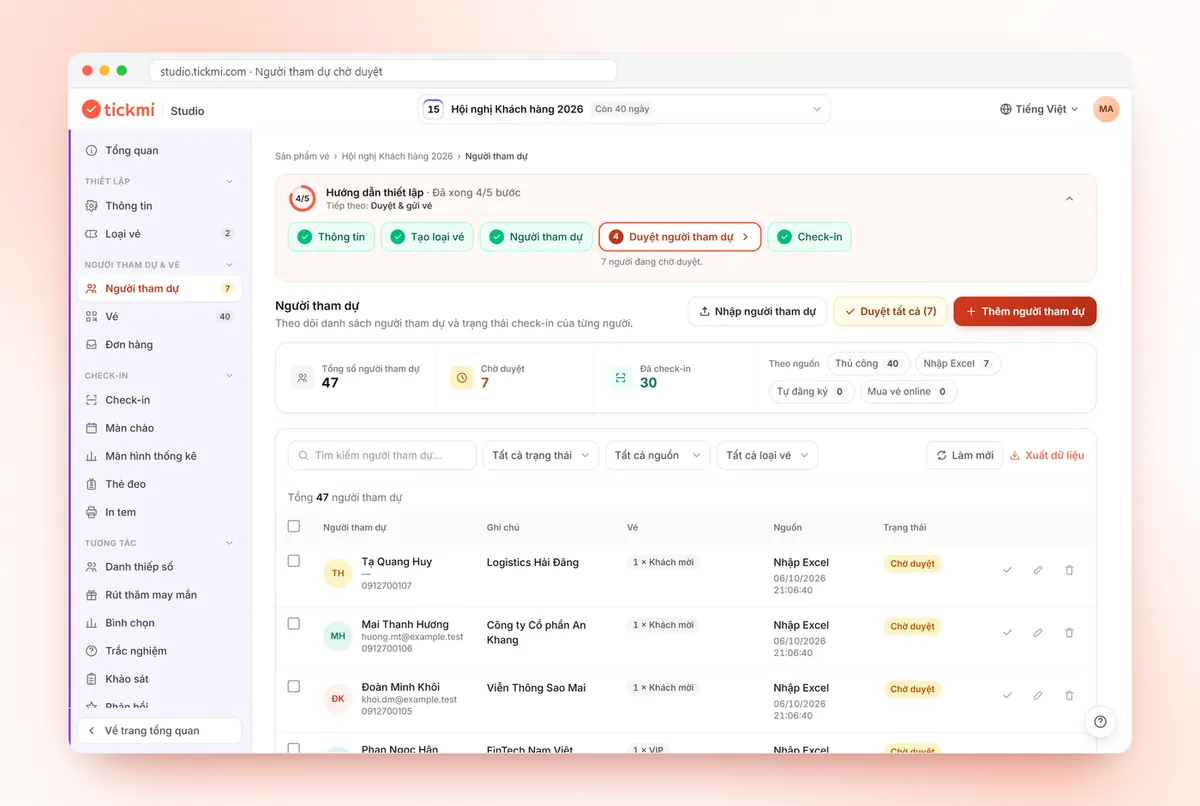
Attendees awaiting approval with an Approve all button 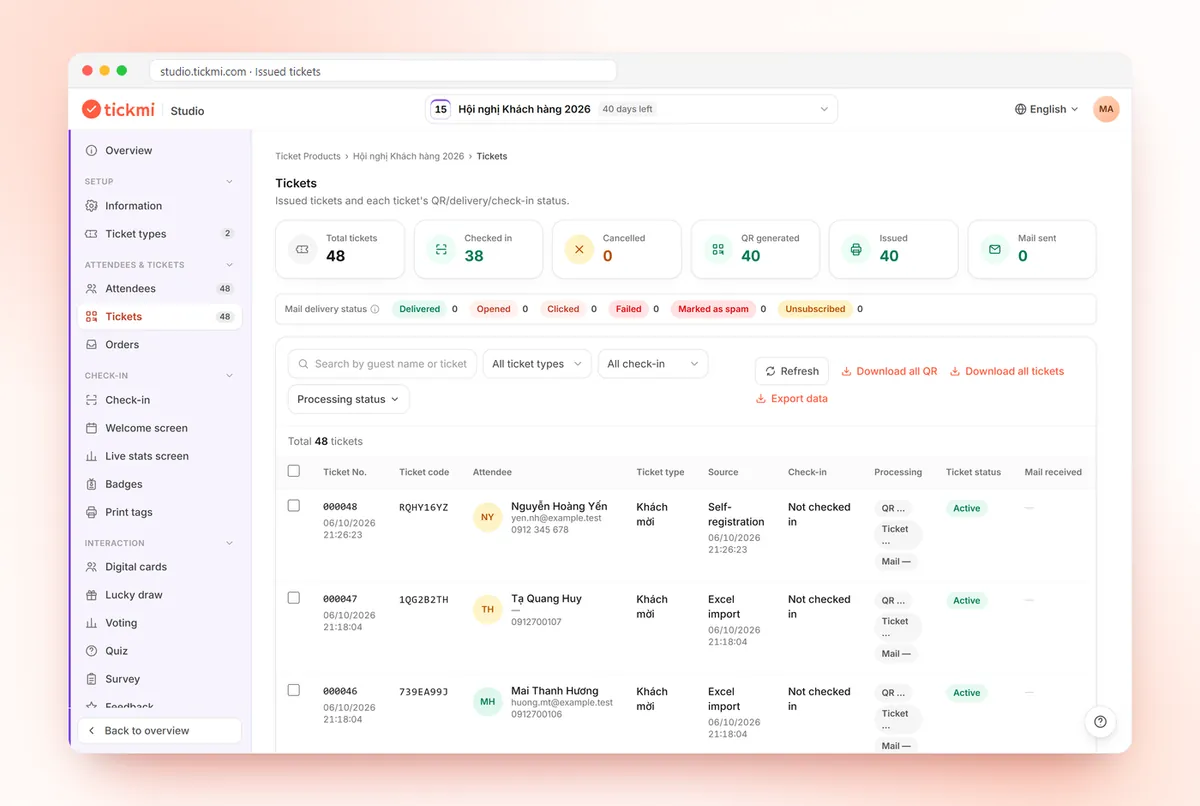
Issued tickets with ticket codes and check-in status 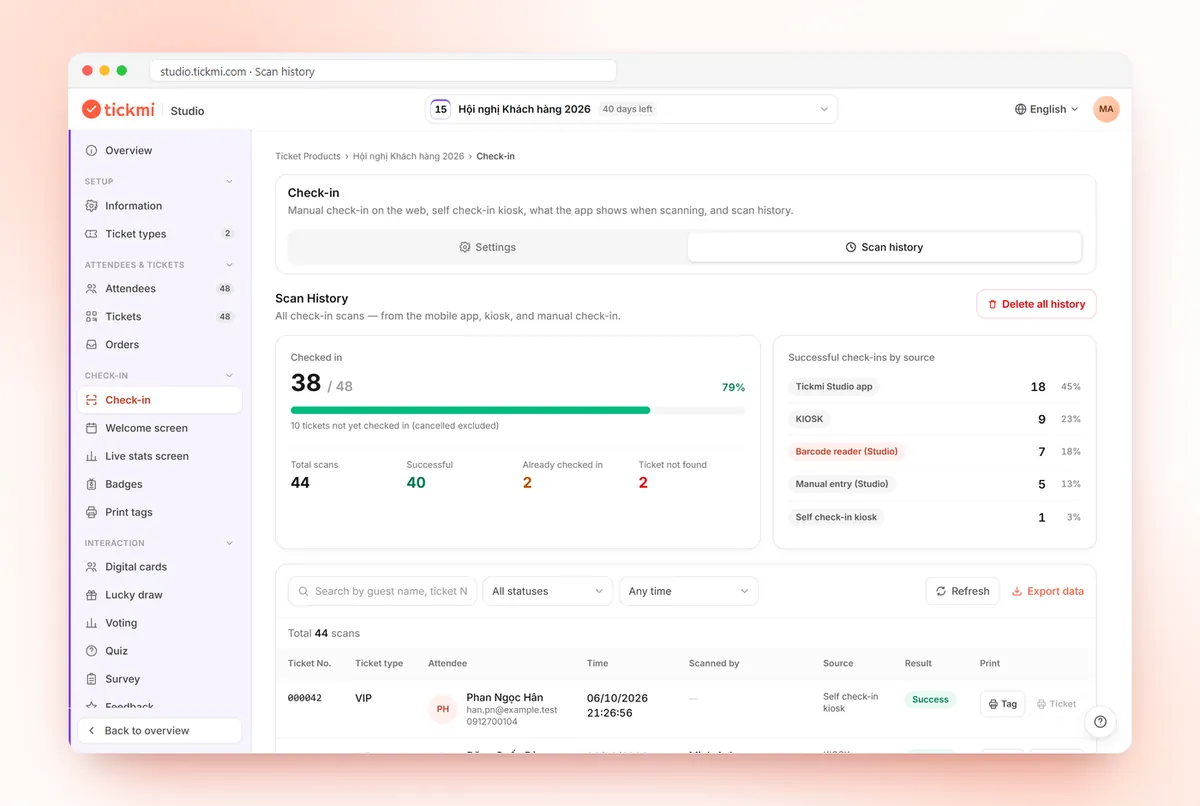
Scan history and check-ins by source: app, kiosk, barcode reader
Get started in 3 steps
- 01
Create a ticket product and ticket types
Each guest is linked to a ticket type.
- 02
Import your guest list
From the Excel template, a Google Sheet, or open a registration page for guests to fill in themselves.
- 03
Send tickets and track
Send QR tickets in bulk, scan them on the day and see who has arrived.
Managing guests in Excel vs. in Tickmi
| Task | Excel files | With Tickmi |
|---|---|---|
| Merging lists | Many files passed around, hard to know the latest | One shared list, imported from Excel or Google Sheets |
| Data errors | Found when emails bounce | Error rows reported on import, download the error file to fix |
| Approving registrations | Filter by hand, color each row | Filter Pending, approve one by one or all at once |
| Sending tickets | Manual mail merge | Individual QR tickets by email, with a send history |
| Who has arrived | Mark on paper, retype later | Updates as tickets are scanned, export to Excel instantly |
Clear pricing, pick how you pay
Event packages: pay once for one ticket product that does not sell tickets. Ticket credits: buy ticket issues and use them across every ticket product.
Pick a package by the maximum number of attendees for one ticket product. Every package includes the full Tickmi Studio feature set.
Basic
Workshops, small seminars
1,990,000 VND
Up to 500 attendees
- All Tickmi Studio features
- Attendees, registration forms and RSVP
- Ticket delivery by email and Zalo ZBS
- Check-in, engagement and reports
- One-day events, set up and run by you
Standard
Corporate events
2,990,000 VND
Up to 1,000 attendees
- All Tickmi Studio features
- Attendees, registration forms and RSVP
- Ticket delivery by email and Zalo ZBS
- Check-in, engagement and reports
- One-day events, set up and run by you
Enterprise Event
Large events needing technical consulting
From4,990,000 VND
Up to 10,000 attendees
- All Tickmi Studio features
- Attendees, registration forms and RSVP
- Ticket delivery by email and Zalo ZBS
- Dedicated onboarding and technical support
- One-day events, set up and run by you
Per-event pricing is being updated. Contact Tickmi for a quote for your ticket product.
Note: packages are for events that do not sell tickets (invitations, free registration) and cover 01 ticket product. Each attendee added counts as 01, with 01 ticket issue included. Need more? Buy another package to add to your limit. Tickets sold via Tickmi do not count. Prices exclude VAT, Zalo ZBS fees, devices and on-site staff.
Ticket credits: pay per ticket issued, credits never expire. Shared across all your ticket products, no device fees, no per-staff fees. Sign up and get 100 free ticket credits right away.
Free
0 VND 100 tickets issued
Your first 100 tickets issued free — enough to fully try the core workflow.
Pay as you go
7,900 VND / ticket issued
Buy exactly the tickets you need, minimum 50 — ideal for small events and occasional needs.
Starter
3,450,000 VND / package of 500 tickets
Equivalent to 6,900 VND / ticket
500 tickets issued, shared across multiple ticket products.
- Most popular
Pro
5,900,000 VND / package of 1,000 tickets
Equivalent to 5,900 VND / ticket
1,000 tickets issued — suited for mid-size events.
Business
14,700,000 VND / package of 3,000 tickets
Equivalent to 4,900 VND / ticket
3,000 tickets issued — great rate for organizations running many events a year.
Business+
21,500,000 VND / package of 5,000 tickets
Equivalent to 4,300 VND / ticket
5,000 tickets issued — high volume, priority support.
Enterprise
Contact us volume-based quote
From 10,000 tickets issued · volume-based quote, SLA on demand.
Frequently asked questions
What columns should a guest list have?
Usually full name, email, phone number and ticket type (VIP, guest, press and so on). If you also need company, job title or a portrait photo, create custom fields; these carry over to printed tickets and badges.
Is there an Excel guest list template?
Yes. In the Attendees section, click Download template to get an Excel file with the right columns, fill it in and upload it. Rows with errors come back in an error file that keeps the template's format so you can fix and re-import them.
How do I know which guests have arrived?
When staff scan the QR ticket at the gate, check-in status updates instantly in the guest list with the scan time. You can filter by arrived or not arrived and export to Excel when needed.
How do I import a guest list from Excel?
In the Attendees section, click Import attendees, download the template, fill in the columns and upload it. Rows with errors are returned in an error file for you to fix. Details at tickmi.com/huong-dan/quan-ly-nguoi-tham-du.
Can I import from Google Sheets?
Yes. Paste the link of a Google Sheet shared as anyone with the link, using the same column structure as the template.
Does adding guests to the list use up credits?
On ticket credit plans: no, ticket credits are only deducted when a ticket is issued to a guest. On event packages: each attendee you add counts as 1 person toward the package's limit and does not go down; the ticket issues included equal this limit and are not deducted from your organization's credits.
How do I let guests register themselves and approve them?
Open a registration page and choose manual approval; registrants stay in Pending status until you approve them. See tickmi.com/en/online-registration-page.
Ready to try Tickmi?
Create an account in a minute and get 100 free ticket credits with every feature included. When you need more, pick an event package or ticket credits.
Leave your number, Tickmi will call you back
Tell us briefly what you need and the Tickmi team will get in touch to suggest a setup that fits your size.
- Advice on issuing tickets and check-in for your attendee count
- Quotes by package or per programme
- A guided trial of Tickmi Studio
Or contact us directly: 0349 632 920 · Zalo · compedia.vn@gmail.com
Request sent
Thank you. Tickmi will call you back on the number you left.