
Knowledge
How to do QR invitations and guest reception for a grand opening of a store, showroom or new office
A grand opening is usually more crowded than your floor space allows for: VIPs, partners, friends and even passers-by all pour in within a short window. QR invitations let you know in advance who is coming, welcome the right people and avoid handing out gifts twice. This article follows a timeline, from finalizing the list to seeing guests off.
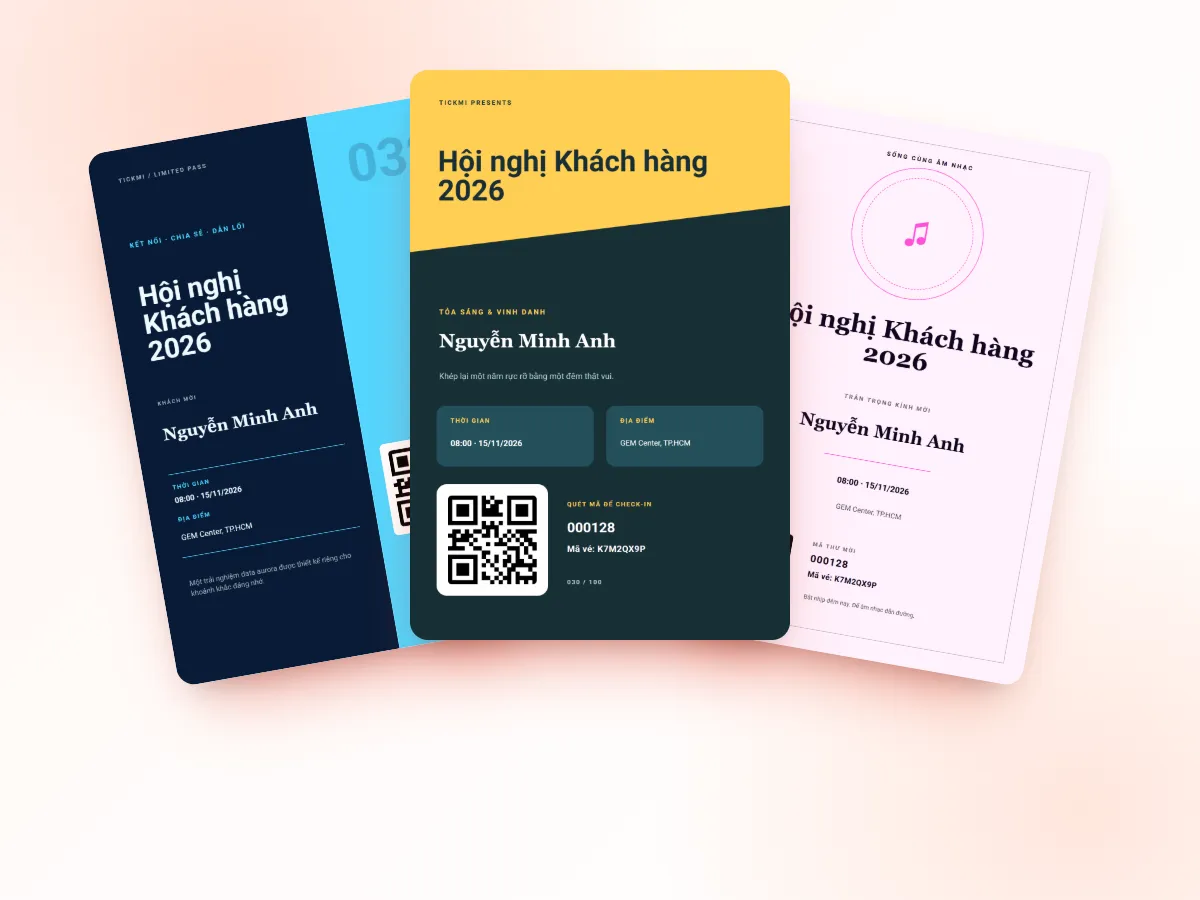
First, group your guests to choose the right way to invite them
Not everyone needs the same kind of invitation. Grouping from the start helps you avoid sending a formal invitation to close friends, or conversely making an important partner register through a form. For close friends, an online invitation card sent through Zalo or Messenger is usually a better fit than a formal invitation. From invitation to check-in on opening day, you can manage the event on one platform instead of scattering it across many files.
| Guest group | How to invite | How to issue tickets |
|---|---|---|
| VIPs, partners, leadership | A personalized invitation with each person's name | Import the list, send an email with a unique QR code |
| Loyal customers, friends | Email or a message with a ticket image | Import the list, download tickets in bulk to send through the channel you already use |
| Community, neighbors, passers-by | Posters and social posts with a QR code | Open a registration page, auto-approve, ticket arrives by email |
| Press, KOLs | Invited separately, confirmation required | A registration page with auto-approval off, you approve each person |
Each group can be its own ticket type within the same ticket product: the ticket type name helps you count and recognize people the moment they are scanned, and each type has its own ticket template and email template.
About 2 weeks before: finalize the list and design the invitation
- Set quantities by capacity. Set the Ticket count of each ticket type according to the real number of places in the space. Beyond that number the system issues no more, which keeps you from "promising" more than you can host.
- Import the guest list from Excel or Google Sheets (full name, email, phone number, ticket type). See how to send QR tickets in bulk by email.
- Design the ticket and email in your new brand identity: logo, colors, and a Program block with the ribbon-cutting time and the time the reception starts. You can start from a template in the template library and adjust it.
- Fill in the time and venue completely in the ticket product information. The guest's personal ticket page will have Add to calendar and Directions buttons that open a map, very useful for a new address nobody knows yet.
A short QR invitation template
An opening invitation should be short, covering five points: who is inviting, what event, when, where, and what the guest needs to do. A reference frame:
- Subject: You are invited to the grand opening of [store name] on [date], [time].
- Body: a paragraph of thanks, the ceremony time, the address, where to park, and who to contact if they get lost.
- Action: "Please show the QR code below to the reception staff. Each code is for one person."
- Gift or offer, if any: state clearly "collect at the counter after check-in".
More sample sentences and how to write subject lines are in the article event invitation email templates.
Open registration with a poster QR code for passers-by
For community groups, you do not have a list ready. How to do it: create a registration page, turn on public access to get the link, then print the link as a QR code placed on a poster, standee or post. People who scan the code fill in their name and email and receive a ticket. You decide whether this ticket type is auto-approved or manually approved, set the Maximum tickets per registration and the registration closing time. Detailed instructions are in creating a registration page.
A sensible tip for a small store: close registration when the tickets run out, while keeping a small number of tickets for guests who show up close to the day so you can add them manually.
Stagger arrivals if the space is small
An 80 square meter store cannot welcome 200 people at once. A simple way is to split guests into waves, for example Wave 1 (9:00-10:00), Wave 2 (10:30-11:30). Make each wave its own ticket type, set the Ticket count to the wave's capacity, and put the wave's arrival time in that ticket type's email template. Tickmi does not automatically block people who arrive in the wrong wave; staff look at the ticket type name on the result screen to ask the guest to come back at the right time or flexibly let them in.
Opening day: a lean reception desk and small things that make a difference
- One desk, two people. One person scans tickets with the Tickmi Studio app, one hands out gifts or guides guests. If a guest forgot their ticket, type the 8-character ticket code or search by name.
- One scan per ticket. If there are gifts or vouchers, hand them out only after the app shows Check-in successful. A used ticket shows Already used, so one guest cannot collect a gift twice.
- A welcome screen at the door. A TV or LED screen showing the name of the guest who just checked in creates a feeling of being welcomed, especially for VIPs. See creating a welcome screen.
- A lucky draw among people who have checked in if you have a prize program. See live lucky draw.
- Weak network in a new area? Tap Download offline data before opening; scans sync automatically when the network is back.
The manual way at small scale: Google Form and a paper list
Under about 50 guests, you can absolutely use Google Form to collect registrations, print the list on paper and cross off names at the door. This costs nothing but time. It starts to wear you out when the list keeps changing, some guests register several people on someone's behalf, or you need to know exactly who came to follow up after the ceremony. The article Google Form, Excel or a ticketing platform looks at when to move to a dedicated tool.
After the ceremony: use the list to thank guests
Export the attendee list with check-in status using the Export data button (for the organization's Owner and Admins). Use that file to send a thank-you with a first-purchase offer to those who came, and a different message, for example an invitation to drop by the store this week, to those who registered but did not come. For the information needed for reports, see also post-event report.
The whole solution for issuing invitations and QR tickets is on the QR invitation tickets page.
About Tickmi
Tickmi is a ticketing and participant experience platform. On a single, unified set of attendee data, Tickmi connects the whole journey: issuing invitation, registration and paid tickets, sending branded QR tickets, checking in with an app, kiosk or scanner (even offline), and then moving on to the welcome screen, lucky draw, polls, quizzes and surveys. Tickmi is trusted by organizations such as Viettel, VNPT, MobiFone, FPT and CMC. Learn about Tickmi or try it free.
Frequently asked questions
How do guests who do not use email receive a QR invitation?
Download tickets in bulk (choose the Image format) and send them through the channel you already use with the guest, such as Zalo or messaging, or print them as cards. Tickmi sends automatically by email; other channels you send manually.
How can passers-by register to attend too?
Create a registration page, turn on public access, then print the link as a QR code on a poster or standee. People who scan the code fill in their details and receive a ticket by email.
Can I block guests who arrive at the wrong time slot?
Not automatically. You can split time slots into ticket types and put the arrival time in each type's email. When scanning, staff see the ticket type name and decide whether to let the guest in or ask them to come back.
Can a guest scan a ticket twice to get a gift twice?
Not with the default configuration, because each ticket can be checked in only once. On the second scan the app shows Already used with the earlier check-in time.
Issue QR tickets, send emails, check in and engage attendees on one platform.