
Knowledge
Build the year-end party run of show for the whole evening: from the guest gate to the final draw
A year-end party fails not for lack of performances, but because the segments are out of rhythm: guests queue at the gate, voting opens when nobody remembers which act was which, and the lucky draw is crammed into the last minute when half the room has left. This article builds a timeline for the whole evening, with places for check-in, lucky draw and act voting.
How many "acts" does a year-end party have?
Think of the party as a play in three acts. Act one is receiving guests: people arrive spread over 30 to 45 minutes and need to feel welcomed. Act two is the social and entertainment part: the whole room sits still, focused on the stage. Act three is the prize draw and awards: the mood peaks and then ends. Each tool should sit in its own act, not be spread evenly.
Sample timeline: a party for 200 people, 17:30 to 21:30
The table below is a hypothetical example for a company party of about 200 people at round tables. Stretch or shrink it to your real program.
| Time | What happens | Technical tasks |
|---|---|---|
| T-14 to T-7 | Finalize the list, assign tables | Import Excel, add a "Table" field |
| T-7 | Issue tickets, attendees receive email | Check the Tickets tab to see who has not received theirs |
| T-1 | Full dry run | Test-scan a few tickets, test-draw, delete test data |
| 17:30 to 18:15 | Receive guests, photos | Scan tickets, turn on the welcome screen |
| 18:15 to 18:30 | Opening, the MC explains the rules for the whole evening | Show the voting QR code |
| 18:30 to 19:30 | Team performances, watching while eating | Draw round 1 between acts |
| 19:30 to 19:40 | Act voting | Open the voting question, show live results, close the question |
| 19:40 to 20:15 | Speeches, act awards | Prepare the major prizes |
| 20:15 to 21:00 | Lucky draw round 2 and the special prize | Choose the prize, click draw, record the winner |
| 21:00 to 21:30 | Thanks, group photo | Export the winner list to hand out gifts |
Before the party: three things to finish the week before
Most of the evening's problems are decided in the list. Do these three things:
- A finalized list, with grouping. Split staff, leadership and partner guests into ticket types for statistics and so you can design different tickets if needed. Import from Excel using the template; note that Excel import only adds new people, it does not update existing ones, so finalize names before importing. For latecomers already on the list, add them by hand with the Add attendee button.
- The table number is an information field. Tickmi has no seating chart, but you can create a free-text Field named "Table" and fill it in Excel. Then turn this field on in Information shown when scanning tickets so gate staff can read out the table number, and choose to show it on the welcome screen. See the attendee management guide.
- Send tickets on the right day. Tickmi sends email as soon as the ticket is issued; there is no scheduled mode. If you want staff to receive tickets on Monday, issue them on Monday. State the arrival time in the email.
Act one: check-in and the welcome screen in the lobby
With 200 people arriving over about 45 minutes, a few staff scanning with phones is enough. What makes the difference is not scanning speed but what happens after the "beep": For a year-end party, managing the event on one platform keeps the guest list, QR tickets and check-in figures in one place.
- Gate staff read out the table number. The result screen shows the fields you selected. For phone numbers and email, turn on Hide sensitive data so people queuing behind cannot read them.
- The welcome screen shows names. Go to Check-in → Welcome screen and write a greeting with the variable
{{name}}, for example "Welcome {{name}} to the year-end party". The welcome screen runs for each person who just checked in, so place it where guests stop for photos. See the welcome screen guide. - People who forgot their ticket. Staff search by name and then Mark as checked in; do not let one person hold up the whole line.
The lucky draw only counts people who have checked in, so the minute of check-in also decides who is in the draw. Say this in the invitation email.
Act two: act voting so the whole room plays along
Act voting often fails because the audience forgets what they just watched. Three ways to avoid it:
- Number the acts and put that number in each option, for example "Act 3 - Sales Team - Modern dance". The MC repeats the number when introducing each team.
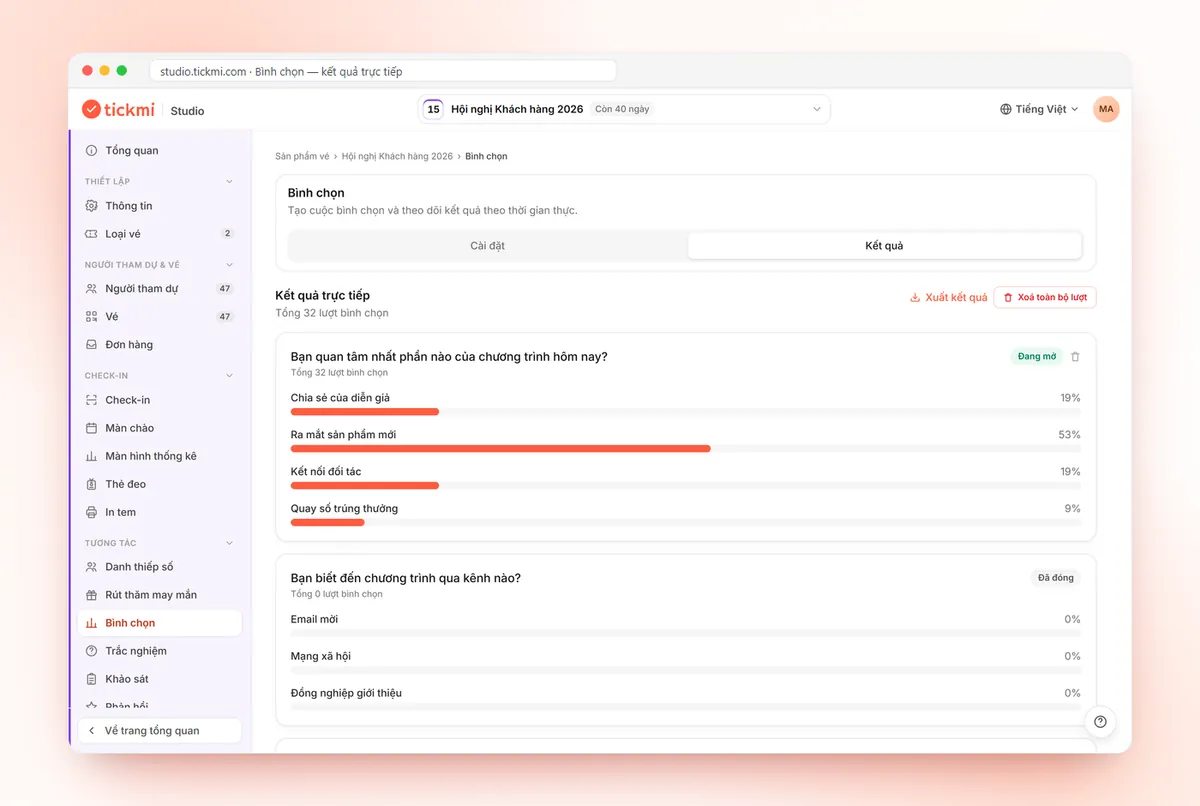
- One question per category. Go to Voting → Add question; each question needs at least 2 options. For example: "Best act", "Most creative act". Tickmi lets you open and close each question independently (Open, Closed), so you open them one at a time and never let two questions compete for attention.
- Time limit. Fill in Voting time in seconds, for example 120 seconds. If it ends quickly, the atmosphere stays hot.
For fairness, decide a rule in advance and tell the whole room: whether people may vote for their own team, and whether leaders' votes count differently from regular votes. The tool only counts votes; the rules belong to the organizers. To let only people who are present vote, in the Participant page section choose Verify by Email or Phone number with the Checked in group; if the QR code spreads outside, use Change code to invalidate the old code. Details are in the guide to voting, quizzes and surveys; question design is covered further in online voting with QR codes.
Act three: a multi-round lucky draw instead of one at the end
Crowding the draw into the end makes half the room stand up before the major prizes appear. Split it into two or three rounds, with small prizes early and the big prize last:
| Round | When | Prizes (hypothetical example) | How to draw |
|---|---|---|---|
| 1 | During the performances | Many small prizes | Several people per draw |
| 2 | After the act awards | Second and third prizes | One prize at a time, draw by draw |
| 3 | End of the evening | Special prize | One person per draw, spin slowly for drama |
In Lucky draw, create each prize with Add prize, setting Quantity and Winners per draw (max 50). In Draw participants, choose Checked in. In Information shown when drawing, choose name and table number so winners know where they are. When it happens, click Live draw, choose the prize in the CHOOSE PRIZE area and click START. People who have already won are no longer in the pool for later draws. How to split the prize structure is in lucky draw prize structure, and the tool is on the lucky draw page.
Common mistakes when building a year-end party run of show
| Mistake | Consequence | How to avoid |
|---|---|---|
| Not checking in but sitting in the room anyway | No name in the draw, causing complaints | State the condition in the email and the MC's words; a support desk for late check-in |
| Voting left open too long | Diluted results, people forget | Set a voting time, close exactly on cue |
| Cramming the draw into the last 15 minutes | Winners have already gone home | Split into 2 to 3 rounds, with someone to collect gifts on a winner's behalf if the rules allow |
| Forgetting to delete test data | Prizes already used up, test votes mixed into results | Use Delete all test draws and Delete all rounds before the day |
Checklist for the evening
- The list matches the real table numbers, and a few tickets were test-scanned showing the right table number.
- The welcome screen, draw screen and voting QR code have been tested on the real projector.
- Test data is deleted; prizes and quantities match the gifts on hand.
- There is a one-page cue sheet for the MC and technicians, with the open/close time of each activity.
- There is a backup laptop already logged in, and the network has been tested right at the audience's seats.
To go deeper into the script for each part, see MC script weaving in lucky draw, voting and quizzes. For tickets and check-in specifically for year-end parties, see tickets, check-in and lucky draw for year-end parties. An overview of the tools is in the attendee engagement solution.
About Tickmi
Tickmi is a ticketing and attendee experience platform (Ticketing & Participant Experience Platform). On a single, unified set of attendee data, Tickmi connects the whole journey: issuing invitation, registration and paid tickets, sending branded QR tickets, checking in with the app, kiosk or scanner, even when the network is down, then the welcome screen, lucky draw, voting, quizzes and surveys. Tickmi is trusted by organizations such as Viettel, VNPT, MobiFone, FPT and CMC. Learn about Tickmi or try it free.
Frequently asked questions
How many interactive activities should a year-end party have?
For an evening of about four hours, two main activities are enough: act voting and a multi-round lucky draw. Adding more tends to fragment the performances and speeches, so add them only when you have a dedicated person operating each part.
How do I make sure only people present at the party can win the draw?
In Lucky draw, under Draw participants, choose the Checked in group. Then only people whose tickets were scanned or who were marked as checked in appear in the draw.
Does Tickmi have table seating charts?
There is no seating chart. You create an information field named Table, fill it in the Excel file, then turn on display when scanning tickets or on the welcome screen. Drawing the table layout of the banquet hall is still up to the organizers.
When should act voting open?
Open it after the acts have ended and only for a few minutes, with numbered options matching the numbers the MC introduced. Open too early and the audience has not seen everything; too late and they have forgotten the first acts.
Do I need to clean up data after a test draw?
Yes. Use Delete all test draws in the Lucky draw History tab and Delete all rounds in the Voting section. Prize quantities and eligible participants are restored so the real evening starts clean.
Issue QR tickets, send emails, check in and engage attendees on one platform.