
Knowledge
Designing a lucky draw prize structure and the hosting script
Whether a lucky draw works well is largely decided before you press the button: how many prizes, how many winners per prize, what order to draw in and what the MC says at each draw. This article goes from the numbers to the script, so your draw has rhythm and does not run out of prizes midway.
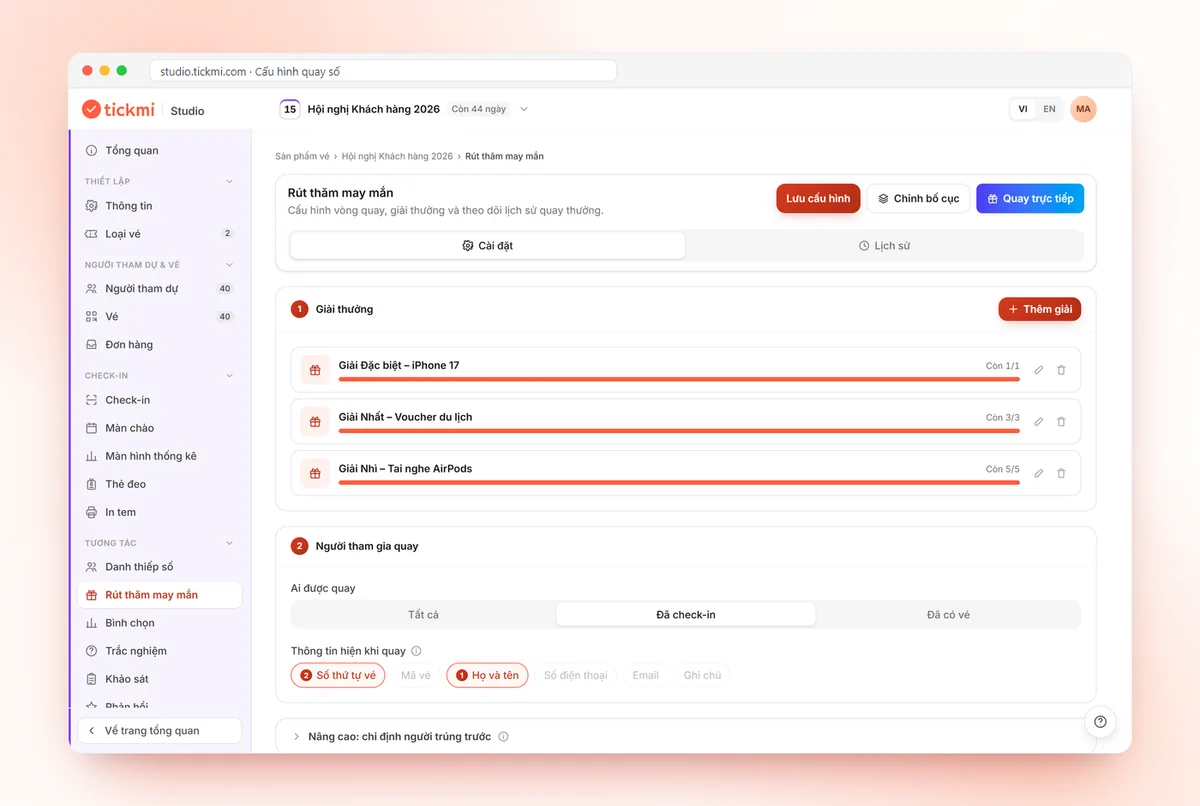
Step 1: Decide the total number of prizes from the win rate you want
Start from how attendees will feel, not from the budget. Divide the total number of prizes by the number of people eligible to draw and you get the win rate. The higher the rate, the more people go home with a gift; the lower the rate, the more "valuable" each prize feels but many people wait a long time with nothing.
| Goal | Suggested win rate | Suits |
|---|---|---|
| Everyone should get something | High (one third of people or more) | Internal parties, many small prizes |
| Balanced | Medium (about one tenth to one fifth) | Customer and dealer conferences |
| Focus on a few big prizes | Low (under one tenth) | Large events, high-value prizes |
These are suggestions to get you started, not standards. If people have traveled far or have to stay until the end, lean slightly toward a higher rate. Once the structure is set, you can test each prize with Tickmi's free online lucky draw tool.
Step 2: Split into prize tiers
A pyramid structure, few big prizes and many small ones, is the easiest to use. A hypothetical example for an event with about 300 checked-in attendees:
| Tier | Prizes | Winners per draw | Suggested budget split |
|---|---|---|---|
| Special prize | 1 | 1 | About 30–40% of the total budget |
| First prize | 3 | 1 | About 25% |
| Second prize | 5 | 1 | About 20% |
| Third prize | 10 | 2–5 | About 15% |
| Consolation prize | 20 | 5–10 | The remainder |
These figures are illustrations; replace them with your real budget and scale. Three principles to keep:
- Each person wins only one prize. In Tickmi, a person who has won is automatically removed from the eligible list for later draws, so you do not need to worry about someone winning twice.
- Draw small prizes with several winners at once, and big prizes one person at a time. When you set up a prize, you set the Winners per draw (up to 50 people). Drawing 10 people at once for a consolation prize saves stage time.
- Big prizes should have a "storytelling" version. The prize name should say what the gift actually is instead of just "First prize".
Step 3: Fix the draw order and pacing
Two common options, each with its own pros and cons:
| Approach | Advantages | Disadvantages |
|---|---|---|
| Draw from small to big prizes, all at the end of the program | Excitement builds, keeps people until the end | The draw segment is long; if the program overruns, the big prizes get drawn in a rush |
| Spread into 3–4 rounds throughout the program | Holds the audience all session, each round is short | The MC must remember which round draws which prize; easy to run off schedule |
For a program longer than two hours, spread the rounds: consolation prizes after the opening, third and second prizes mid-program, first and special prizes at the end. On Tickmi's draw screen, the SELECT PRIZE area lets you choose which prize to draw, so the order is up to the MC and is not fixed to the list. Remember that the special prize should always come last, because it is the reason for everyone to stay.
Step 4: The MC script for each draw
A complete draw has five beats, each with a line the MC should prepare in advance:
- Introduce the prize. "The next prize is second prize, 5 prizes, each one a [gift name]." Say the gift name and the number of prizes so the audience can gauge how attractive it is.
- Remind the rules briefly. "Only people currently in the hall can draw." One sentence, without rereading the whole set of rules.
- Build suspense. Press START and let the spinning effect run. The spin time (in seconds) can be adjusted to suit the MC's voice.
- Announce and call the name. Read the name together with the displayed information (for example the ticket sequence number) so the winner recognizes themselves. If two people share a name, rely on the accompanying information.
- Transition. "Congratulations. The winner please come to table [X] after the program." Then move on to the next prize.
The rules and transparency principles are in the article on running a transparent, fair lucky draw, so they are not repeated here. For choosing a wheel style and preparing the list, see lucky wheel for company parties.
Step 5: Prepare backup prizes for absent winners
Drawing someone who has already left is a situation everyone meets at least once. How the rules handle it is covered in the transparency article; in terms of structure, you can act in advance by creating backup prizes:
- For each big prize, add a separate prize named something like "Backup for first prize" with 1–2 prizes.
- Only draw the backup prize when the main winner is not present after the announced waiting time.
- Backup prizes that are not used can simply be left as they are, or drawn at the end of the program as consolation prizes.
This is clearer than deleting a draw and drawing again, because every draw stays in the history with an understandable reason. Remember that deleting a draw returns the prize and puts that person back on the eligible list.
Prize structure checklist before the draw day
- The win rate and total number of prizes have been set against the number of eligible people.
- Each prize has a clear gift name, number of prizes and winners per draw.
- Big prizes have backup prizes.
- The order and rounds have been written into the program script with estimated times.
- You have done a trial draw and then used Delete all trial draws to restore the prizes.
- Someone holds the prize handover list and reconciles it with the History tab (which can be exported to a file).
- If the draw is for customers and tied to purchases, ask your legal team about the applicable regulations, because this article is not legal advice.
How to set up prizes and present step by step is in the live lucky draw guide. See more solutions at lucky draw software.
Common mistakes when splitting prizes
- Too few prizes for a large event. The whole hall waits and only a few people win, so the final draw falls flat.
- Big prizes at the start of the program. People leave early once the most attractive prize has been announced.
- Drawing one person at a time for small prizes. 20 consolation prizes drawn one by one would take ten minutes or more. Draw several people per round.
- Not stating the gift name. The MC has to say "a gift" and the prize loses weight.
- Changing the number of prizes on stage. Any adjustment should be made beforehand and announced.
About Tickmi
Tickmi is a ticketing and attendee experience platform (Ticketing & Participant Experience Platform). On one unified set of attendee data, Tickmi connects the whole journey: issuing invitation tickets, registration tickets and paid tickets, sending branded QR tickets, checking in by app, kiosk or scanner — even when the network is down — and then the welcome screen, lucky draw, polls, quizzes and surveys. Tickmi is trusted by organizations such as Viettel, VNPT, MobiFone, FPT and CMC. Learn about Tickmi or try it free.
Frequently asked questions
How many prizes should there be for 300 people?
There is no fixed number. Start from the win rate you want, for example about one tenth to one fifth of the eligible people, then split into prize tiers by budget. The article has a hypothetical example table for you to adjust.
Can one draw produce several winners?
Yes. When you set up a prize in Tickmi Studio, you set the Winners per draw for each prize, up to 50 people per draw. This suits small prizes with many winners.
Can one person win two prizes?
Not by default. A person who has won is removed from the eligible list for later draws. If you delete that win in History, they become eligible to draw again.
How do I have a backup prize when the winner is absent?
Create a separate prize for each big prize, for example Backup for first prize with 1–2 prizes, and draw it only when the main winner is not present after the announced waiting time.
Issue QR tickets, send emails, check in and engage attendees on one platform.