
Knowledge
Year-end awards voting and recognition done fairly: from nominations to the stage
Year-end awards only have value when both winners and non-winners see the selection as reasonable. This article follows five steps: setting nominees, setting criteria, deciding who votes, combining attendee votes with the judging panel's opinion, and then announcing the results.
Step 1: Settle categories and nominees before talking about tools
The first job is not opening software but answering: what are you honoring? The more specific a category, the fewer complaints about the result.
- One question per category. “Most dedicated colleague” and “Best project” are two categories; do not combine them on one ballot.
- A reasonable number of nominees. A list that is too long makes voters pick whoever they know best. Hypothetical example: 3 to 6 nominees per category, shortened from an earlier open nomination round.
- Each nominee needs a short reason. One or two sentences about achievements help voters judge by work rather than by closeness.
The nomination round can be run with a registration form or a short survey, after which the organizers filter the entries. Sample survey questions are in the article post-event survey templates.
Step 2: Set criteria so every vote uses the same yardstick
Without criteria, voting becomes a popularity contest. Each category should have at most 3 criteria, written as statements people can verify.
| Category (hypothetical) | Suggested criteria | Who evaluates |
|---|---|---|
| Dedicated colleague | Supports others, completes work on time | All attendees |
| Project of the year | Results achieved, impact on customers, novelty | Judging panel, with attendee votes as reference |
| Rising star | Integrates quickly, contributions in the first year | Attendees |
Categories that need expertise (evaluating projects or performance) should have a judging panel. Categories about culture and team spirit can be left to the attendees themselves.
Step 3: Decide who gets to vote and how
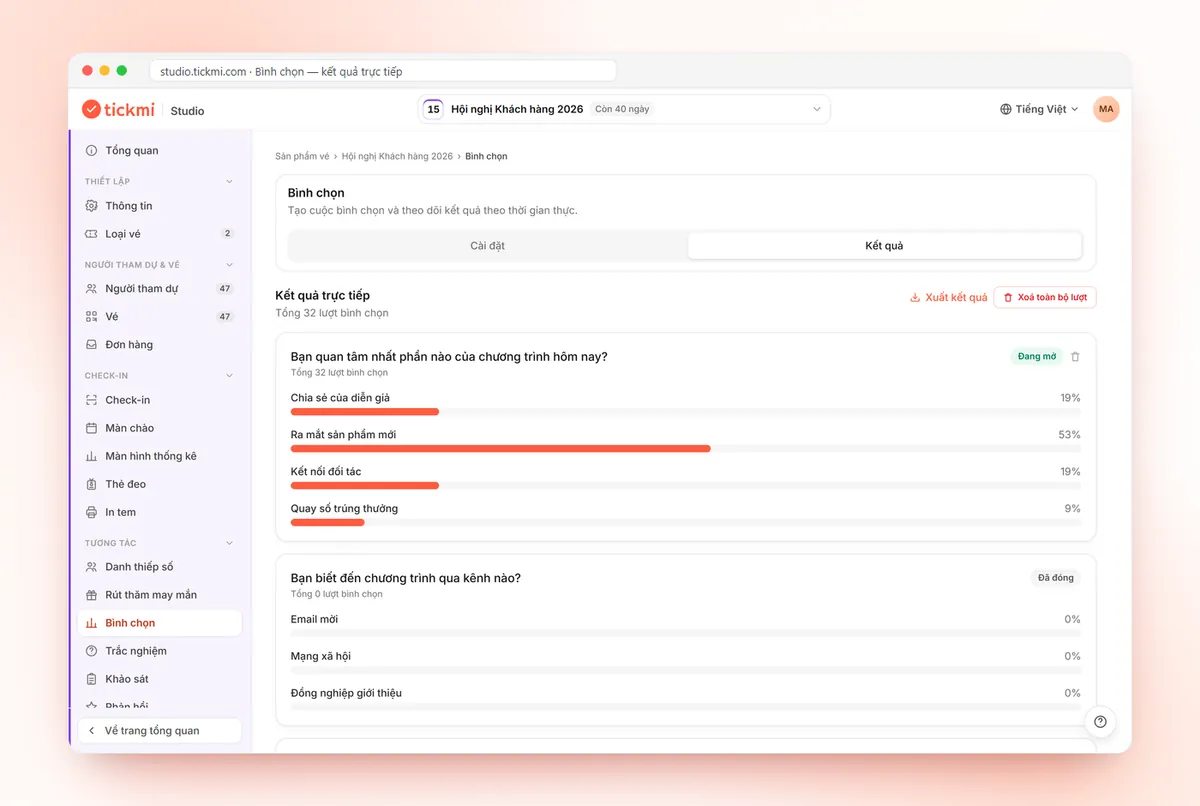
In Tickmi Studio, each category is a question in the Voting section under the Engagement group: click Add question, enter the category name and at least 2 options, with each option being a nominee. Attendees pick one answer per question. Then:
- Switch on Enable public access, copy the link or download the QR code to display or send in advance.
- Under Attendee page, choose Who can access. If you want only people who are present to vote, choose verification by Email or Phone number and the Checked in group. The system only matches against the attendee list and does not send a verification code.
- Set the Voting time in seconds for each question, or leave it blank for no limit. Each question is Open or Closed independently, so you can open each category at the right moment.
With verification on, each person can vote only once per question. Without verification, the system only identifies by browser, which means a determined person can still vote again, so do not use that approach for awards that carry significant benefits. Operation details are in the guide to voting, quizzes and surveys.
Step 4: Combine attendee votes with the judging panel
This is the part many programs leave unclear: how crowd votes and the panel's opinion are counted. Tickmi currently provides the attendee voting portion; you record the panel's scores separately (a spreadsheet or paper ballots) and combine them in the final step. Three common ways to combine:
| Method | When to use | Note |
|---|---|---|
| Panel shortlists, attendees pick the winner | A long nominee list that needs both screening and atmosphere | The panel works before the program and only the final nominees are announced |
| Attendees pick the top few, panel decides | You want the panel to have the final say | Tell attendees in advance that their votes are advisory |
| Weighted conversion | You want both sources to carry specific weight | Announce the weights before voting and do not change them afterward |
A hypothetical weighting example: final score = 60% panel score + 40% attendee votes, where votes are converted to a 100-point scale by the percentage of votes each nominee received. The 60/40 ratio is only an example; choose weights that fit your award and write them into the rules.
More important than the numbers is consistency: the rules must be published in advance, and once voting opens the method of calculation must not change.
Step 5: Announce the voting results and present the awards
- Lock the data. Switch the question to Closed, open the Results tab to see live results and the total number of votes, then click Export results to save the original copy.
- Choose how to announce. Announce on the spot for atmosphere, or keep results secret until the award moment for drama. You should tell attendees in advance so they know when they can see the results.
- Settle ties. Decide from the start: in a tie, give the award to both, or let the panel decide, or use a secondary criterion. Decisions made on stage often cause disputes.
- Explain briefly. Give each winner one sentence about their achievement. Those who did not win should be named in the nominee list.
To add a highlight for attendees during the awards, you can combine it with a lucky draw after the recognition segment. An overview of the voting features is on Tickmi's online voting page, and how to run each beat live is in the article online voting with QR codes.
Common mistakes in year-end awards voting
- Changing the rules midway. Changing the weights after seeing preliminary results is the fastest way to lose trust.
- Letting nominees campaign for votes openly. Set a rule: no calls to vote through chat groups, or allow voting only on site.
- Opening all categories at once. Attendees vote hastily and skim. Open each category in step with the program.
- Forgetting to clear test data. After a test run, click Delete all votes before opening officially. This action deletes permanently, so do it only when you are sure.
- Only names, no information about nominees. People outside the nominee's department do not know who is who, so votes go to well-known people.
Frequently asked questions
How many nominees should each award category have?
Around 3 to 6 nominees is about right. Fewer leaves too little choice, while more makes voters pick whoever they know best. This is a suggestion; adjust it to the size of your program.
How do I make sure each person votes only once?
In Tickmi Studio, under Attendee page, turn on verification by Email or Phone number with the Has a ticket or Checked in group. Each person can then vote only once per question. Without verification, the system identifies only by browser.
Does Tickmi calculate panel scores and combine them with attendee votes?
Currently you use Tickmi to collect attendee votes and export the results. Panel scores are recorded separately, and you combine them using the weights announced in the rules.
Can attendees choose several nominees in one voting question?
Each question currently lets attendees choose one answer. If you want multiple choices, split it into several questions, each one a category.
Where do I export voting results to save or report?
On the Results tab of the Voting section, click Export results to download the file. Export before you click Delete all votes.
Issue QR tickets, send emails, check in and engage attendees on one platform.