
Knowledge
Writing and sending a post-event thank-you email with a short survey
A post-event thank-you email should go out within 24 hours, to people who actually attended, and contain just three things: thanks with the recipient's name, something of value such as materials or photos, and a short rating link. On Tickmi, thank-you emails are sent from the Feedback section to attendees who have checked in and have an email address, with a link for them to rate the event.
When should you send a post-event thank-you email?
A thank-you email should arrive within 24 hours after the event ends, while attendees still remember the content and the feeling. Collecting opinions should start even earlier, right in the hall.
| Timing | What to do | Why |
|---|---|---|
| Last 10 minutes of the event | Show the feedback or survey QR code, and the MC invites everyone to respond right away | Attendees are still in their seats with phones in hand |
| Within 24 hours | Send a thank-you email with a rating link to those who have not responded | The impression is fresh, and the email does not get lost in the next day's work |
| A few days later (optional) | Send materials, photos or an edited video | Gives attendees another reason to open mail from the organizers |
Do not mention the survey many times, because people who have already answered also receive the reminder.
What should a post-event thank-you email say?
A post-event thank-you email should be short, readable in a minute and have a single call to action. The suggested structure has five parts:
- A subject line with the event name: recipients need to know where the email comes from.
- Thanks with the recipient's name: one specific sentence of thanks, not a generic one.
- A memorable number or moment: for example the number of people who attended together, the most-asked session. Only use real numbers from your event.
- Something of value: a link to presentation materials, a photo album, a recording.
- One invitation to rate: a button leading to the feedback or survey, stating how long it takes.
A template for you to adjust (the parts in square brackets are what to replace):
Subject: Thank you for coming to [Event name]
Hello [Full name], thank you for taking the time to attend [Event name] on [Date] at [Venue]. The speakers' materials and photos from the event are available at [link]. The organizing team would love to hear your opinion so we can do better next time: it only takes a minute to rate us at [Rate the event button]. We hope to see you again at [next event, if any].
If your emails often land in the promotions or spam folder, see the article ticket emails not going to spam. How to write emails sent before the event is in the article invitation email templates.
Who to send to: checked-in people or the whole list?
A thank-you email should only go to people who checked in. Registrants who were absent need a different email, because thanking them for "attending" is untrue and damages the organizers' credibility.
- Checked-in people: thank-you email, materials, rating link.
- Absent people: a "sorry we missed you" email, with materials and an invitation to the next one. The list of people who have not checked in comes from the attendee list export file.
- VIP guests, speakers, sponsors: should get a personal thank-you from the person in charge, not just an automated email. See the article welcoming VIP guests.
Feedback or Survey to collect opinions?
Use Feedback when you only need one overall satisfaction score, and use Survey when you need to ask several specific questions. On Tickmi, these two tools sit side by side in the Engagement group of the ticket product.
| Feedback | Survey | |
|---|---|---|
| What attendees do | Rate from 1 to 5 stars, write a comment if they want | Answer several questions, picking one answer for each, with optional written comments |
| Time to complete | A few seconds | One to a few minutes, depending on the number of questions |
| Results | Average rating score, total responses, list of comments | Per-question statistics, written comments, exportable results |
| Best for | A button in the thank-you email | The last ten minutes in the hall, training programs |
Survey question sets by goal are in the article post-seminar survey template.
Sending the thank-you email and collecting feedback in Tickmi Studio
- Create the email template. In Email templates, write the email following the template above. The attendee's full name, event name, time and venue are filled in automatically for each person. The ticket image, ticket sequence number and ticket code will be blank because a thank-you email is not tied to a ticket, so remove those blocks from the template.
- Turn on the feedback link. Go to Feedback, in the Public link card switch on Enable public access and copy the link. If you want only people who were present to rate, under Who can access choose verification by Email or Phone number and the Checked in group.
- Attach the link to the email template as a clear button.
- Choose the template and send. In the Thank-you email for checked-in attendees section, Studio shows the number of people eligible to receive it (checked in, with an email). Click Choose email template, pick the template, save, then click Send thank-you email and confirm.
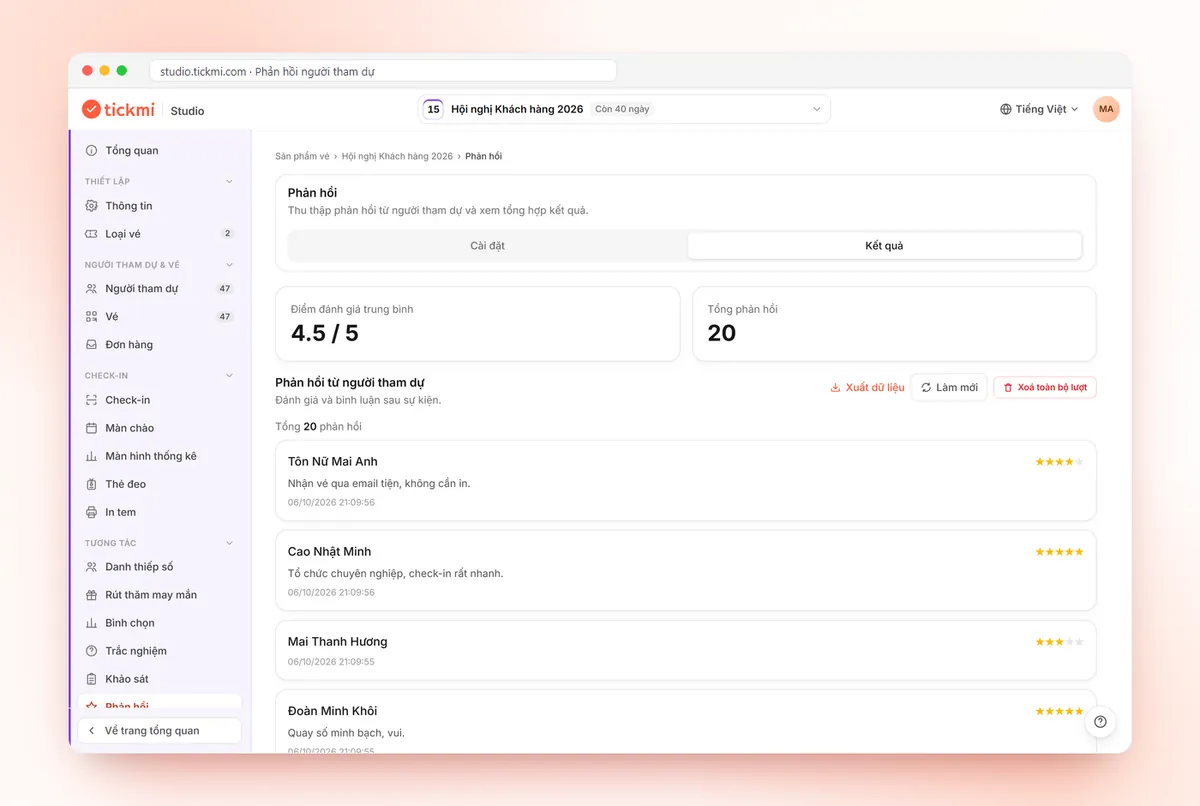
- View results. The Results tab of Feedback shows the Average rating score, Total responses and a list of comments that can be exported to a file.
Detailed steps are in the guide to polls, quizzes, surveys and feedback and the email design guide.
How do you measure the effect of a thank-you email and survey?
The main metric is the response rate, calculated as the number of responses divided by the number of checked-in people, not by the number of registrants. Hypothetical example: 300 people checked in, 96 responses, so the response rate is 32%.
Also track the average score across events, and read comments under 3 stars carefully, because that is where things need fixing. Put these numbers into the post-event report.
Checklist before clicking send on the thank-you email
- Test check-ins have been reset to not checked in, so staff who ran tests do not receive the email.
- Test feedback has been cleared with Delete all responses.
- The email template no longer has the ticket image or ticket code blocks; a test has been sent to yourself.
- The feedback link is enabled, opens on a phone, and has the right access group.
- The number of eligible recipients matches the check-in count you know.
- A separate email for absent people has been drafted.
Common mistakes when sending thank-you emails and surveys
- Clicking send twice. Each time you click Send thank-you email, Tickmi sends to all people eligible at that moment and it cannot be cancelled. Click only once, after checking the template.
- A survey that is too long. Ten or more questions in a thank-you email make many people abandon it. Put the main question in Feedback, and keep Survey for the in-hall part.
- Turning on verification without saying so. Attendees must enter the exact email or phone number they registered with. State this next to the rating button.
- Sending too late. An email that arrives after a week is easily ignored.
- Asking and then doing nothing. Next time, mention one thing you fixed thanks to the feedback so attendees see their opinions matter.
Other ways to keep attendees engaged during and after the event are on the attendee engagement page.
About Tickmi
Tickmi is a ticketing and participant experience platform. On a single, unified set of attendee data, Tickmi connects the whole journey: issuing invitation, registration and paid tickets, sending branded QR tickets, checking in with an app, kiosk or scanner (even offline), and then moving on to the welcome screen, lucky draw, polls, quizzes and surveys. Tickmi is trusted by organizations such as Viettel, VNPT, MobiFone, FPT and CMC. Learn about Tickmi or try it free.
Frequently asked questions
When should I send a post-event thank-you email?
Within 24 hours after the event ends, while attendees still remember the content. The invitation to rate should start right in the last 10 minutes in the hall.
Who does Tickmi send the thank-you email to?
The thank-you email in the Feedback section is sent to attendees who have checked in and have an email address. Studio shows the number of eligible people before you click send.
Does the thank-you email fill in the recipient's name automatically?
Yes. The email uses the email template you choose, in which the attendee's full name, event name, time and venue are filled in automatically for each person. The ticket image and ticket code stay blank because a thank-you email is not tied to a ticket.
Do attendees need to install an app to take the post-event survey?
No. Attendees open the link or scan the QR code with their phone and complete it right in the browser.
Is there a way to let only people who were present rate the event?
Yes. In the Who can access section of the public link, choose verification by Email or Phone number and the Checked in group. The system cross-checks against the attendee list and does not send a verification code.
Issue QR tickets, send emails, check in and engage attendees on one platform.