
Knowledge
Post-seminar survey template: choose your questions by goal
Many post-seminar surveys run to 20 questions and still fail to answer the one thing you need: what to keep and what to change next time. The fix is to choose your goal first, then take only the few questions that serve that goal. This article provides ready-made sample questions for you to copy and adjust.
Choose one goal before writing questions
Every question in a survey must be tied to a decision you will make afterward. If no answer to a question would change anything, drop it. The table below links goals to decisions:
| Goal | The decision you will make | Question groups you need |
|---|---|---|
| Evaluate content | Keep, drop or change speakers and topics | Usefulness, most memorable part, parts that did not fit |
| Evaluate organization | Fix the venue, timing, reception | Check-in, sound, duration, signage |
| Predict next time | Whether to run it again, how many places to open | Intent to attend again, intent to recommend |
| Collect new needs | Choose the topic for the next session | Topics they want to hear, preferred format |
| Support the business | Who should be contacted after the seminar | Level of interest in products, when they need advice |
For most seminars, the first two goals are enough. Add a third or fourth only when someone will actually act on the results. If you need a shorter article on a thank-you email with 5 basic questions, see thank-you emails and surveys after an event.
Sample questions by goal
Goal 1: evaluate content
- Was the seminar content useful for your work? (Very useful / Fairly useful / Neutral / Not relevant)
- Which session did you find most memorable? (list the session names, add the option "No session stood out")
- How did the content level compare with your knowledge? (Too basic / About right / Too advanced)
- What do you feel was missing from the program? (free-text comment box)
Goal 2: evaluate organization
- Was reception and check-in convenient? (Very fast / Average / Long wait)
- Was the length of the program right? (Too long / Just right / Too short)
- Did sound, visuals or seating affect your ability to follow? (No / A little / A lot)
- Was the information before the seminar (email, ticket, directions) clear enough?
Goal 3: predict next time
- Would you like to attend the next edition? (Definitely / Maybe / No)
- Would you recommend this event to colleagues or partners? (Definitely / Maybe / No)
- What time of day would you prefer for next time? (Morning / Afternoon / Evening)
Goal 4: collect needs and business opportunities
- Which topic would you most like to hear about next time? (3 to 5 specific topics)
- Would you like further advice on the content presented? (Yes / Not needed)
Each question should have an optional free-text comment box. Questions like "most memorable part" or "what was missing" often bring out details that a list of choices would not think of.
Which question types to use, and when
| Type | Example | Use when | Note |
|---|---|---|---|
| Single answer, 3-5 levels | Very useful ... Not relevant | Measuring satisfaction, easy to tally | Give each level a clear name rather than just a number |
| Star rating (1-5) | Overall rating of the seminar | One summary score to compare across editions | Ask only once, at the end |
| Recommendation scale 0-10 (NPS) | Likelihood of recommending to others | Tracking loyalty over many editions | 11 levels is long on a phone; can be cut to 5 levels |
| Open question | What needs improving? | Finding new ideas you have not thought of | Only 1-2, since typing on a phone is effortful |
General rule: closed questions for measurement, one open question to leave room for surprises. Avoid leading questions such as "Do you agree the event was excellent?". Ask neutrally and keep answer options balanced, including negative ones.
How many questions are enough and when to send
A practical suggestion: 5-7 questions, answered in under 2 minutes. If you want to add an 8th question, ask yourself which existing one can go. Every added question is another chance for a respondent to give up halfway.
- Right in the hall: show the QR code on screen in the final session, and ask the emcee to read out the invitation. This is when the impression is freshest, and attendees already have their phones in hand.
- Within 24 hours: send a thank-you email with the survey link to those who attended. People who registered but did not attend should get a different email, asking why they could not make it.
- Remind once: remind people who have not answered after 2-3 days. Stop at one reminder so you do not bother attendees.
For extra motivation, you can announce a small gift for respondents in advance or mention it on stage. See also how to increase attendee engagement.
Building the survey in Tickmi Studio
If you already use Tickmi to issue tickets and check in, the survey sits in the same place and knows who attended. The steps:
- Open the ticket product, go to the Engagement group and choose Survey.
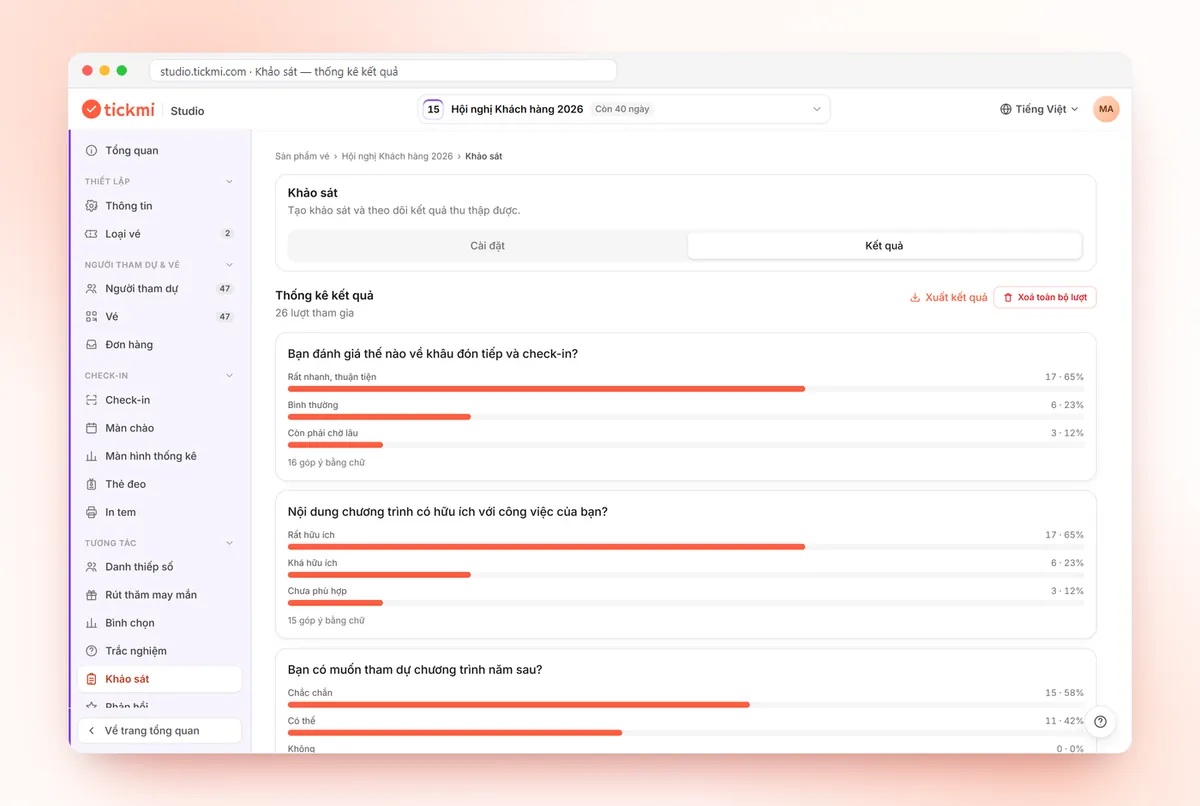
- Click Add question, and enter the question and the options. For each question attendees choose one answer, so a rating scale needs to be written as named options, for example "Very useful", "Fairly useful"...
- Turn on Let attendees add a text comment for the questions where you want to hear the reasons.
- In the Public link card, switch on Enable public access, choose a language, then download the QR code to show on a screen or insert into an email.
- In Who can access, choose Verify by Email or Phone number with the Checked in group if you want only people who were present to answer.
- The Results tab shows statistics per question and the text comments; click Export results to download the file.
For an overall star rating, use the Feedback section right next to it, which shows the average rating. You can also click Send thank-you email from there to email people who have checked in. Details of each action are in the guide to polls, quizzes, surveys and feedback, and all the engagement tools are on the attendee engagement page.
A small tip: before the seminar day, submit one test response, then use the Delete all entries button to clear the test data. This deletes permanently, so only do it before opening the real survey.
Common mistakes with post-seminar surveys
- Asking too many things at once. A 20-question survey yields 20 numbers no one reads. Stick to one or two of the goals above.
- One question containing two ideas. "Were the speaker and the sound good?" leaves respondents not knowing what to choose. Split it into two questions.
- A scale with no negative levels. If there is only "Good, Very good, Excellent", you will never know what is not working.
- Sending too late. After a week, attendees struggle to recall details and the response rate usually falls.
- Not reporting back the results. A single line in next time's email, "Thanks to your feedback, this time we changed...", lets attendees know their opinions matter.
- Not knowing who answered. When the survey is open to anyone with the link, even people who did not attend can answer. Limiting it to the checked-in group makes the data reflect the people who were present.
Once you have results, put them in your end-of-event report in the way described in post-event reports.
About Tickmi
Tickmi is a ticketing and participant experience platform. On a single, unified set of attendee data, Tickmi connects the whole journey: issuing invitation, registration and paid tickets, sending branded QR tickets, checking in with an app, kiosk or scanner (even offline), and then moving on to the welcome screen, lucky draw, polls, quizzes and surveys. Tickmi is trusted by organizations such as Viettel, VNPT, MobiFone, FPT and CMC. Learn about Tickmi or try it free.
Frequently asked questions
How many questions should a post-seminar survey have?
Keep it to about 5-7 questions, answered in under 2 minutes. Prioritize closed questions for measurement and add one or two open questions to collect detailed opinions.
When should I send the survey to get the most responses?
Most effective is to show the QR code in the hall during the final session, then send a thank-you email with the link within 24 hours, and remind people who have not answered once, a few days later.
Can only people who attended the seminar answer the survey?
Yes. In Tickmi Studio, under Who can access in the survey, choose Email or Phone number verification and select the Checked in group. The system matches the details against the attendee list.
Does the Tickmi survey support a 1-10 scale?
Each question in the Survey section lets attendees choose one answer from the list you create, so a scale is built as named options. If you need an overall star score, also use the Feedback section to see the average rating.
How do I export the survey results for a report?
In the Results tab of the Survey section, click Export results to download the data file, including statistics per question and the text comments.
Issue QR tickets, send emails, check in and engage attendees on one platform.