
Knowledge
Event tickets: what they need, which types to create and how to issue them
An electronic event ticket is a ticket with a unique QR code or ticket code, stating the event, time, venue and ticket type, sent to each attendee to be scanned at the gate. To create event tickets properly, you need to settle three things: the content on the ticket, how to split ticket types, and the issuing route. Tickmi supports all three; this article goes through each and ends with a 300-person conference example.
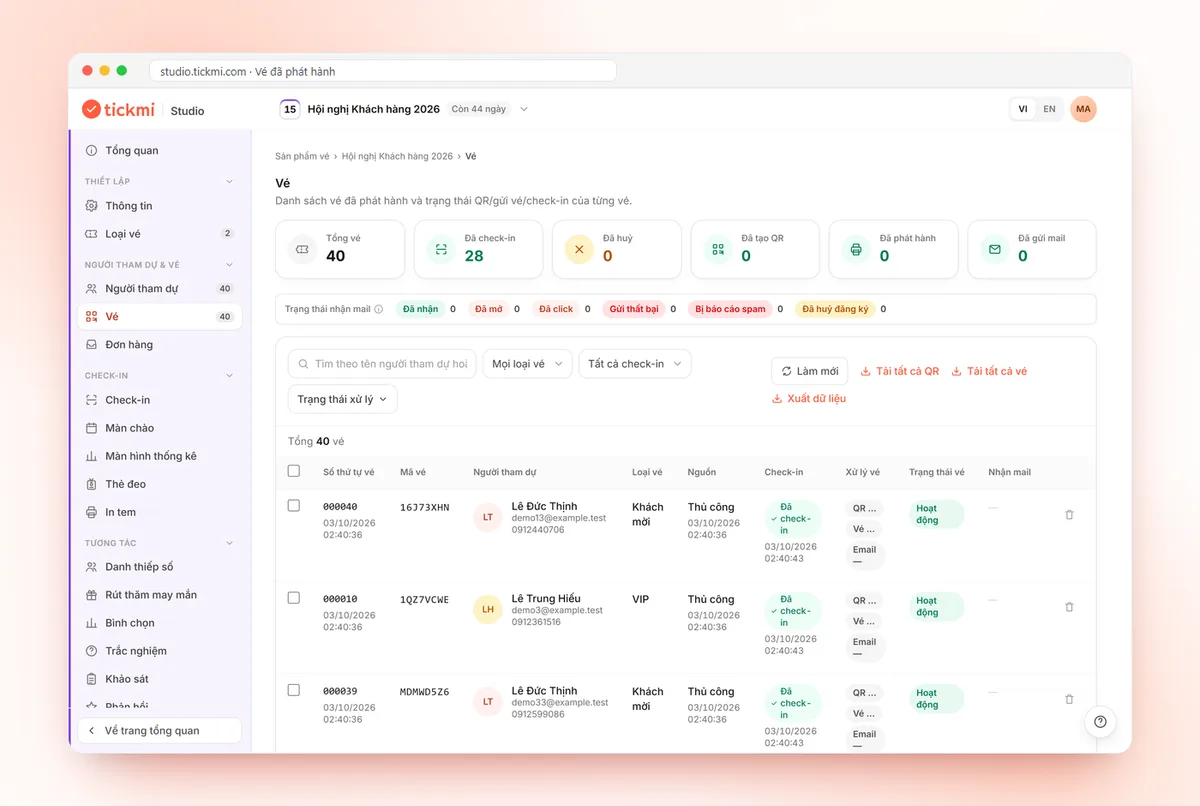
What information does an event ticket need?
An event ticket needs at least six pieces of information: event name, time, venue, ticket type, a unique QR code or ticket code, and terms of use. If one is missing, attendees will message to ask or stand puzzled at the gate.
- Event name and organizer: so recipients recognize the real email or ticket image and don't mistake it for spam.
- Time: date, door opening time and start time. Multi-day events should state which day the ticket is valid for.
- Venue: name of the place, address, and the entrance if there are several.
- Ticket type and recipient name: for example "Delegate", "VIP", "Guest". The recipient's name helps gate staff cross-check when needed.
- Unique QR code or ticket code: what the scanner reads. One code per ticket, not one shared code for the whole batch.
- Terms: dress code, gate closing time, rules on items to bring, refund/transfer policy (see below).
A ticket design doesn't need to be elaborate, but the QR code must be large enough and have good contrast. If you want to design it yourself, see e-ticket design; if you need to send invitations with a QR code, also read QR invitation tickets.
How should event ticket types be split?
Split ticket types by benefits and audience, not by gut feeling. Anything that differs in price, quantity, sale period or ticket template should be its own ticket type.
| Ticket type | When to use it | Notes |
|---|---|---|
| Regular ticket | General attendees | The type with the largest quantity |
| VIP ticket | A separate area or benefits (for example a lounge, a closing party) | You can use a ticket template in a different color so staff recognize it instantly |
| Guest ticket | Speakers, partners, press | Usually priced at zero, issued by list import |
| Early bird ticket | Driving early-stage demand | In effect a ticket type with its own sale open/close time and limited quantity |
| Group ticket | Company groups, families | Can be a separate ticket type, or allow buying several tickets per order |
On Tickmi, each ticket type has its own sale open/close time, maximum tickets per order (or per registration) and ticket template. Tickmi does not yet have a seat-by-seat seating map, so if the event needs specific seat selection, you have to manage that outside, or split by area using ticket types.
On paper versus electronic tickets, the article paper tickets or QR e-tickets compares the pros and cons of each in detail.
Free or paid tickets: how to choose?
Free tickets suit seminars, open days and customer meetings; paid tickets suit when you need to filter for people who are truly interested or to cover costs. Free tickets should still have an individual code per person, because no-show rates for unpaid events are usually higher, and a named ticket helps you predict how many will come.
On Tickmi, you enter a price of 0 for free tickets: attendees still reserve on the ticket page but don't have to pay. Paid tickets are paid online through VNPAY and the QR ticket is sent automatically after successful payment. The costs of each approach are in types of fees when selling tickets online.
Three ways to issue event tickets
There are three ways to issue tickets: paid online sales, registration followed by approval, and importing a guest list from Excel. An event usually combines two of the three.
- Paid online sales. Buyers go to the ticket page, choose a ticket type, pay and receive the QR ticket automatically. Suitable for events selling tickets publicly. When many people arrive at once, you can turn on a virtual queue so buyers enter in order instead of all at once, and the system holds tickets while buyers pay so none are oversold. See more at event tickets on Tickmi.
- Registration then approval. Attendees fill in the form on the online registration page. If you choose auto-approval, they receive the ticket immediately; if not, you review each registration before approving. This suits events that need to screen the audience (for example partners only, students only).
- Import a list from Excel. You already have a list of guests, employees or students: import an Excel file (up to 10,000 rows at a time) and then issue tickets to the whole list. Excel import only adds new people and does not update existing ones.
Should tickets be sent as an image, PDF or HTML?
An image is most convenient for Zalo and saving to the phone gallery; PDF suits printing or formal email; HTML suits when you want the ticket content displayed right inside the email. Tickmi lets you export tickets as an Image, PDF or HTML. A detailed comparison is in choosing a ticket format: image, PDF or HTML.
Basic fraud prevention for electronic tickets
Three measures are enough for most events: a unique code per ticket, a limit on the number of scans and the ability to resend tickets when needed.
- A unique QR code per ticket: someone who photographs a ticket and sends it to another person still only gets in as many times as the scan limit allows.
- A limit on the number of scans: for multi-day events or events with multiple entries, set Check-ins per ticket higher than one.
- Reissue a ticket when an attendee loses the email: this function keeps the QR code sequence unchanged and still deducts one ticket issuance, so use it when necessary.
- Scan history: when there is a dispute about "ticket already scanned", you can look up the time and who scanned it.
The process at the gate is in QR code check-in.
Refund and transfer policy: what to state?
State the policy right on the ticket page, before buyers pay, because disputes usually come from things that weren't made clear. Points worth including:
- Whether refunds are given, within what period, in full or in part.
- What happens if the event is postponed or canceled.
- Whether tickets may be transferred to another person, and how the recipient should report their name to the organizers.
- Rules when a buyer loses the ticket email.
For tickets sold through Tickmi, buyers submit a refund request and you approve it in Tickmi Studio; Tickmi carries out the refund. The platform fee of the order may not be refunded, so read the ticket sales policy for organizers before writing your own terms.
Example: issuing tickets for a 300-person conference
Below is a hypothetical process for a one-day conference of about 300 people, including paying delegates, guests and partners.
- T-30: finalize three ticket types: "Delegate" (sold online), "Guest" (Excel import, price zero), "Partner" (registration then manual approval).
- T-28: create ticket templates for each type, one color per type so gate staff can recognize them.
- T-25: open sales for Delegate tickets, set the maximum tickets per order and a sales close time a few days before the event.
- T-20: import the guest list from Excel, issue tickets and send emails.
- T-14: open the registration page for partners, approve each registration.
- T-7: check for bounced emails, send reminders, handle refund or person-change requests.
- T-1: do a test scan of a few real tickets at the venue, create check-in staff accounts.
When don't you need a platform yet?
If the meeting is only about 30-40 people you know, with no ticket sales and no need to count attendance, an Excel list with name checking at the door is enough. A platform starts to be worth it when the number of people is large enough that sending tickets, fixing emails and counting entries by hand becomes error-prone.
Read next: sell tickets yourself or through a marketplace · what features event management software needs.
About Tickmi
Tickmi is a ticketing and attendee experience platform (Ticketing & Participant Experience Platform). On a single, unified set of attendee data, Tickmi connects the whole journey: issuing invitation, registration and paid tickets, sending branded QR tickets, checking in with the app, kiosk or scanner (even when the network is down), and then welcome screens, lucky draws, voting, quizzes and surveys. Tickmi is trusted by organizations such as Viettel, VNPT, MobiFone, FPT and CMC. Learn about Tickmi or try it free.
Frequently asked questions
How is an electronic event ticket different from a paper ticket?
An electronic ticket is a unique QR code or ticket code sent by email or Zalo or stored on a phone, scanned at the gate with an app. Compared with paper, an electronic ticket is easier to resend when lost, easier for counting entries and harder to forge in bulk.
Does creating a free event ticket need a QR code?
It should have one. A free ticket with an individual code per person lets you know who registered, who arrived and prevents one person from entering several times. On Tickmi, you enter a price of 0 for a free ticket type.
Can I import an existing guest list to issue tickets?
Yes. You import an Excel file of up to 10,000 rows at a time and then issue tickets to the whole list. Note that Excel import only adds new people and does not update existing ones.
What if an attendee loses their ticket email?
Use the Reissue ticket function: the ticket is sent again and the QR code sequence stays the same. Each reissue still counts as one ticket issuance.
Can one ticket be scanned multiple times?
Yes, if you set Check-ins per ticket higher than one. By default each ticket can be scanned once, which suits single-entry events.
Issue QR tickets, send emails, check in and engage attendees on one platform.