
Knowledge
Should you use paper tickets or QR e-tickets for your event?
QR e-tickets suit most events that have an attendee list: tickets go out in minutes, each person has an individual code, and a used ticket scanned again is flagged immediately. Paper tickets still make sense when the ticket itself is part of the experience, such as a formal invitation, or when attendees rarely use phones. With Tickmi you do not have to choose one or the other: the same QR ticket can be emailed and printed on paper.
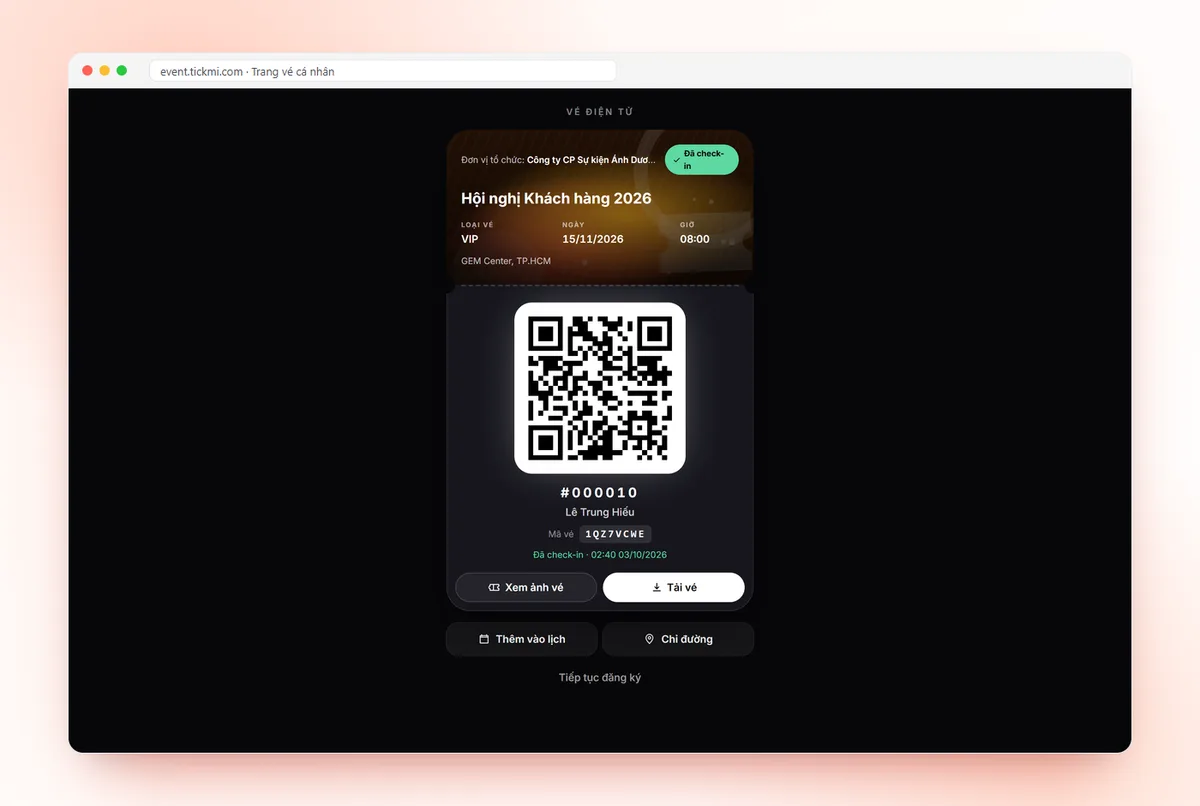
How do paper tickets and QR e-tickets differ?
Paper tickets and QR e-tickets differ mainly in how tickets are distributed and checked, not in their appearance. A paper ticket printed with an individual QR code is checked just like an e-ticket. Conversely, a paper ticket printed only with a seat number or event name has to be checked by eye, by looking up names or by tearing a stub.
- Traditional paper ticket: pre-printed, handed out or mailed, identical for everyone or differing only by serial number. Checked by eye.
- QR e-ticket: each attendee has an individual QR code, received by email, Zalo or a personal ticket page. Checked with an app or scanner.
- Paper ticket with QR: the e-ticket file printed on paper. It keeps the feel of holding a ticket in hand and is still checked with a scanner.
Comparison table of paper tickets and QR e-tickets by criterion
QR e-tickets win on speed, control and flexibility to change; paper tickets win on formal feel and not depending on a phone. The table below compares the three options on the same criteria.
| Criterion | Traditional paper ticket | QR e-ticket | Paper ticket with individual QR |
|---|---|---|---|
| Printing and distribution cost | Printing, envelopes, delivery or people handing them out | No printing; the cost is in the ticket-sending tool | Printing cost, but you do not need to print the whole batch in advance |
| Time to distribute tickets | Several days: design, print, deliver | A few minutes after approving the list | As long as printing and delivery take |
| Forgery and sharing | Easy to photocopy, hard to tell real from fake | Individual code per person; a ticket scanned again is flagged as already used | Same as e-tickets: a photocopy gets in only once |
| Check-in control | Count stubs after the event | Know right away who checked in and when | Same as e-tickets |
| Changing the list | Tickets already handed out are hard to recall | Cancel a ticket or issue a new one instantly | Cancel the ticket in the system; the old paper copy no longer scans |
| Attendee experience | Formal, held in hand; easy to forget at home | Only needs a phone; hard for people not used to them | Formal, with a backup option |
| Environment | Uses paper, ink, envelopes | Paperless | Printed only for those who need it |
Note: the table compares options and does not measure specific costs. Printing and tool costs depend on your quantity, materials and vendor.
When should you still use paper tickets?
Paper tickets remain a sensible choice when the ticket has value in itself or attendees cannot easily use phones. Common cases:
- Formal invitations to VIP guests, senior partners and anniversary ceremonies: the envelope and card are part of the invitation.
- Older attendees or people who rarely use email, for example community events, hometown associations and veterans' groups.
- Keepsake tickets: graduation ceremonies, performance nights, running races, where attendees want to keep the ticket.
- Handing out tickets in person at an office or school, when the list is divided by department or class.
- Places with no signal, where attendees cannot open email right at the door.
Even in these cases, you should print an individual QR code on the paper ticket instead of printing identical tickets. The ticket still looks good, while the check-in team can still scan it and detect reused tickets.
Which events suit QR e-tickets?
QR e-tickets suit lists of hundreds of people, lists that change close to the date, or situations where you need to know exactly who has come. Customer conferences, seminars, internal training, year-end parties and trade fairs with pre-registration all fall into this group.
Hypothetical example: a seminar of 500 people, where the organisers receive 40 more late registrations two days before the event. With paper tickets, you have to print more and deliver them in time. With QR e-tickets, you just add people to the list and approve, and tickets reach their inboxes in a few minutes.
If the event charges a fee, see how to sell online event tickets with QR codes, where buyers receive the ticket by email right after paying.
How do you combine e-tickets and printed QR tickets?
A common approach is to send QR e-tickets to everyone and print paper tickets only for the group that needs them. It is the same ticket and the same QR code, so the check-in app reads both. On Tickmi, the steps are:
- Design a ticket template with the QR code and Ticket code elements. If you plan to print, open Alignment help and turn on Print area (3mm trim, 5mm safe) so text and the QR are not trimmed.
- In the ticket type, set the Issued ticket file format to Image if you will print in bulk; tickets in PDF format are skipped when printing from the Tickets tab.
- Approve attendees to issue tickets and send email to everyone.
- In the Tickets tab, select the group that needs paper tickets (for example the VIP ticket type), click Print tickets, and choose Exact ticket size or A4 paper.
- On the event day, staff scan both phone tickets and paper tickets with the Tickmi Studio app.
Details of each operation are in the guide to downloading and printing tickets in bulk. For choosing paper, size and how to test-scan before a full run, see printing QR tickets on an office printer. If you are still torn between Image, PDF and HTML, read how to choose an image, PDF or HTML ticket format.
Common mistakes when choosing paper or e-tickets
- Printing identical paper tickets for everyone. Without individual codes you cannot know who has come in and cannot block photocopied tickets.
- Printing tickets too early. The list changes after printing, surplus tickets must be cancelled and newcomers need urgent extra printing.
- Editing the template after issuing without reissuing. On Tickmi, Reissue tickets rebuilds the file from the new template, keeping the QR code and Ticket code content unchanged; each reissued ticket uses 1 ticket issuance quota and does not resend the email automatically.
- Shrinking the QR to fit the design. A code that is too small or too light makes scanners read slowly. See also dynamic and static QR codes for tickets.
- Having only one option at the door. People who forgot their paper ticket or ran out of phone battery need to be looked up by Ticket code or by the list at the desk.
Checklist: choosing paper or QR e-tickets
- Do attendees have email or Zalo and are they used to phones? Yes: QR e-ticket.
- Is the ticket part of the invitation or a keepsake? Yes: print a paper ticket, but with an individual QR code.
- Might the list change close to the date? Yes: prefer e-tickets and print as late as possible.
- Do you need to block one ticket from entering several times? Yes: every ticket needs its own code, paper or electronic.
- Is there a lookup desk at the door for people who forgot their ticket? There should be, for both types.
To see the whole approach to tickets that look good and scan well, read e-ticket design on Tickmi and the QR code check-in workflow. On cost, Tickmi has an event package for events that do not sell tickets (chosen by maximum number of attendees, applying to 1 ticket product) and a quota package paid per ticket issuance with non-expiring quota; events that sell tickets through Tickmi only pay the ticket sales fee. You can start with 100 free ticket issuance quota.
About Tickmi
Tickmi is a ticketing and attendee experience platform (Ticketing & Participant Experience Platform). On one unified attendee dataset, Tickmi connects the whole journey: issuing invitation, registration and paid tickets, sending branded QR tickets, check-in by app, kiosk or scanner — even offline — then the welcome screen, lucky draw, voting, quizzes and surveys. Tickmi is trusted by organisations such as Viettel, VNPT, MobiFone, FPT and CMC. Learn about Tickmi or try it free.
Frequently asked questions
Can a QR e-ticket be printed on paper?
Yes. A ticket file in image or PDF format still scans when printed. On Tickmi, a printed ticket and a ticket sent by email are the same ticket with the same QR code.
What happens if a paper ticket with a QR code is photocopied?
The photocopy and the original have the same code, so only the first scan is checked in. On later scans, the app reports the ticket as already used along with the earlier check-in time.
What about older attendees who are not used to phones?
Print a ticket with a QR code and send it to them, or look them up at the door. Staff can enter the 8-character Ticket code printed on the ticket instead of scanning the QR.
What if I have printed paper tickets and someone cannot come?
Cancel that person's ticket in the system. A cancelled ticket can no longer be checked in, even a paper copy that has already been printed.
Are e-tickets cheaper than paper tickets?
E-tickets remove printing, envelope and delivery costs, but there is still a tool cost for issuing and sending tickets. Compare total cost for your own number of attendees.
Issue QR tickets, send emails, check in and engage attendees on one platform.