
Knowledge
Conferences with foreign guests: making bilingual Vietnamese-English tickets from registration form to check-in gate
A bilingual Vietnamese-English ticket means the tickets, emails and the pages attendees see can all be read in both languages. On Tickmi, the interface of the registration page, ticket page and confirmation page is available in English, and you choose it when you get the link; but content you type yourself, such as event names, ticket types, text on the ticket and emails, is not translated automatically. So the main job is to write bilingual text in the right places, following one consistent glossary.
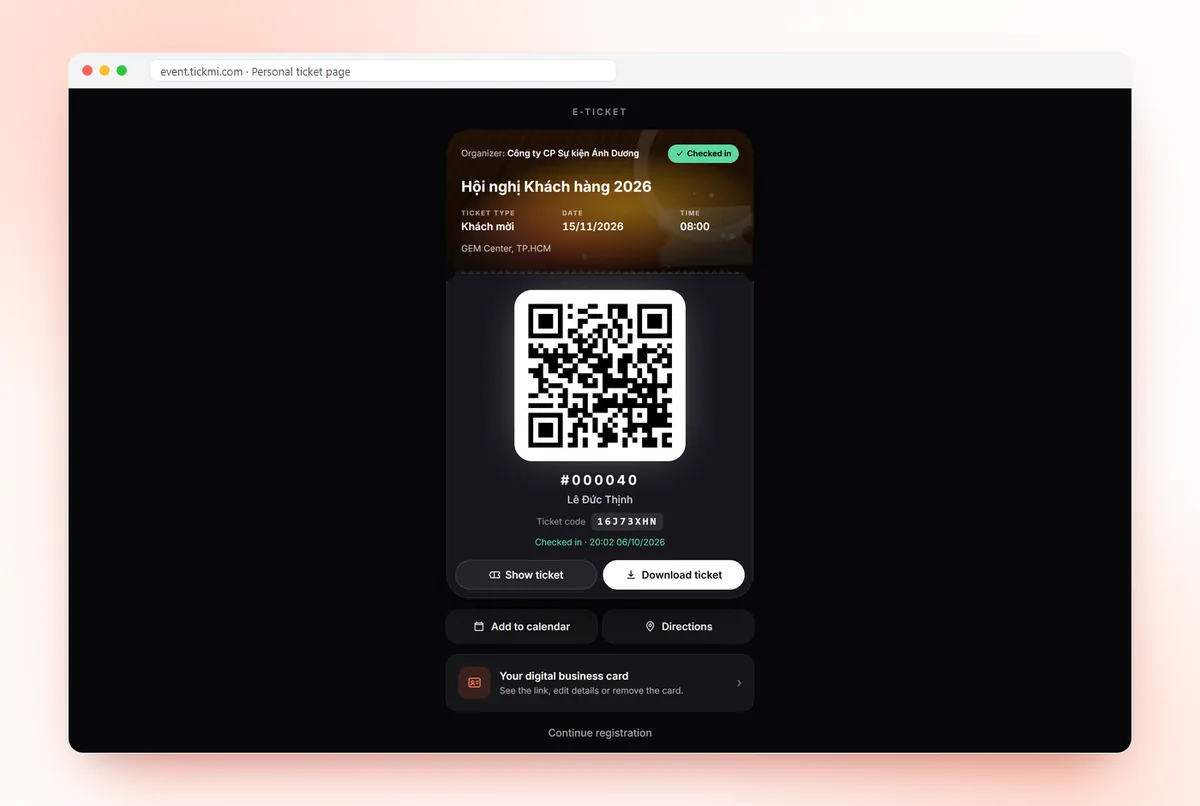
An international conference ticket has two layers of text: interface and content
To make a bilingual ticket correctly, first separate the two layers of text. The interface layer is the buttons, column headings and error messages written by the system. The content layer is everything you enter yourself: the event name, ticket type names, venue, text on the ticket, email content.
The image at the top of the article shows these two layers clearly: the ticket page has switched to English (Ticket type, Download ticket, Add to calendar), but the event name and the ticket type name are still in Vietnamese because that is text the organizer typed. International attendees only fully understand when both layers are in English.
| Touchpoint | English interface | Content you must write bilingually yourself |
|---|---|---|
| Registration page | Yes, choose English when you get the link | Title, introduction, field names, ticket type names, text on the submit button |
| Ticket email | No interface layer, all of it is composed by you | Email subject, greeting, directions, button text |
| Ticket (image/PDF) | No, the ticket is your own design | Every line of text on the ticket |
| Personal ticket page | Yes, choose Ticket page language for the view-ticket button in the email | Event name, ticket type, venue |
| Attendance confirmation page | Yes, choose the confirmation page language | Questions and messages you add |
English registration page: use a separate link for international guests
Tickmi's registration page has no language switcher and does not guess from the browser; the language is chosen by you when you get the link. When you turn on Public link — Registration, you choose Language for attendees as Vietnamese or English, then copy the link or download the QR code. The English link has its own QR code.
The neatest approach is to have two links: the Vietnamese link for domestic delegates, and the English link sent to partners, speakers and foreign delegations. On the registration page, the buttons, error messages (for example entering a wrong email) and the successful registration message will appear in English. The rest is your own text, so you should:
- Change the display name of each field to a bilingual form, for example "[Vietnamese label] / Full name" and "[Vietnamese label] / Organization". In the page designer, select the Registration form element and click a field name to change it; see the guide to creating a registration page and choosing fields on the form.
- Give ticket types bilingual names: "[Vietnamese name] / Delegate" and "[Vietnamese name] / Speaker".
- For custom choice-type fields (nationality, sessions attended, dietary needs), write both languages in each option, because that is the data that will be exported and filtered later.
Designing a bilingual ticket: Vietnamese primary, English secondary, not side by side at equal weight
A bilingual ticket is easiest to read when one language is the main text and the other is smaller secondary text placed right below. Two languages at the same font size make the ticket cluttered and the person scanning at the gate wastes time looking for information.
In the ticket designer, all text is typed by you, so you have complete control. The steps:
- Choose the primary language according to the majority of attendees. For a domestic conference with a few international delegations, Vietnamese is primary; for a regional conference held in Vietnam, it may be the reverse.
- Write fixed labels on two lines: the Vietnamese label in capitals, and below it "Date & time" smaller and lighter. Do the same for Venue, Ticket type and Ticket code.
- Keep auto-filled information to a single instance: full name, serial number and ticket code are data and need no translation.
- Write dates so they cannot be confused: "15/11/2026" is easily misread by people used to the month-before-day style, so add "15 Nov 2026" or state the weekday.
- Choose a font that has full Vietnamese diacritics for both languages so the two lines share one typeface.
- Preview with sample data to check that the longest name does not overflow its box.
Detailed steps are in the guide to ticket design and template library. General principles for ticket layout are on the e-ticket design page.
English ticket email: one bilingual email or split by ticket type?
There are two approaches and both can be done on Tickmi, because each ticket type is assigned its own email template. Which you choose depends on whether you can separate international guests into their own ticket type.
- One bilingual email: use it when domestic and international guests share one ticket type. Put the Vietnamese block first, a divider, then the English block. Write the email subject concisely in both, for example "[Vietnamese subject] / Your ticket – {{name}}".
- A separate email per ticket type: create an "International delegate" ticket type and assign it an email template written entirely in English. In this template, choose Ticket page language as English for the view-ticket button, so recipients open their personal ticket page in English.
How to create a template, set the subject and assign the template to a ticket type is in the guide to designing ticket emails. If you have an attendance confirmation step, remember to choose the English version of the confirmation page in the English email.
Role-to-English glossary for tickets and conference signage
Use one glossary across every touchpoint so that tickets, emails, signage and badges all use the same words. The table below is a suggestion; adjust it to your organization's style.
| Role or phrase | Recommended English | Used in |
|---|---|---|
| Conference attendee | Delegate | Ticket type, badge |
| Presenter | Speaker | Ticket type, badge |
| Invited guest | Guest | Ticket type |
| Journalists | Press / Media | Ticket type, check-in lane |
| Organizing committee | Organizer | Email, staff badge |
| Welcome desk | Registration desk | Email, signage |
| Main session / topic-specific session | Plenary / Breakout session | Program, session ticket |
| Ticket identifier | Ticket code | Ticket |
| Instruction to show the QR code | Please show this QR code at entry | Ticket, email |
At the gate, lane signs should also be bilingual using this same glossary; for how to divide lanes, see setting up check-in lanes.
Bilingual ticket checklist before sending
- You have an English registration link and its own English QR code.
- Field names, options within fields, ticket type names and the submit button text are all bilingual.
- The ticket has two-line labels, unambiguous dates and long names do not overflow.
- The English email leads to the English ticket page; the email subject can be read in both languages.
- You have sent a test to a colleague with good English and asked them to proofread everything.
- Badges and signage use the glossary. For a name badge template, see name badges for press conferences and customer conferences.
Common mistakes when making English tickets for international guests
- Sending the Vietnamese link to foreign guests: the registration page has no language switcher, so guests will see everything in Vietnamese. Always get the link with English.
- Changing only the interface and forgetting the content: the page is in English but ticket type and field names are still in Vietnamese, and guests still have to guess.
- Verbatim machine translation: a literal rendering of the Vietnamese term for an invitation ticket as "invitation ticket" sounds stiff; for guests, "Guest pass" or "Invitation" is more natural. Ask someone to proofread.
- Two languages at the same font size on the ticket: the ticket is cluttered and gate staff struggle to find information.
You can try the whole process with 100 free ticket issuances; for other plans, see the pricing page.
About Tickmi
Tickmi is a ticketing and participant experience platform. On a single, unified set of attendee data, Tickmi connects the whole journey: issuing invitation, registration and paid tickets, sending branded QR tickets, checking in with an app, kiosk or scanner (even offline), and then moving on to the welcome screen, lucky draw, polls, quizzes and surveys. Tickmi is trusted by organizations such as Viettel, VNPT, MobiFone, FPT and CMC. Learn about Tickmi or try it free.
Frequently asked questions
Does the registration page on Tickmi come in English?
Yes. When you get the Public link — Registration, choose English as the Language for attendees to get an English link and QR code. Buttons, error messages and notifications appear in English; field names, ticket type names and the introduction are text you set yourself, so you need to write them bilingually.
Does the registration page switch to English automatically based on the guest's browser?
No. The attendee page does not guess the language and has no language switcher. The language is chosen by the organizer when getting the link, and the default is Vietnamese.
Does Tickmi translate tickets and emails into English automatically?
No. The text on tickets and the email content are composed by you in the designer. You can write bilingual text in one template, or create a separate ticket type for international guests and assign English ticket and email templates.
How do I make recipients of an English email open the ticket page in English?
In the email designer, for the view-ticket button choose Ticket page language as English. The personal ticket page then shows buttons such as Download ticket and Add to calendar in English.
Should Vietnamese or English be the primary text on the ticket?
Choose according to the majority of attendees. For a domestic conference with a few international delegations, Vietnamese is primary with smaller English right below it; avoid putting both languages at the same font size.
Issue QR tickets, send emails, check in and engage attendees on one platform.