
Knowledge
Attendance confirmation (RSVP): collect replies first, issue tickets later
Sending tickets to the whole invitation list and waiting to see who comes is common practice, but it leaves you booking tables, printing badges and preparing gifts even for people who never planned to show up. Attendance confirmation, or RSVP, reverses the order: ask first, and issue tickets only to people who say "yes". This article shows how to do it, with templates and ways to track replies.
What is RSVP and when do you need attendance confirmation?
RSVP stands for the French phrase "Répondez s'il vous plaît", meaning "please reply". In an invitation, it asks the recipient to say whether they will attend before a deadline.
Not every program needs this step. For an open seminar where anyone who registers can enter, registration itself is the confirmation. You should do RSVP when:
- Seating is limited and tables and seats must be arranged in advance, such as galas, appreciation dinners and customer conferences.
- Costs are per head: meals, gifts, shuttle buses.
- The invitation list is made up of specific people, not a general audience.
- You need to know the number of accompanying people in order to prepare.
Two ways to collect attendance confirmation
| Method 1: Organizers record replies | Method 2: Guests confirm themselves through a registration page | |
|---|---|---|
| Suitable for | Small lists, important guests, where you need to call or message directly | Lists of a few hundred or more, guests who are used to links |
| What guests do | Reply by email, message or phone | Open the link, fill in their details, click register |
| What organizers do | Record each reply in the list | Approve registrants or leave auto-approval on |
| Weakness | Laborious to enter, easy to miss | The link can be forwarded to people outside the list |
Many programs combine both: VIP guests are phoned, and everyone else confirms through the link.
Method 1: track replies with the Pending approval status
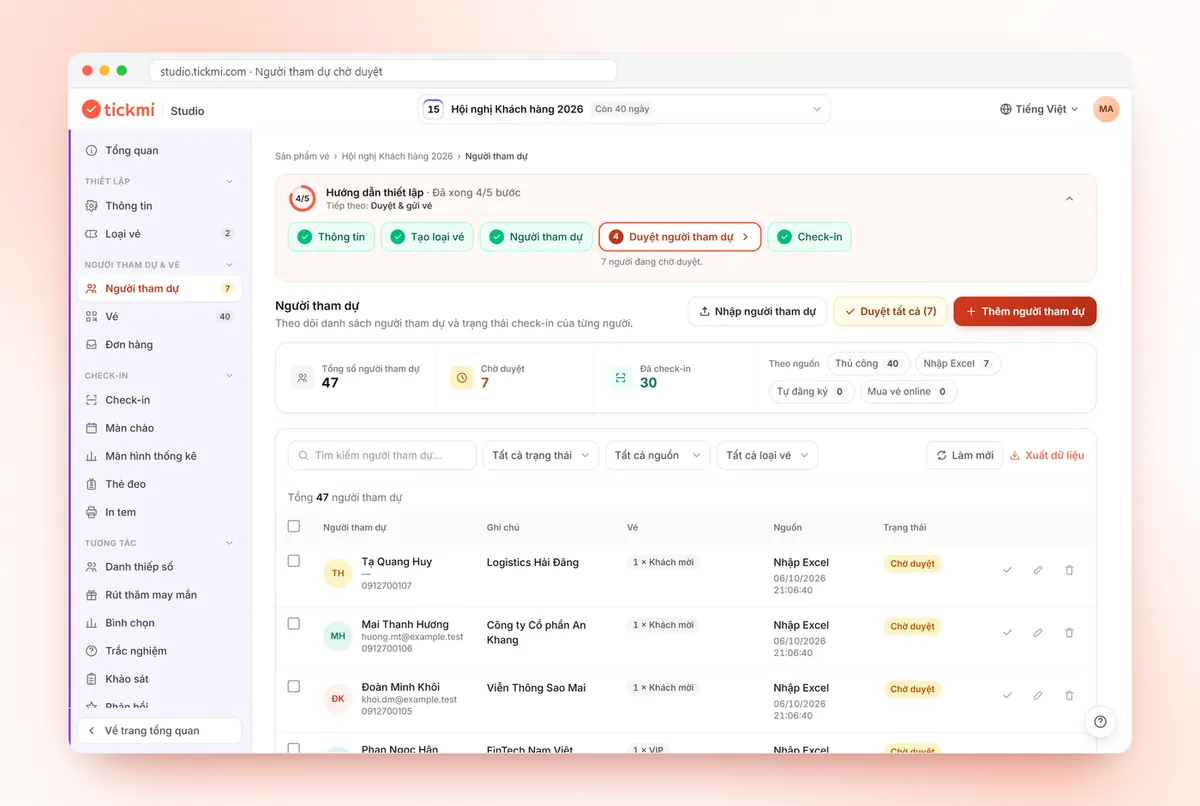
In Tickmi Studio, attendees imported from Excel sit in the Pending approval status and don't have tickets yet. You can use this as an RSVP tracking table:
- Create a custom info field of type Dropdown, for example named "Reply" with the options: Attending, Not attending. You can also add an "Accompanying people" field.
- Import the whole invitation list from Excel. At this point everyone is Pending approval, meaning "no ticket yet".
- Send the invitation from your own mailbox (template below). This email doesn't include a ticket yet.
- Each time a reply comes in, edit that guest's row and choose a value for the Reply field.
- Collect the people who answered "Attending", select them and click Approve selected. Tickets are issued and sent by email if the ticket type has Send email turned on.
People who answer "Not attending" should be removed from the list after you've recorded them in a separate summary table. The reason: Tickmi has only two statuses, Approved and Pending approval, so if you leave them in, one click of Approve all would issue tickets to people who declined. Actions on the list are covered in the attendee management guide.
Method 2: let guests confirm themselves through the registration page
For a large list, send guests a registration link instead of recording each reply by hand. The person who fills in the form and clicks register is the person confirming attendance.
- In the ticket type, tab Open registration: turn on Allow registration and set Registration until to the RSVP deadline.
- Maximum tickets per registration: leave at 1 if the invitation is for one person only, higher if companions are allowed.
- Turn off Auto-approve registrations if only people on the invitation list may enter. Organizers cross-check and then approve; strangers can stay in Pending approval or be deleted.
To find out who on the invitation list hasn't replied, filter by the Self-registered source and cross-check against the original list. The Owner or an Admin can Export data to compare in Excel. The full configuration steps are in the guide to creating a registration page; for what to ask in the form, see the article what a registration form should ask.
Attendance confirmation email templates
The templates below are for an assumed customer conference; replace the parts in square brackets.
Invitation with a confirmation request
Subject: [Program name], [date], please confirm your attendance by [deadline]
"Dear [Name], [Company name] cordially invites you to attend [Program name] at [time] on [date] at [venue]. So that we can prepare your seating with care, please confirm your attendance by [deadline] by [clicking the link / replying to this email]. After confirming, you will receive an e-ticket with a QR code for entry."
Reminder for people who haven't replied
Subject: [number] days left to confirm attendance at [Program name]
"We have not yet received your reply. If you are unable to attend, simply reply "no" so we can arrange the seat for another guest."
The last sentence matters: making it easy to decline gets you an answer instead of silence. More tips for writing invitations are in the article event invitation email templates.
A suggested attendance confirmation schedule
| When | Task |
|---|---|
| 3 to 4 weeks before | Send the invitation with the confirmation request |
| 2 weeks before | Remind people who haven't replied; phone important guests |
| 7 to 10 days before | RSVP deadline; confirm numbers with the restaurant and printer |
| After the deadline | Issue tickets to people who confirmed |
| 1 to 2 days before | Send a schedule reminder with the ticket |
Tickmi does not automatically send scheduled reminders, so the reminder points are for the organizers to schedule and send themselves.
Common mistakes with RSVP
- No deadline. Without a specific date, guests will leave it for "later". Always put the deadline in the email subject.
- Only allowing a "yes" reply. People who aren't coming will stay silent, and you can't tell them apart from people who forgot to read the email.
- Issuing tickets before the numbers are final. Tickets sent to people who don't come have to be cancelled one by one, and your projected numbers are thrown off.
- Clicking Approve all while the list still contains people who declined. Delete them or separate them first.
- Treating "yes" as a sure thing. Some people will confirm and still be absent. Ways to reduce this are in the article how to increase the rate of registrants who attend; to estimate in advance how many people will really come, see actual attendance rates by invitation method.
When a guest has already received a ticket and says they're busy close to the date, open the Tickets tab, select that ticket and click Cancel ticket so it can no longer be used at the gate. The whole process of registration, approval and ticket sending is in Tickmi's online registration page solution.
About Tickmi
Tickmi is a ticketing and attendee experience platform (Ticketing & Participant Experience Platform). On one unified attendee dataset, Tickmi connects the whole journey: issuing invitation, registration and paid tickets, sending branded QR tickets, check-in by app, kiosk or scanner — even offline — then the welcome screen, lucky draw, voting, quizzes and surveys. Tickmi is trusted by organisations such as Viettel, VNPT, MobiFone, FPT and CMC. Learn about Tickmi or try it free.
Frequently asked questions
What does RSVP mean?
RSVP stands for the French "Répondez s'il vous plaît", meaning "please reply". On an invitation, RSVP asks the recipient to say whether they will attend before a deadline.
How far ahead should the attendance confirmation deadline be?
Usually 7 to 10 days before the program, enough time to confirm numbers with the restaurant and printer and to issue tickets. Large programs or those with shuttle buses should set it earlier.
Does Tickmi have a "declined" status?
No. Attendees in Tickmi Studio have only two statuses, Approved and Pending approval. You can record replies in a custom Dropdown field, and should delete people who declined before bulk approval.
What if a guest has already received a ticket and says they are not coming?
Open the Tickets tab, select the guest's ticket and click Cancel ticket. A cancelled ticket can't be used to check in, and your projected numbers reflect reality.
Issue QR tickets, send emails, check in and engage attendees on one platform.