
Knowledge
Online invitation card templates: wording and layout for 5 types of events
A good online invitation has three layers: a short invitation in the right tone for the event, a block of required information (time, venue, contact person) and each attendee's own QR code. This article gives sample invitation wording for conferences, openings, galas, school seminars and workshops, with a pre-send checklist and how to build a QR invitation on Tickmi.
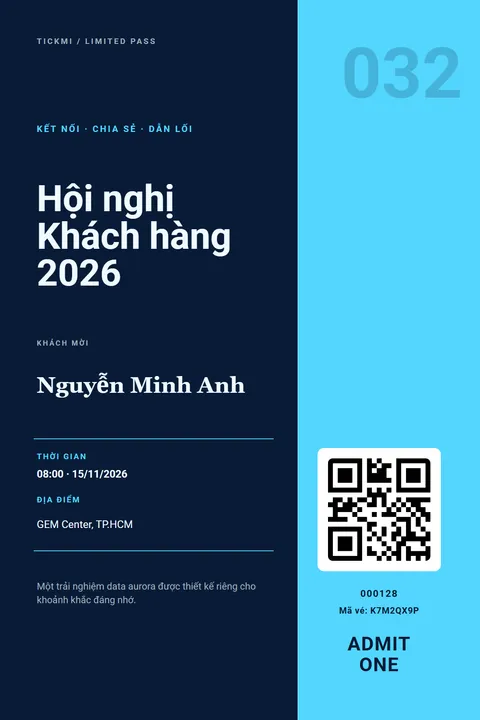
The general layout of an electronic invitation template
Every electronic invitation should be readable in 5 seconds on a phone screen. So the order of information matters more than decoration. The layout below applies to any online invitation with a QR code.
Suggested layout, from top to bottom:
- Logo and name of the inviting organization: small, at the top of the invitation.
- Event name: the largest text on the invitation.
- Name of the invited guest: filled in for each person, not a generic "Dear guest" when you already have a list.
- Time and venue: give the full time, date, building name, floor or room.
- QR code and ticket code: placed in the lower corner, large enough to scan, with a text code for manual entry when needed.
- One line of instruction: "Please show this code at the reception desk."
A nice online invitation usually uses at most two main colors, one heading font and one body font. White space makes an invitation look more elegant than any decorative detail.
Required information on an online invitation
An invitation missing any of the lines below will make recipients ask the organizers again. The table below summarizes which lines are required and which depend on the event type.
| Information | Required? | Notes |
|---|---|---|
| Event name | Yes | The official name, no internal abbreviations |
| Invited guest's name | Yes, if you have a list | Check spelling and Vietnamese diacritics |
| Time | Yes | Give the guest arrival time if it differs from the opening time |
| Venue | Yes | Building name, floor, room, entrance |
| QR code, ticket code | Yes, if tickets are checked | One individual code per person |
| Contact person | Yes | Name and phone number or email |
| Dress code | Depends | Needed for galas and appreciation dinners |
| Summary agenda | Depends | Useful for seminars and workshops |
Sample invitation wording by event type
Each type of event needs a different tone of invitation. The frameworks below are hypothetical examples; the parts in square brackets are where you substitute real information.
Conferences and corporate seminars
A formal tone, emphasizing content and speakers.
"We respectfully invite [Mr./Ms.] [Full name], [Job title], [Organization] to attend [Conference name]. The program includes [number] sessions on [topic]. Time: [time], [date]. Venue: [address]."
Layout: large conference name, information block in columns, QR code on the right. Include the job title and organization so attendees see they were invited in the right role.
Openings and product launches
An enthusiastic tone, emphasizing what is new that guests will see first.
"[Brand name] is delighted to invite [Mr./Ms.] [Full name] to a preview of [the product/new store] at [time], [date] at [venue]. Guests will be the first to experience [highlight]."
Layout: a product photo or storefront takes the top half, concise information in the bottom half.
Galas and appreciation dinners
A warm tone, thanking first and then inviting.
"Thank you, [Mr./Ms.] [Full name], for accompanying [Organization name] through [year/period]. We respectfully invite you to attend [Gala name] at [time], [date] at [venue]. Dress code: [dress code]."
Layout: a dark background or deep brand color, gold or white text, with the dress code and table number clearly stated if applicable.
School seminars and school ceremonies
A polite, clear tone suitable for both parents and students.
"The Board of Directors of [School name] respectfully invites [Dear parent/Student] [Full name], [class], to attend [Program name] at [time], [date] at [hall]. Please bring the QR code on this invitation to check in at the gate."
Layout: school logo, program name, a column for class or grade information. Large text, little decoration.
Workshops and short courses
A friendly tone, saying clearly what attendees need to prepare.
"Hi [Full name], your spot at [Workshop name] is reserved. See you at [time], [date] at [venue]. Please bring [laptop/tools]."
Layout: a compact invitation with a "what to bring" section and the instructor's name.
Checklist before sending an online invitation
Sending a test to yourself is the cheapest step to avoid sending a mistake to hundreds of people. Go through the list below before clicking send:
- [ ] Event name, time, date and venue match the finalized plan.
- [ ] The longest invited guest name still displays fully, without overflowing the frame.
- [ ] The QR code scans from a phone screen and when printed on paper.
- [ ] There is a text ticket code for staff to enter manually.
- [ ] There is a contact person who will pick up the phone on the day of the event.
- [ ] A test has been sent to yourself and opened on both a computer and a phone.
- [ ] The email subject states the event name clearly, not in all capitals.
Common mistakes with online invitation templates
Most mistakes come from designing to look good on a computer and forgetting that recipients open it on a phone.
| Mistake | Consequence | How to avoid it |
|---|---|---|
| Small text, lots of decoration | Hard to read on a phone | The event name and time must be readable without zooming in |
| One shared invitation image for everyone | No way to know who came; the code is easily shared | One invitation per person with an individual QR code |
| Missing floor, room, entrance | Attendees keep calling to ask | Give the full detailed address |
| QR code at the edge or on a busy background | Scanners can't read it | Leave a white margin around the code, test-scan beforehand |
| Re-importing the whole Excel file to fix one name | Creates duplicate attendees | Edit that attendee directly |
Turning an online invitation template into a QR invitation on Tickmi
On Tickmi, you build the invitation once, and the system fills in the name and creates an individual QR code for each attendee. The short steps:
- Create a ticket product and ticket types for each guest group (for example VIP, Guest).
- Click Choose ticket template from the library, pick a template close to your event type and click Use template. Change the logo, colors and text following the invitation wording above.
- Insert full name, job title and ticket type using the Merge information section; the QR code and ticket code are created for each person.
- In the Send email tab, turn on Send email automatically when an attendee is approved, choose the email template, and turn on Attach ticket file to the email if needed.
- Click Download template, fill in the list and then import. New people are imported in Pending approval status; add yourself as an attendee to receive a test first (this person also counts as 1 ticket issuance when approved).
- After checking the test invitation, click Approve all to issue and send.
Design operation details are in the guide to ticket design and the template library. For choosing the type of QR code and sending channel, see the article on invitations with QR codes; for the wording of the email body, see event invitation email templates. A feature overview is on the online invitation page. New accounts get 100 free ticket issuances; details are on the pricing page.
About Tickmi
Tickmi is a ticketing and attendee experience platform (Ticketing & Participant Experience Platform). On a single, unified set of attendee data, Tickmi connects the whole journey: issuing invitation, registration and paid tickets, sending branded QR tickets, checking in with the app, kiosk or scanner (even when the network is down), and then welcome screens, lucky draws, voting, quizzes and surveys. Tickmi is trusted by organizations such as Viettel, VNPT, MobiFone, FPT and CMC. Learn about Tickmi or try it free.
Frequently asked questions
What information does an online invitation template need?
At minimum: event name, invited guest's name, time, detailed venue, QR code with a text ticket code and a contact person. Galas should add a dress code; seminars and workshops should add a summary agenda.
How does the wording differ between a conference invitation and an opening invitation?
A conference invitation uses a formal tone, emphasizes content and speakers, and states the invited guest's job title. An opening or product launch invitation uses an enthusiastic tone, emphasizes what is new that guests will see first, and usually has a large photo.
Are there ready-made electronic invitation templates to edit?
Yes. In Tickmi Studio, click Choose ticket template from the library, pick a template and click Use template, then change the logo, colors and text. Each attendee's name and QR code are filled in automatically.
How do I make sure each person receives an online invitation with their own name?
Import the attendee list using the Excel template, insert the full name into the invitation using the Merge information section, then approve so the system issues an invitation with an individual QR code and emails it to each person.
How do I fix wrong information on an invitation I already sent?
Edit it directly on the attendee or on the ticket template, then click Reissue ticket (each reissue also counts as a ticket issuance) and resend the email to those who need the corrected version. Don't re-import the whole Excel file, because import only adds new people and will create duplicates.
Is making an online invitation on Tickmi free?
New accounts get 100 free ticket issuances, enough for the invitations of a small event. For larger events, see the packages on Tickmi's pricing page.
Issue QR tickets, send emails, check in and engage attendees on one platform.