
Knowledge
Online number draw: choose the right draw mode for each program
An online draw means pasting the participant list into a browser tool, pressing spin and letting the computer pick winners at random, shown straight on the big screen. With Tickmi's <a href="/quay-so-online">online number draw</a> tool, you don't need to register: you only decide three things, the draw mode, the number of winners per draw and whether your list goes over 100 people. This article walks through each decision.
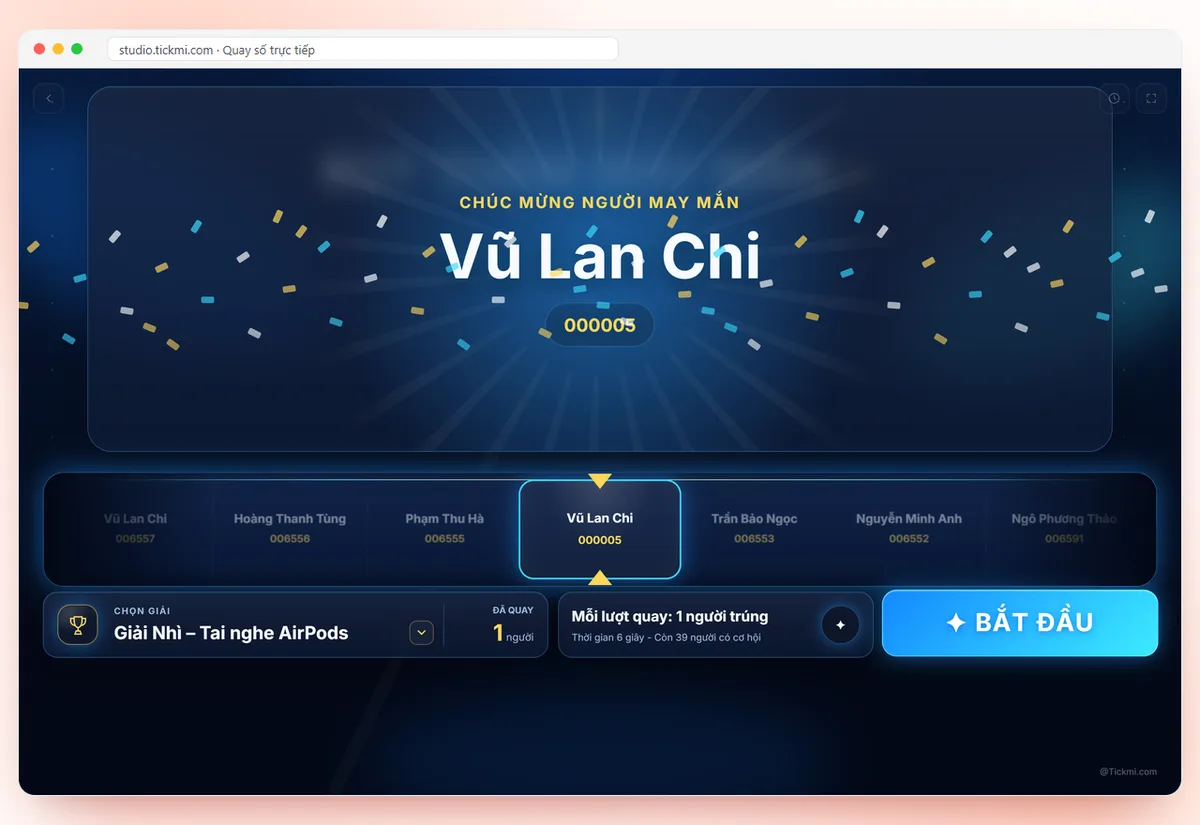
What are the steps of an online draw
The short answer first: an online draw session has only four steps, and most problems happen in the preparation step rather than when you press spin.
- Paste the list. Open Settings and paste into the Participant list box, one person per line (a name, a ticket number, or both if you paste 2 columns from Excel).
- Choose the draw mode. At the left corner of the screen there are Wheel and Number Draw. The two modes differ in how many winners come out per draw; see the table below.
- Set how to draw. Set the Current prize name, Winners per draw, Spin time (3-30 seconds) and turn on Exclude previous winners from later draws if each person should receive only one prize.
- Show and draw. Click Full screen, then click SPIN or press Space. After each prize, click Download winners list (CSV) to keep the results.
If you want to draw from a sequence of numbers (for example tickets from 1 to 100), how to create the sequence in Excel is covered in the article drawing by name or by number; this article focuses on choosing the draw mode and the list limits.
Wheel or Number Draw: choose by the number of winners per draw
The short rule: if winners come one at a time, use Wheel; if many winners come at once, use Number Draw. Both use the same list and the same random selector, so the difference is only in how it is displayed.
| Criterion | Wheel mode | Number Draw mode |
|---|---|---|
| Look | A wheel divided into slices, with a pointer stopping on the winner | A scrolling strip of names, with results shown as a grid |
| Winners per draw | One person at a time, up to 10 people per draw | Many at once, set from 1 to 100 |
| Best for | Big prizes, calling on people to speak, classroom minigames | Consolation prizes with many slots, bulk gifts |
| Feel on stage | Slow and suspenseful, the whole room watches one slice | Fast, each person revealed in turn in the grid |
A program can switch modes between prizes. An assumed example: a year-end party of 80 people, 20 consolation prizes drawn in Number Draw mode with 10 winners per draw (2 draws), while the second and first prizes switch to Wheel mode, drawing one person at a time with a 15-second spin for atmosphere. If you only need a wheel to pick names for a classroom, the random name wheel page opens in exactly this mode.
Set winners and spin time for each prize in an online draw
The principle: the more valuable the prize, the fewer winners per draw and the longer the spin time. The table below is a starting point, which you adjust to the pace of your program.
| Prize type | Draw mode | Winners per draw | Spin time |
|---|---|---|---|
| Consolation, many slots | Number Draw | 5-20 | 5-8 seconds |
| Third prize, second prize | Number Draw or Wheel | 1-3 | 8-12 seconds |
| First prize, special prize | Wheel | 1 | 15-30 seconds |
Remember to change the Current prize name before each draw, because the prize name is recorded in Draw results and in the CSV file. The line "n/t people not yet won" tells you whether enough people remain for later prizes.
What if the online draw list has more than 100 people
The free version draws up to 100 people. When you paste a bigger list, the tool shows how many people you have and won't let you draw; you have two options.
- Trim the list down to 100 people. Suitable when you have already filtered, for example drawing only among people who completed the survey.
- Click "Draw on Tickmi Studio". The list (both columns) and settings are carried over to Tickmi Studio, where each person gets a lucky-draw entry with a ticket sequence number. New accounts can draw 100 people for free; for bigger lists choose a draw package by number of people right in Studio, see pricing.
Don't split a list of 300 people into three draws of 100 on the free version: each person only has a chance within their own group, so results are no longer fair across groups. The article fair random drawing explains why in detail.
Draw only among people who are present
With a hand-pasted list, the computer doesn't know who is sitting in the room, so it's easy to draw someone who has already left. When drawing in Tickmi Studio, the Lucky draw tab lets you choose the group to draw from: Has a ticket or Checked in. If you choose Checked in, only people who have scanned their QR ticket at the door enter the draw.
Studio also has things the browser version doesn't: pre-defined prizes and slot counts, an exclusion list (organizers and staff cannot win), logo, background image, a separate draw music, drag-and-drop Edit layout for the draw screen, and history stored in the system that you can export to Excel when presenting prizes. Step-by-step actions are in the live lucky draw guide; for the overall solution see the lucky draw software page.
A 10-minute checklist before the online draw
- The count line under the list box matches the real number of people.
- The right draw mode is selected for the first prize.
- You clicked Reset draw to clear test-run results.
- Exclude previous winners from later draws is on or off exactly as in the announced rules.
- The projector is in Full screen mode, and the speakers were tested with Music while drawing.
- Use one computer and one browser throughout the event: the list and results are stored in that computer's browser.
Common mistakes in an online draw
| Mistake | Consequence | How to avoid it |
|---|---|---|
| Setting 20 winners per draw in Wheel mode | The wheel only produces up to 10 people per draw | Switch to Number Draw mode for prizes with many slots |
| Pasting a list of more than 100 people | The free version won't let you draw | Filter down to 100 or draw on Tickmi Studio |
| Forgetting to change the prize name | The CSV file records the wrong prize for winners | Change the Current prize name before each draw |
| Closing the tab midway | Hard to cross-check results when presenting prizes | Download the CSV right after each prize |
| Showing phone numbers in the secondary column | Personal information exposed on the big screen | Use the secondary column only for organization or sequence number |
For programs with tickets or registration, you can start with the free trial of 100 units of ticket issuance quota so you can issue tickets, check in and draw on the same list; details on the pricing page.
About Tickmi
Tickmi is a ticketing and attendee experience platform (Ticketing & Participant Experience Platform). On one unified attendee dataset, Tickmi connects the whole journey: issuing invitation, registration and paid tickets, sending branded QR tickets, check-in by app, kiosk or scanner — even offline — then the welcome screen, lucky draw, voting, quizzes and surveys. Tickmi is trusted by organisations such as Viettel, VNPT, MobiFone, FPT and CMC. Learn about Tickmi or try it free.
Frequently asked questions
Do I need to register an account for an online draw?
No. You open the online draw page, paste a list of up to 100 people and click SPIN or press Space. You only need a Tickmi Studio account to draw a bigger list or to draw among checked-in people.
What is the difference between Wheel mode and Number Draw mode?
Wheel is a wheel divided into slices that produces winners one at a time, up to 10 people per draw. Number Draw lets many people win at once, from 1 to 100 people per draw, with results shown as a grid. Both select at random in the same way.
Can I run an online draw with a list of 300 people?
The free version draws up to 100 people. With 300 people, click Draw on Tickmi Studio to carry the list and settings over; new accounts can draw 100 people for free, and for more you choose a draw package by number of people in Studio.
How do I keep previous winners from winning again?
Turn on Exclude previous winners from later draws in the How to draw section. To let everyone draw again from the start, click Reset draw.
Are online draw results saved?
Each draw is recorded in Draw results and can be downloaded with the Download winners list (CSV) button. The browser version stores data on the computer you are using; in Tickmi Studio, history is stored in the system and can be exported to Excel.
Issue QR tickets, send emails, check in and engage attendees on one platform.