
Knowledge
New Year and year-end lucky draws: where things easily go wrong in Tet season
A year-end lucky draw differs from an ordinary one in three ways: the prizes carry a Tet flavor, more attendees leave early, and the results get discussed longer in the company chat group. This article goes through each point, in the order you will meet them from choosing prizes to publishing results.
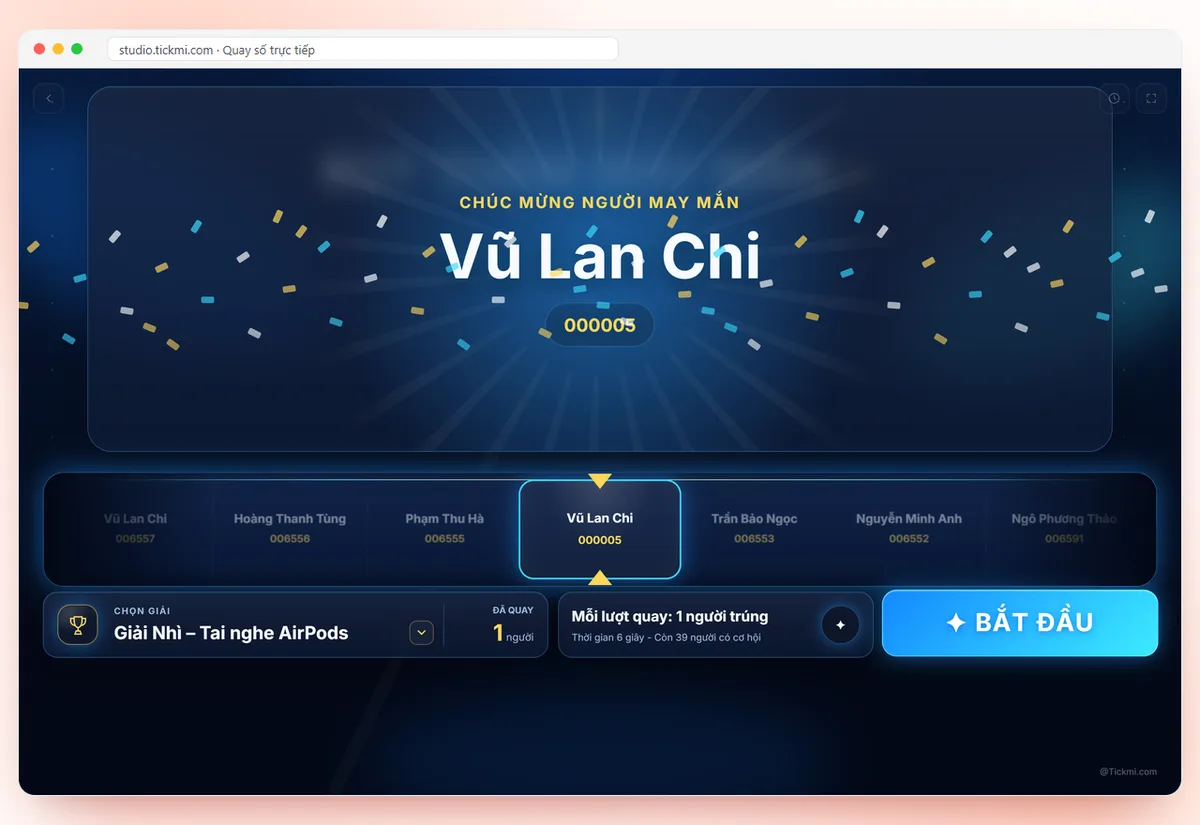
Year-end party and New Year lucky draws: two settings, two approaches
These two occasions are often lumped together, but the people sitting in the audience are in two different states.
| Criterion | Year-end party (before Tet) | Spring opening, first meeting of the year |
|---|---|---|
| Attendees' mindset | Relaxed, wanting to wrap up and receive gifts | Still half on holiday, need to be pulled into a working mood |
| Biggest risk | People asking to leave early, leaving before the draw | Absences because people have not returned to work, arriving late |
| Role of the draw | A reward for the whole year, placed at the end of the program | An opener that creates energy; draw early |
| Suggested placement | Two rounds: small prizes mid-party, big prizes at the end | One short round right after the opening segment |
If you have not yet fixed the number of prizes and tiers, do that first with the article on lucky draw prize structure. The sections below only cover what is specific to Tet season. For a small gathering that does not need a dedicated draw screen, the free online lucky draw tool is enough.
Choosing seasonal prizes: gifts that are easy to hand over and easy to receive
Tet-season gifts are things everyone needs, but they also easily overlap. Three questions help you filter quickly:
- Can the winner carry it home? Bulky gifts (a microwave, a big box) make winners reluctant to accept, especially when they are traveling to their hometown by coach. For heavy gifts, state in the rules that they are collected later at the office.
- Does it have an expiry? For food or vouchers with a short shelf life, put the expiry on the prize board so winners do not have to ask again.
- Is it suitable for everyone in the room? If the event has vegetarians, non-drinkers or foreigners, the prizes should be neutral.
A tip for setting the mood: name prizes by season instead of rank, for example "Spring Fortune Prize" or "Spring Opening Prize". In Tickmi Studio, this name is entered in the Prize name field when you click Add prize, and it also shows on the draw screen in the SELECT PRIZE area.
Absent and early-leaving people: decide beforehand, not on stage
This is the situation met most often in Tet season. You draw someone who has already left, the whole room waits, the MC fumbles, and every decision afterward is seen as favoritism. The way to avoid it is to fix the rules in advance and announce them at the start of the program.
- Limit the draw list to people who are present. In Draw participants, choose the Checked in group so only people who have checked in are in the draw. People who received a ticket but have not arrived cannot win.
- Fix a waiting time. A hypothetical example: call the name twice, wait up to 30 seconds; when time is up, redraw that prize. The number is yours to decide; what matters is saying it out loud before the draw.
- Tell people who leave early. If there is a big prize at the end, announce the time of the big-prize draw right at the opening so people who need to leave early can plan.
- Know how to redraw a prize. To redraw, go to the History tab and delete that win: the prize is restored by one and that attendee becomes eligible to draw again.
One thing to remember: a person who has won a prize is no longer in the eligible pool for later draws, so in practice each person receives only one prize. Write this into the rules so the audience does not wonder. The general transparency principles are in the article on running a transparent, fair lucky draw.
Confirming the winner on the spot
On stage, duplicate names are common: a company of a few hundred people easily has two people with the same full name. Have the draw screen show an extra identifier.
- In Information shown when drawing, choose Ticket sequence number or Ticket code to display alongside the name at the announcement. Choosing a few fields is enough; avoid full emails or phone numbers on a public screen.
- The winner comes up to receive the gift, and the organizers check that code against the ticket on their phone or their badge.
- Record the handover (received or to be collected later) in a simple table, with the prize name in the first column and the name and ticket code in the next.
A hypothetical example: a table with 4 columns: Prize, Winner, Ticket code, Status (handed over, to collect later, redrawn). The person holding the table is an organizing team member, not the MC.
Communicating results after the draw
After the event, results are often asked about again. Prepare an official announcement instead of letting it spread through screenshots.
- Take it from the source data. The History tab records each draw with Prize, Winning attendee, Selection method and Time; you can export a winners list file for reconciliation.
- Minimize personal information. When posting to an internal channel, only the prize name, the winner's name (or initials) and the deadline for collecting the gift are needed.
- Post photos only with the winner's consent. Say it right on stage: "We would like to take photos of the gift handover".
- Attach a collection deadline. For any prize to be collected later, state the pickup place, contact person and deadline.
The legal rules for promotional programs, if the draw involves external customers, are outside the scope of this article.
Checklist before a year-end or New Year draw day
- The prize list is fully entered, with quantities matching the real gifts in stock.
- The Draw participants group is set correctly (Checked in is recommended for on-site draws).
- You have done a test draw, then clicked Delete all trial draws so prizes and eligible people are restored.
- The screen only shows the necessary fields (ticket code, ticket sequence number).
- The absence rule is already written into the MC script.
- There is a handover record table and a person in charge.
Step-by-step instructions are in live lucky draw on Tickmi Studio. If your party needs tickets from a staff list and check-in at the lobby, see also tickets, check-in and lucky draw for year-end parties. An overview of features is on Tickmi's lucky draw page.
Common mistakes with Tet-season draws
| Mistake | Consequence | How to avoid it |
|---|---|---|
| Putting the big prize at the last minute, after 10 pm | Many people have left, the prize is called and missed | Split into two rounds, announce the big-prize time beforehand |
| Drawing from the invitation list instead of the present list | Winning someone who has not arrived | Choose the Checked in group |
| Not doing a test draw | Sound and display errors show up right on stage | Do a test draw, then delete the test draws |
| The screen shows the winner's phone number | Personal information is exposed | Only choose ticket code and ticket sequence number |
| A gift to be collected later has no person in charge | Tet is over and nobody has collected it | Fix a contact person and a collection deadline |
About Tickmi
Tickmi is a ticketing and attendee experience platform (Ticketing & Participant Experience Platform). On one unified set of attendee data, Tickmi connects the whole journey: issuing invitation tickets, registration tickets and paid tickets, sending branded QR tickets, checking in by app, kiosk or scanner — even when the network is down — and then the welcome screen, lucky draw, polls, quizzes and surveys. Tickmi is trusted by organizations such as Viettel, VNPT, MobiFone, FPT and CMC. Learn about Tickmi or try it free.
Frequently asked questions
Should the year-end party draw go at the start or the end of the program?
If the program is long, split it into two rounds: small prizes mid-party to keep the mood, big prizes at the end. Announce the big-prize draw time from the start of the program so people who need to leave early can plan.
If the winner has left, can that prize be redrawn?
Yes, if the rules you announced allow it. In Tickmi Studio, open the History tab and delete that win: the prize is restored by one and that attendee becomes eligible to draw again. Fix the waiting time before the draw.
How do I make sure only people who are present are in the draw?
In Draw participants, choose the Checked in group. Only people who have checked in are in the draw list.
What information about the winner should the draw screen show?
The name together with the Ticket sequence number or Ticket code is enough to tell apart people with the same name. Avoid full emails and phone numbers because the screen is public.
Can I export the winners list for reporting?
Yes. The History tab stores each draw with the prize, winner, selection method and time, and you can export a winners list file.
Issue QR tickets, send emails, check in and engage attendees on one platform.