
Knowledge
15 event minigames: play in the room and on the phone
A good minigame does not need expensive props. It needs to fit the group size, the time available and the mood of the event. This guide puts 15 games in one table so you can compare quickly, then shows how to choose, how to slot them into the run of show, and the mistakes that make a game "lose the mood".
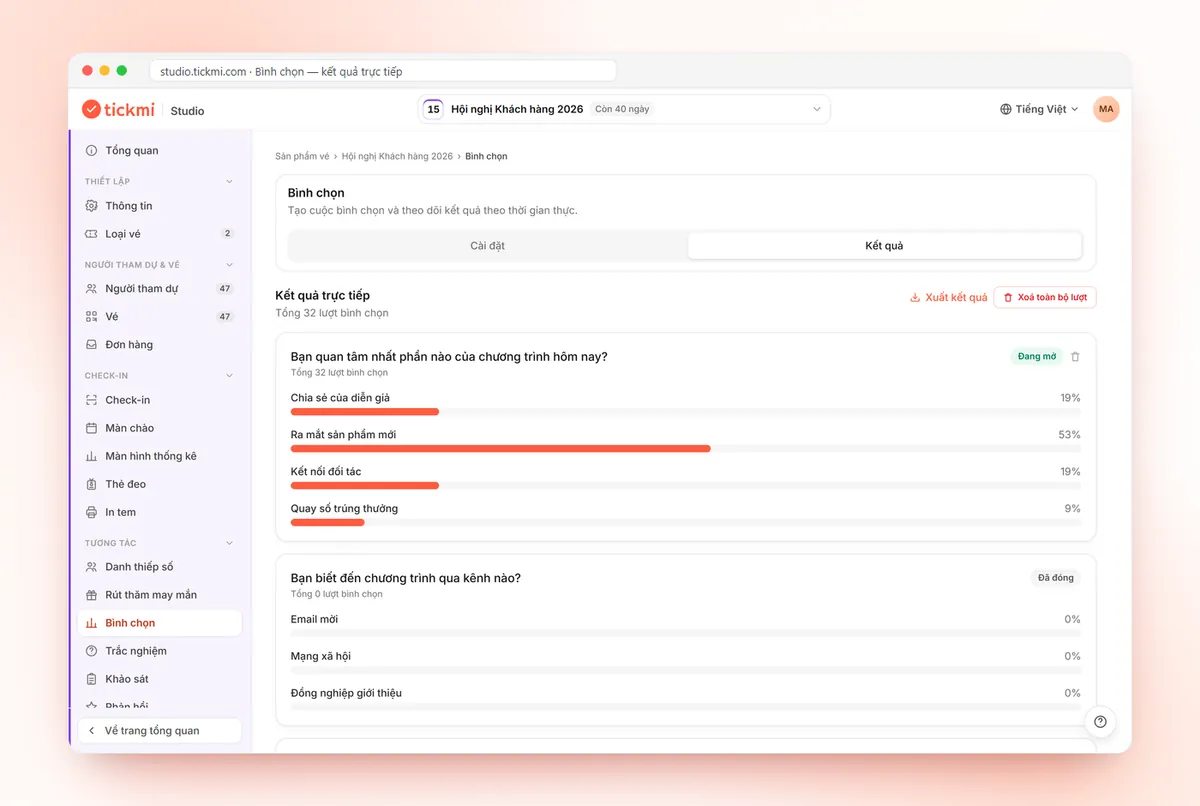
Table of 15 event minigames: group size, duration, props
Games 1 to 9 are played in the room and need no internet. Games 10 to 15 are played on phones; attendees just scan a QR code to join. Group sizes and durations are suggestions, so adjust them to your actual space.
| # | Game | Group size | Duration | Props |
|---|---|---|---|---|
| 1 | People bingo (find someone who "has been to Da Lat", "has a cat"...) | 20–150 | 10 min | Pre-printed bingo sheets, pens |
| 2 | Line up by birthday without speaking | 10–40 per team | 5 min | None |
| 3 | Charades: guess your teammate's keyword by acting | 4–6 per team | 10–15 min | Keyword cards, stopwatch |
| 4 | Whisper down the line | 6–10 per team | 5–10 min | Original sentence cards |
| 5 | Match half-proverbs to find your tablemates | 20–200 | 5 min | Half-proverb cards, handed out at reception |
| 6 | Name that tune | Whole hall, split into teams | 10 min | Speaker, song list |
| 7 | Build the tallest paper tower | 4–6 per team | 15 min | A4 paper, tape, ruler |
| 8 | Hold up True/False boards; wrong answers sit down | Whole hall | 5–8 min | Two-sided boards or raised hands |
| 9 | Tug of war, relay races | 8–20 per team | 15–20 min | Rope, open space |
| 10 | Guess the number by voting | Unlimited | 3 min per question | Phones, projector screen |
| 11 | "What does the majority think": guess the whole room's choice | Unlimited | 3 min per question | Phones, projector screen |
| 12 | Vote for the favourite outfit or performance | Unlimited | 5 min | Phones, list of candidates |
| 13 | 5-minute quiz with a leaderboard | Unlimited | 8–10 min | Phones, question set |
| 14 | Prize draw from the checked-in list | Based on the attendee list | 3–5 min per prize | Computer connected to a screen, prizes |
| 15 | Wheel spin for small groups | Up to 100 | 3 min | Computer, list of names |
Playing on phones: setting up games 10–15
Games 10 to 14 run under the Interaction group of the ticket product in Tickmi Studio. Attendees do not need to install an app.
- Games 10, 11, 12 (Voting). Go to Voting → Add question, enter at least two options, and set the Voting time in seconds if you want a countdown. Each question has its own Open or Closed status, so the MC opens each question at the right moment. For game 10, give number ranges as the options ("under 50", "50–100"...), close the question, then reveal the answer. In game 11, the winners are those whose choice matches the option with the highest share on the Live results tab. Voting does not score automatically, so use it for fun and opinions.
- Game 13 (Quiz). Set the Quiz time limit (seconds). Each person completes the whole question set and submits, rather than answering question by question at the MC's pace. The Leaderboard shows score and submission time so you can award prizes. Question ideas are in conference quiz minigame ideas.
- Game 14 (Lucky draw). Click Add prize and set Who can be drawn to Checked in so only people who are present have their names in the draw. When it is time, click Live draw, Full screen, pick a prize under CHOOSE PRIZE, then START. Detailed steps are in the live lucky draw guide.
- Game 15 (free wheel). For a small group that does not need an attendee list, use the free online lucky wheel: no sign-up, choose a wheel style, paste up to 100 names and spin.
To let only real attendees play games 10 to 13, under Participant page choose Email or Phone number verification for the Ticketed or Checked in group. If the link leaks, click Change code (revoke old link). To turn on the link and QR code, see the voting, quiz and survey guide.
Choosing event minigames by type of event
| Event type | Good choices | Avoid |
|---|---|---|
| Conferences and seminars with fixed seating | 10, 11, 13, 14: nobody has to leave their seat | 7, 9: need movement and floor space |
| Year-end parties and galas seated by table | 5 at arrival, 6, 12, 14 | 4, 8: hard to hear in a noisy room |
| Outdoor team building | 2, 3, 7, 9 | Games that need a projector screen |
| Classes and internal training | 1 at the start, 13 at the end of each section, 15 for calling names | Noisy games that run past 10 minutes |
| Product launches | 10 guessing product specs, 13 on the product, 14 at the end of the programme | Games unrelated to the message |
Three quick questions to decide: can attendees leave their seats, does the room have a screen and stable internet, and are the prizes valuable enough that you need to verify the winner? If the last answer is "yes", prefer games tied to the checked-in list.
If you need to quickly pick players to come on stage, use Tickmi's free random name wheel, no sign-up needed.
Slotting minigames into the run of show: a hypothetical 120-minute example
Hypothetical example: a year-end party of about 200 people, seated by table, with an LED screen.
| Minute | Programme segment | Minigame |
|---|---|---|
| -30 to 0 | Reception, check-in | Game 5: hand out half-proverbs at the reception desk |
| 0 to 10 | Opening | Game 11: one "what does the majority think" question to break the ice |
| 10 to 40 | Year in review, awards | No games |
| 40 to 50 | Dinner begins | Game 13: a company quiz while people eat |
| 50 to 80 | Performances | Game 12: vote for a performance, close the question after the last act |
| 80 to 90 | Interaction | Game 6: name that tune, by table |
| 90 to 120 | Prize draw, closing | Game 14: draw from small prizes up to the grand prize |
The rule: alternate seated and active games, and put the games with the biggest prizes at the end to keep people in the room. Sample MC scripts for each segment are in MC script weaving in lucky draw, voting and quizzes.
Common mistakes when running event minigames
- Explaining the rules at length. If the rules run past three sentences, put them on screen. Playing one sample round is faster than explaining.
- Calling people on stage without warning. Many people feel shy. Invite volunteers or pick with games 14 or 15 so nobody feels singled out.
- Not testing the network. Phone games need stable internet. Test with a few devices at the venue and prepare an offline backup game.
- Forgetting to clear test data. Use Delete all responses for voting and quizzes, and Delete all test draws for the lucky draw, before showtime.
- Showing private information on screen. When announcing winners, show only the name and ticket code, never phone numbers or emails.
- Unclear prize rules. Who gets the prize, what happens if the winner is absent, how ties on points are decided: say it before playing.
Minigame checklist before the event day
- Games chosen using the table above, with at least one offline backup game.
- Props printed and prepared in full, plus about 10% spare.
- Voting questions, quizzes and prizes created and tested on two different phones.
- QR code large enough to scan from the back row, with the short link written underneath.
- Each game has a timekeeper and a person in charge of prizes.
- The MC has a script stating the time slot, rules and prizes for each game.
If you do not have an attendee list on Tickmi yet, you can start with the free plan of 100 ticket issuance quota, with details on the pricing page. An overview of voting, quizzes, surveys, lucky draw and the welcome screen is on the attendee interaction page; for the prize draw specifically, see lucky draw.
About Tickmi
Tickmi is a ticketing and attendee experience platform (Ticketing & Participant Experience Platform). On one unified attendee dataset, Tickmi connects the whole journey: issuing invitation, registration and paid tickets, sending branded QR tickets, check-in by app, kiosk or scanner — even offline — then the welcome screen, lucky draw, voting, quizzes and surveys. Tickmi is trusted by organisations such as Viettel, VNPT, MobiFone, FPT and CMC. Learn about Tickmi or try it free.
Frequently asked questions
How long should event minigames run?
About 3 to 15 minutes each depending on the type. Phone games like voting or a prize draw need only a few minutes; team activity games need 10 to 20 minutes. Spread them between the main content rather than bunching them together.
Do attendees need to install an app to play phone minigames?
No. With Tickmi voting and quizzes, attendees scan a QR code or open a link and play right in their phone browser.
Does a Tickmi quiz run question by question at the MC's pace?
No. Each person completes the whole question set within the time you set and submits; the leaderboard shows score and submission time. For question-by-question pacing, use Voting and open and close each question, but Voting does not score automatically.
Is there a free draw tool for small groups?
Yes. The online lucky wheel at tickmi.com/lucky-draw is free, needs no sign-up, offers wheel styles and accepts up to 100 names per list.
How do I make sure only people who are present can win prizes?
For the lucky draw, set Who can be drawn to Checked in. For voting and quizzes, turn on Email or Phone number verification for the Checked in group under Participant page.
Issue QR tickets, send emails, check in and engage attendees on one platform.