
Knowledge
Bank transfer or payment gateway for ticket sales: decide with 3 questions
Bank transfers have no transaction fees, but they cost you time. A payment gateway saves time, but it has fees and pays out in cycles. There is no answer that fits every event, only the answer that fits your ticket count, your number of buyers and the number of people reconciling payments.
Quick answer: decide with three questions
| Question | If the answer is "yes" | If the answer is "no" |
|---|---|---|
| Are you selling to strangers, through ads or social media? | Lean toward a payment gateway | Bank transfer can still work |
| Are tickets limited and many people buying at the same time? | Payment gateway, so tickets are held while buyers pay | Bank transfer is fine |
| Is someone free to check the bank statement every day and answer "I paid but I haven't got my ticket"? | Bank transfer is fine | Payment gateway |
If all three questions point the same way, the decision is clear. The rest of this article helps you weigh the options when the answers differ.
Manual bank transfer: how it really plays out
The familiar flow: the buyer picks a ticket, transfers money to your account, sends a photo of the receipt, and you check it and send the ticket. Every step is a place where things can go wrong:
- The transfer note has no order code. Two people transfer the same amount and you cannot tell which payment belongs to whom.
- Underpaid, overpaid or paid twice. Each case turns into a round of messages to sort out.
- A receipt photo does not prove the money arrived. Screenshots, edited images and unfinished transactions can all be sent to you. Trust only the balance or statement of the receiving account itself.
- Nobody holds a seat for anyone. One person asks "are tickets still available?" and transfers an hour later, while someone else has already paid. You have to count the remaining tickets yourself.
- Tickets are sent late. The buyer has paid but gets the ticket half a day later, and starts to doubt you.
If you still choose bank transfer, reduce the risk like this: create a separate order code for each person and make it mandatory in the transfer note; set a hold period (for example 30 minutes, then release the seat); send the ticket only after you see the money in your account; and use a spreadsheet with three columns "held", "paid" and "ticket sent". The article Google Form, Excel or a ticketing platform explains when the manual approach is still enough.
Payment gateway for online ticket sales: what you gain and lose
What you gain:
- Automatic payment confirmation, with the ticket issued as soon as the transaction succeeds.
- Seats are held during payment; when time runs out they are released automatically, so you never oversell.
- Every order has a code, a buyer, a ticket count and a status. You do not have to match statement lines one by one.
- Buyers have several ways to pay: ATM cards, Visa/Mastercard, bank QR scan.
What you lose:
- There are fees. You need to know who bears the fee (the organizer or the buyer) and whether it applies to free tickets. See the types of fees when selling tickets online to price tickets correctly.
- Money does not arrive second by second. The platform usually reconciles in periods and then pays you. If you need cash to pay suppliers before the event date, know the cycle from the start.
- There is paperwork. You need to declare your receiving account and invoicing information before receiving payouts.
Comparison by criteria
| Criteria | Manual bank transfer | Payment gateway |
|---|---|---|
| Confirming payment | You check each payment yourself | Automatic |
| Holding seats during payment | No, you count yourself | Yes, for a limited time |
| Risk of overselling | High when many people buy at once | Low |
| Ticket delivery speed | Depends on whoever is on duty | Right after payment |
| When money reaches you | As soon as the buyer transfers | By reconciliation period |
| Transaction cost | Almost none | There are fees |
| Reconciliation effort | Grows with ticket count | Almost constant |
| Refunds | You transfer back and record it yourself | Has a process, tracked in the system |
Which payment methods Tickmi supports
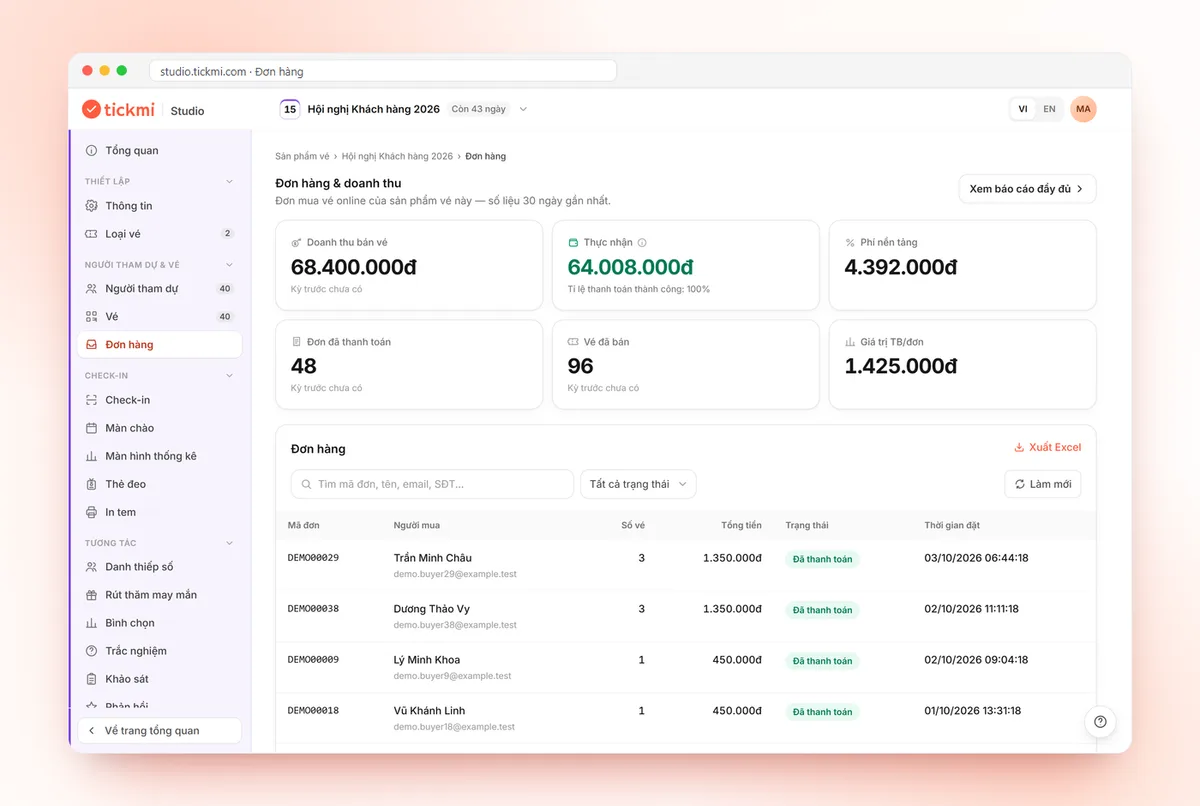
This is what Tickmi can do today. When you turn on online sales for a ticket type, buyers pay through VNPay (ATM cards, Visa/Mastercard, bank QR). Free tickets only need a confirmation click to receive the ticket by email. Tickmi does not yet have a flow that accepts manual bank transfers and confirms orders automatically.
If you still want to accept some bank transfers (for example corporate customers who need a separate invoice), you can take payment outside the system and then add that person to the Attendees list with Add attendee or Excel import so they receive a QR ticket. Be clear on this: these people have no order on Tickmi, so they do not appear in the platform's revenue reports, reconciliation or refunds. You track that money yourself.
The detailed steps to turn on ticket sales and choose who bears the fee are in the online ticket sales guide. For service costs, see the pricing page.
Ticket refunds: how the two approaches differ
With bank transfer, you transfer the money back, cancel the ticket and note the reason yourself. It is easy to forget, especially once the ticket has been sent. With ticket sales on Tickmi, the buyer submits a Refund request for the whole order from the order page, and you handle it in the Refunds menu with Approve or Reject and a reason. After a refund, the order's tickets are cancelled and the seats are released for resale; the platform fee of the order is not refunded, except for errors on Tickmi's side.
One situation worth knowing: if the order's money has already been paid out to you, Tickmi cannot refund it. In that case you transfer the money to the buyer yourself and then click Refunded directly to cancel the ticket, and this action cannot be undone. That is why your refund policy should have a deadline (for example, a number of days before the event date). See also revenue, reconciliation and refunds.
Common mistakes when choosing how to collect payment
- Using bank transfer for a high-traffic sale launch. Orders spike exactly when you have the least time.
- Using a payment gateway without building the fee into the ticket price. What you actually receive is lower than expected because you forgot who bears the fee.
- Not checking the reconciliation cycle before committing to payments you owe.
- Having no written refund policy. Every request becomes a negotiation.
To go from splitting ticket types all the way to reconciliation, read how to sell tickets online from A to Z; for Tickmi's ticket sales solution, see online ticket sales.
About Tickmi
Tickmi is a ticketing and participant experience platform (Ticketing & Participant Experience Platform). On a single, unified attendee dataset, Tickmi connects the whole journey: issuing invitation tickets, registration tickets and sold tickets, sending QR tickets with your own branding, checking in by app, kiosk or scanner (even when the network is down), then moving on to the welcome screen, lucky draw, voting, quizzes and surveys. Tickmi is trusted by organizations such as Viettel, VNPT, MobiFone, FPT and CMC. Learn about Tickmi or try it free.
Frequently asked questions
Is selling tickets online by bank transfer legitimate?
As a way of collecting money, yes, and many small events still do it. Tax and invoicing obligations depend on your organizational form and current regulations, so ask your accountant or tax advisor.
Does Tickmi accept manual bank transfers and confirm them automatically?
Not yet. For online ticket sales, buyers pay through VNPay (ATM cards, Visa/Mastercard, bank QR); free tickets only need confirmation. You can accept a bank transfer outside the system and then add that person to the attendee list, but that payment is not part of Tickmi reconciliation.
Why does the payment gateway not pay me immediately?
Ticket revenue is consolidated into reconciliation periods so you can check the figures before the payout is made. In Tickmi Studio, the Reconciliation section shows the cycle your organization uses and the periods waiting for your confirmation.
What if a buyer transfers too much or pays twice?
If you accept manual transfers, check the statement and send back the excess. Put the order code in the transfer note and record the refund so the end-of-event reconciliation does not come out wrong.
Issue QR tickets, send emails, check in and engage attendees on one platform.