
Knowledge
Lucky wheel for company parties and conferences: running it so it is fun and transparent
The lucky wheel is the segment the whole hall waits for, but it is also the one most likely to go wrong: the projector will not turn on, the list is missing people, someone who already left gets drawn. This article helps you choose the right type of wheel, prepare the data and run the draw smoothly from start to finish.
Two kinds of "lucky wheel" — choose the right kind before choosing a tool
When people say "lucky wheel", they usually want one of two very different things:
- A name wheel (spinning to choose the winner): each slice of the wheel is an attendee. You spin to find out who wins the prize being announced. This is the kind used for prize draws at year-end parties, customer conferences and anniversary events.
- A prize wheel (spinning to choose a gift): each slice is a gift or a challenge. One person comes on stage and spins to see what they get. This is the kind used for mid-program minigames, fair booths and gift counters.
For company parties and conferences with a few hundred people, a name wheel with hundreds of slices would be crammed with text and hard to read on screen. In that case a number draw / raffle format (names or numbers cycling continuously and then stopping on the winner) fits better, even though it is still loosely called a "lucky wheel". A wheel looks best with a few dozen slices or fewer.
| Situation | Format to use |
|---|---|
| Under about 50 people, you want a fun visual effect | A wheel with each person's name |
| Hundreds of people, several first, second and third prizes | A number draw / raffle on a big screen, drawn prize by prize |
| Minigame: players spin to receive a gift | A prize wheel, one gift per slice |
| Only people who are present can win | Draw from the checked-in list |
Option 1: Use the free in-browser wheel
For a small event, you do not need installed software. Tickmi's free lucky draw tool runs in the browser and has two modes: raffle and wheel. How to use it:
- Open the tool on the computer that will connect to the projector, and choose wheel or raffle mode.
- Open the configuration section and enter the participant list (one name per line).
- Turn on the option to remove people who have won if each person can win only once.
- Choose the spin sound and spin time (10–20 seconds), adjust the wheel size, font size and display title, then save.
- Click full screen and do one trial spin before the official time.
This is quick and enough for many cases, but the list is entered by hand: you have to know who is present yourself, record who won what yourself, and you cannot split several prizes with different numbers of winners.
Option 2: Draw from the checked-in attendee list
When the event has invitation or registration tickets, the fairest way is to draw directly on the attendee data. In Tickmi Studio, the Lucky draw feature is in the Engagement group of the ticket product:
- In the Settings tab, click Add prize for each prize: prize name, quantity, winners per draw.
- In Draw participants, choose Checked in so only people who are present are in the draw list.
- Choose the information shown at the announcement (for example ticket sequence number, ticket code), the draw screen theme, sound, spin time, logo and background image.
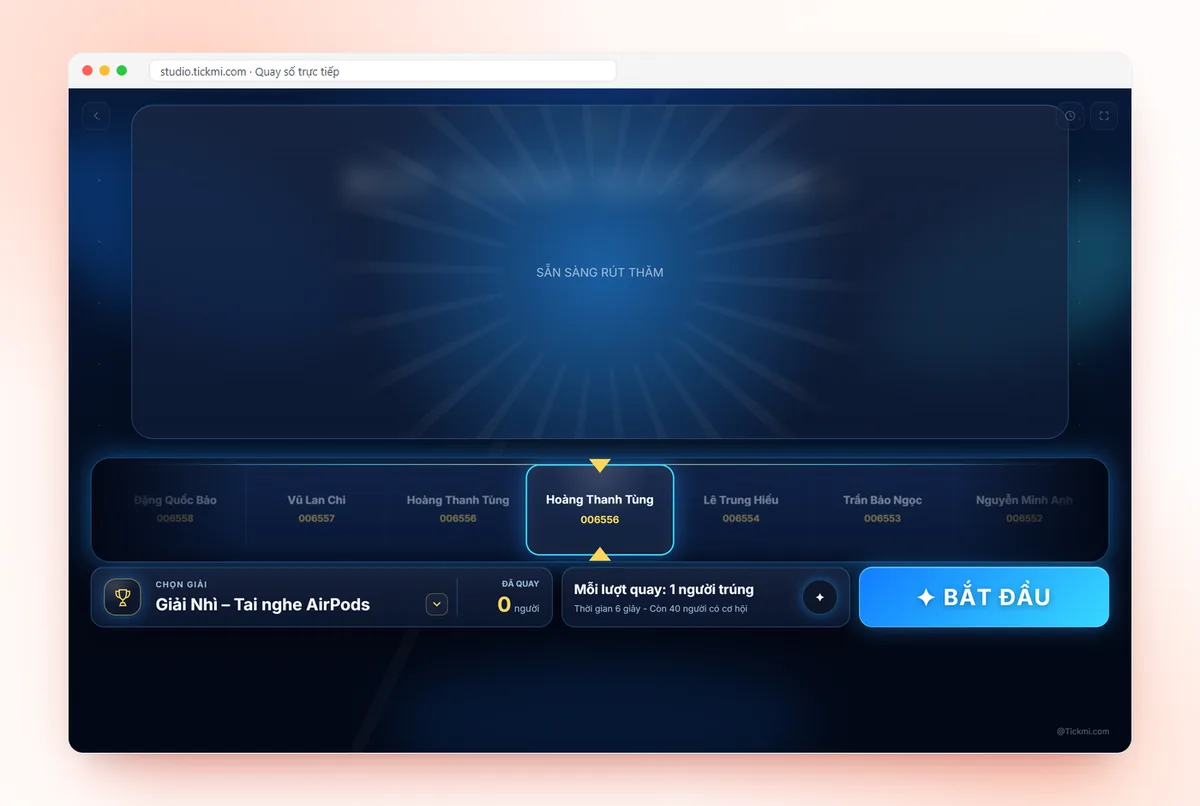
- Click Live draw on the computer connected to the LED screen, choose the prize and click START. People who have won are automatically removed from the list for the next draw.
- The History tab stores who won what and when, and can be exported to a file for handing out gifts.
For step-by-step details see the live lucky draw guide; an overview of the solution is on the lucky draw software page. The biggest advantage: the draw list comes from the check-in desk, nobody has to compile it by hand, so nobody is missed or duplicated.
Preparing the draw list: where mistakes happen most
- Filter duplicate names. Two people named "Nguyen Van Hung" will leave the whole hall unsure who won. Show the department, unit or ticket sequence number alongside.
- Decide who is eligible: official employees, guests too, or only people who are present? State it in the rules.
- Split prizes by group if needed, for example separate prizes for customers and for employees.
- Do not show phone numbers or emails on a public screen.
- Finalize the list close to draw time: people who left early are still in an Excel file compiled the day before. Drawing from check-in data solves this.
The stage script
A tidy draw segment usually follows this rhythm:
- Introduce the rules (1 minute): how many prizes, who can draw, what happens if a winner is absent.
- Draw from small prizes to big prizes: keeps the excitement building and keeps people until the end.
- Spread the draws throughout the program instead of one block: for example consolation prizes after the opening, third prize after a performance, the special prize at the end of the party.
- Call the winner up immediately and count down the waiting time. If time runs out, follow the announced rules (redraw that prize or hold it over).
- Take photos of the handover and match them against the draw history.
The transparency principles (rules, trial run, handling absent winners) are analyzed in detail in the article on running a transparent, fair lucky draw. If you are worried about the whole party, also read tickets and check-in for year-end parties.
Technical checklist before draw time
| Item | Check |
|---|---|
| Presentation computer | Plugged in, notifications off, sleep mode off |
| Screen/LED | Correct aspect ratio, text readable from the back row |
| Sound | Connected to the hall speakers, spin music volume tested |
| Network | The browser-based tool needs a stable connection; have a backup network option |
| Data | Do a trial draw, then delete the trial results before the real draw |
| Gifts | Arranged by prize, with someone holding the handover list |
Common mistakes
- Drawing someone who already left: caused by drawing from the registration list instead of the present list.
- One person winning twice: forgot to turn on removal of people who have won.
- A wheel with too many slices: tiny text and the audience cannot see the names. Switch to a number draw or split the wheel.
- Drawing on a laptop that is not shown on the screen: if the audience cannot see it, they immediately get suspicious.
- Not recording results: at the end of the party nobody remembers who won which prize to hand out gifts.
Want to try it right away with your list: the browser-based online lucky draw, paste the list, click spin, no installation needed.
A list of only a few dozen people, and you want a sliced wheel with each person's name? Use the random name wheel: paste the list, click spin, and people who have won leave the wheel automatically.
About Tickmi
Tickmi is a ticketing and attendee experience platform (Ticketing & Participant Experience Platform). On one unified set of attendee data, Tickmi connects the whole journey: issuing invitation tickets, registration tickets and paid tickets, sending branded QR tickets, checking in by app, kiosk or scanner — even when the network is down — and then the welcome screen, lucky draw, polls, quizzes and surveys. Tickmi is trusted by organizations such as Viettel, VNPT, MobiFone, FPT and CMC. Learn about Tickmi or try it free.
Frequently asked questions
Is there a free lucky wheel that needs no installation?
Yes. Tickmi's lucky draw tool at tickmi.com/lucky-draw runs in the browser, with raffle and wheel modes, a participant list input and an option to remove people who have won.
For a party of a few hundred, should I use a wheel or a number draw?
A wheel looks good with a few dozen slices or fewer. With hundreds of people, use a number draw / raffle on a big screen, prize by prize, so the winner's name is clearly readable.
How do I make sure only people who are present can win?
Draw from the checked-in list. In Tickmi Studio, choose Checked in under Draw participants; people who have won are removed from the list for the next draw automatically.
Is there a record of who won which prize?
The lucky draw in Tickmi Studio stores each draw in the History tab (prize, winner, time) and can export a winners list file.
Issue QR tickets, send emails, check in and engage attendees on one platform.