
Event management
Event management software: attendees, QR tickets and check-in on one platform
Event management software brings your attendee list, registration, tickets, check-in and reports into one place. Tickmi does this on a single shared dataset: import a list or open a registration page, send QR tickets by email, scan tickets with the app, then run a lucky draw, voting and a post-event report.
- 100 free ticket credits
- Check-in app for iOS and Android, scans offline
- Trusted by Viettel, VNPT, MobiFone, FPT and CMC
Trusted by
- Viettel
- VNPT
- MobiFone
- FPT
- CMC
What goes wrong when you run events with scattered tools?
- Google Forms for registration, Excel for filtering, Gmail for invitations, and the data drifts apart at every step
- On the day you scan paper for names, queues build at the door and nobody knows who has arrived
- Lucky draw and voting each need separate software, and you retype the list
- You only gather the numbers for a report after the program ends, which takes a whole day
Every stage of your program on one attendee list
Guest list
Import from Excel or Google Sheets, custom fields, and ticket types such as VIP, guest and press.
Online registration page
A branded registration page, approval of registrants and capacity limits.
QR tickets by email
Each person gets their own QR ticket, sent in bulk from your organization's email.
Check-in at the gate
Scan with the phone app, a self check-in kiosk or a barcode reader; scanning still works offline.
Multi-session programs
Set up the schedule, venue and speakers for each session; tickets can be checked in multiple times when needed.
Welcome screen
Show the name of whoever just checked in on a big screen in the lobby.
Lucky draw, voting, quiz
Use the list of checked-in attendees right away, with no retyping.
Post-event report
Registrations, tickets and check-ins by hour and by gate, exported to Excel after the program.
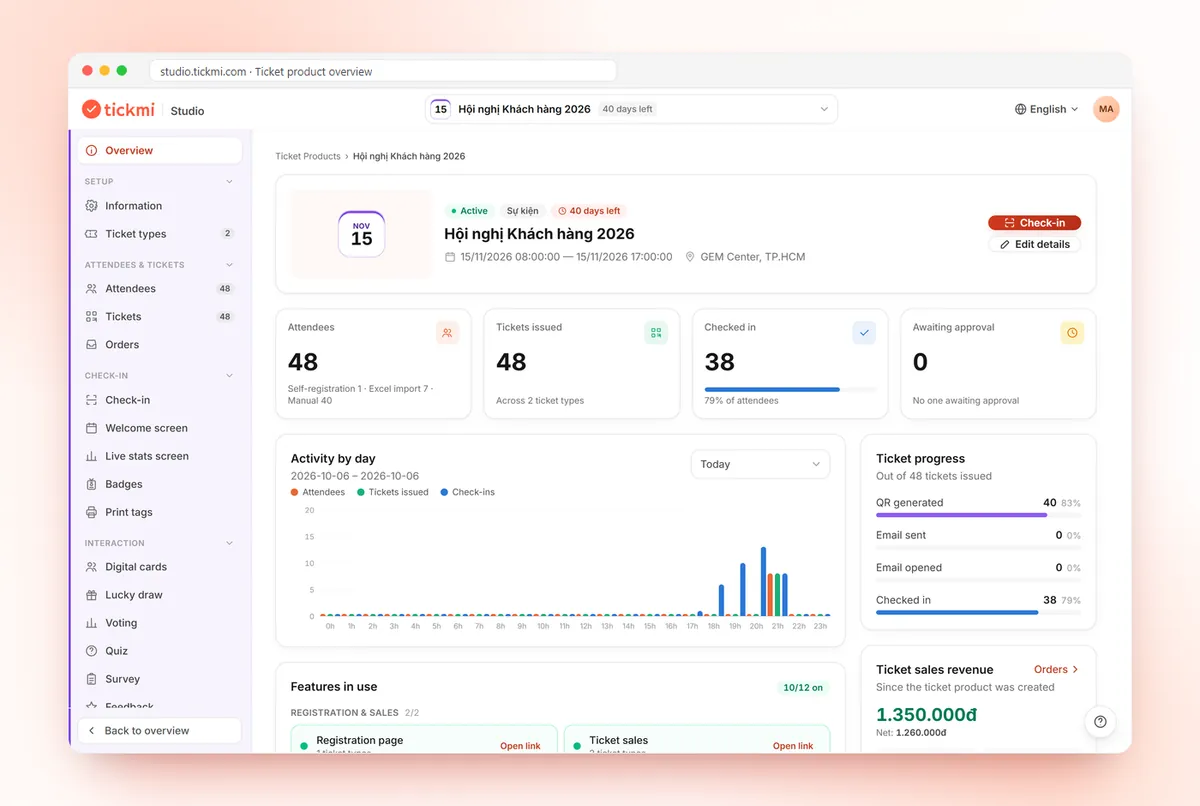
Real screens from Tickmi
Screenshots from the Tickmi Studio app and the built-in template library.
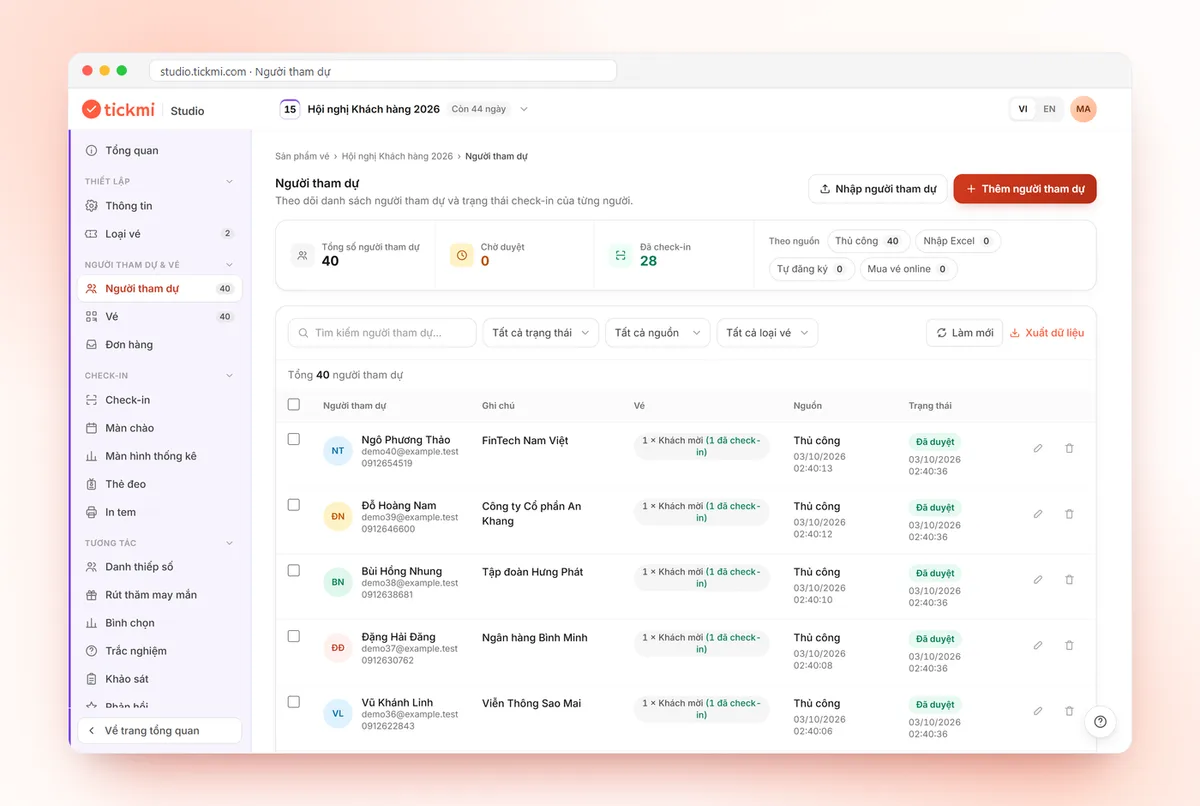
Attendee list with check-in status 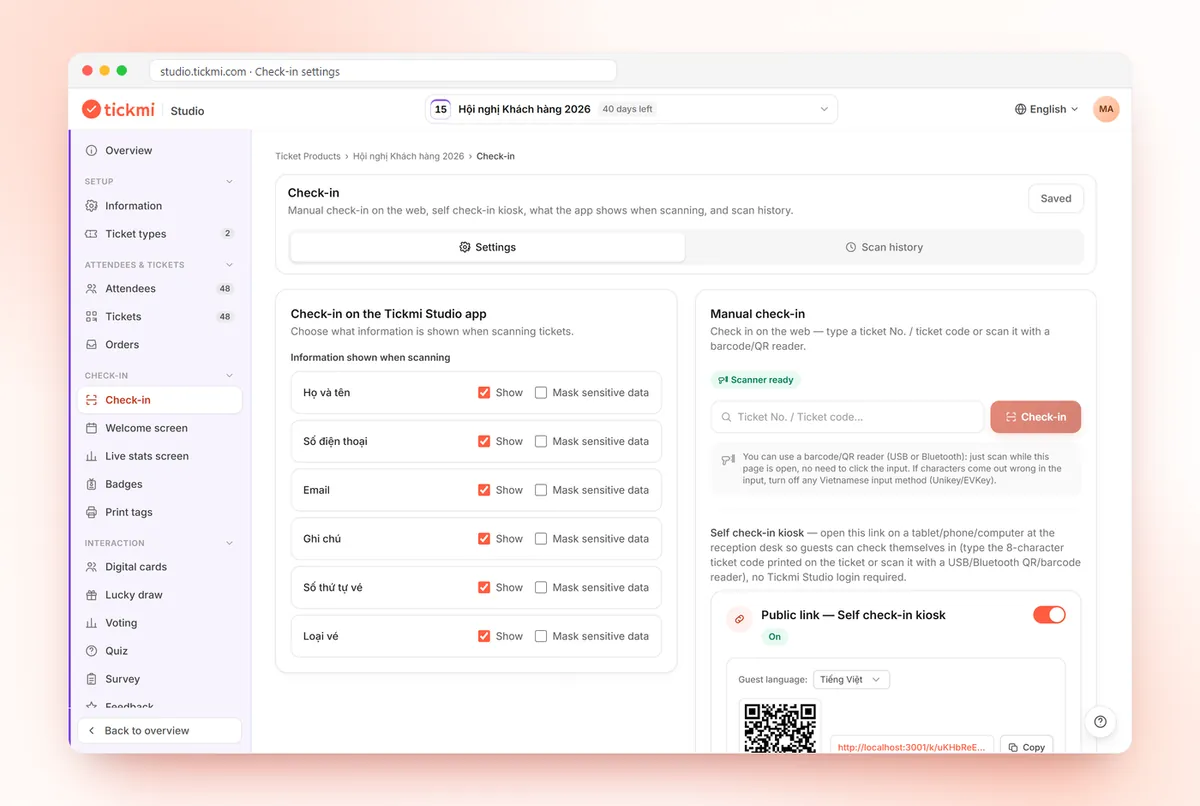
Check-in settings: fields shown when scanning, barcode readers 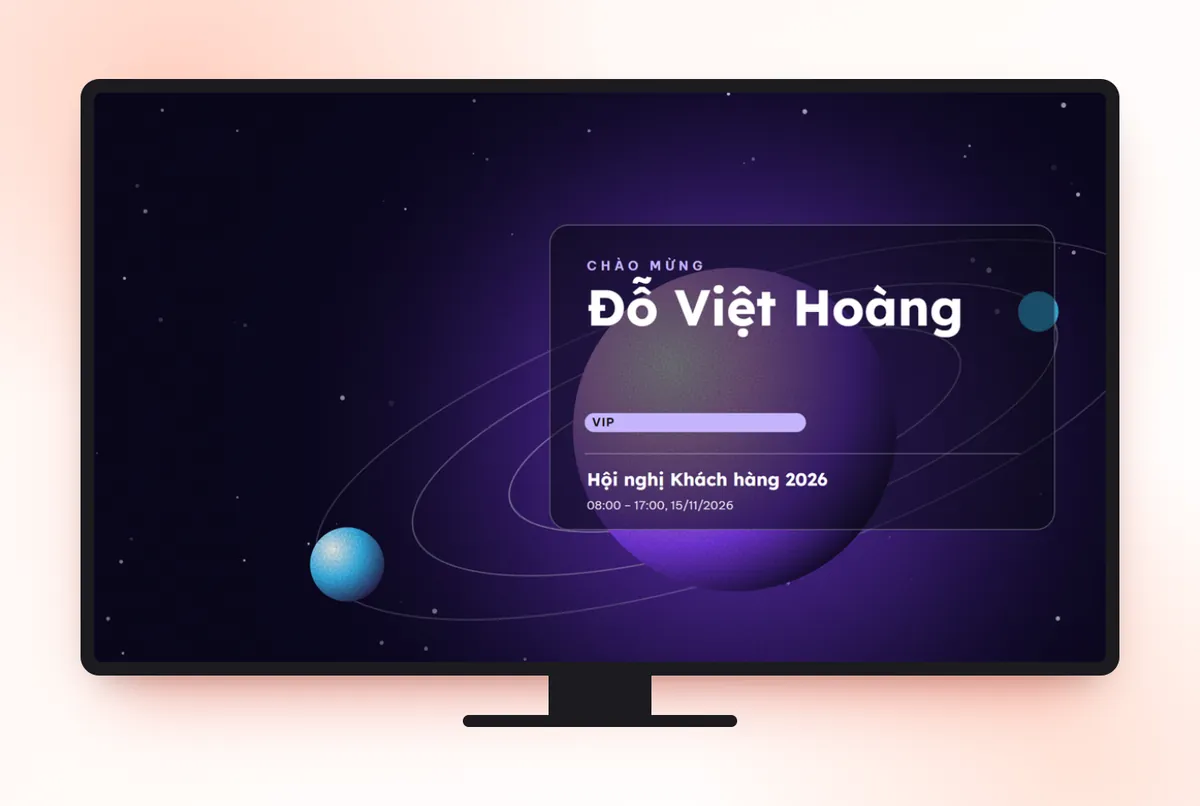
Welcome screen greeting the attendee by name at check-in 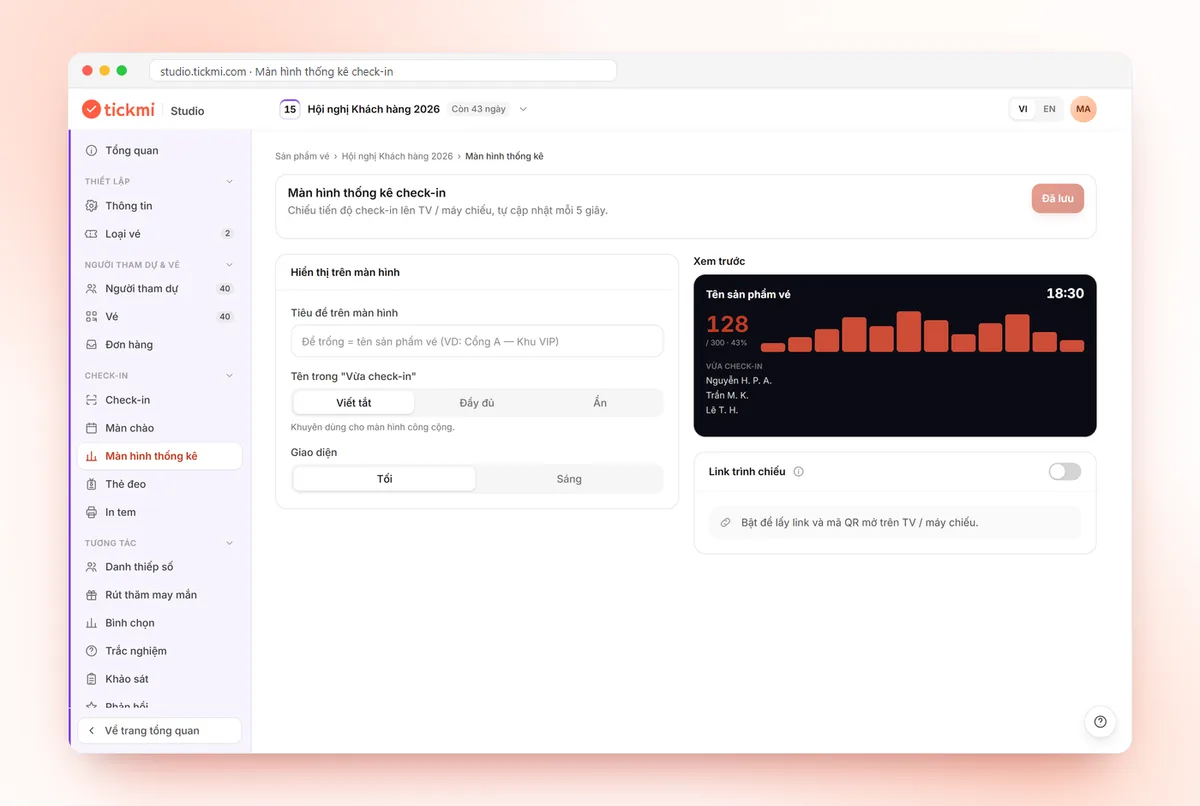
Check-in statistics screen settings: title, name display, projection link and QR
Get started in 3 steps
- 01
Create a ticket product
Program name, time, venue and ticket types.
- 02
Invite and open registration
Import your guest list or open a registration page, then send QR tickets in bulk.
- 03
Welcome your attendees
Check in with the app, welcome them, run a lucky draw or voting, and see the report right afterwards.
Google Forms + Excel vs. Tickmi software
| Task | Google Forms + Excel + Gmail | Tickmi software |
|---|---|---|
| Registration | A generic form, exported to Excel and filtered by hand | A branded registration page, with automatic or manual approval |
| Sending tickets | Manual mail merge, no unique codes | A unique QR ticket per person, sent by bulk email |
| Check-in | Scan names on paper or a printed file | Scan QR with the app, used tickets flagged, scans offline |
| Lucky draw, voting | Other software, retype the list | Use the attendee list directly, and draw only from people who checked in if you like |
| Reporting | Gather numbers after the program | A post-event report ready in Tickmi Studio |
Clear pricing, pick how you pay
Event packages: pay once for one ticket product that does not sell tickets. Ticket credits: buy ticket issues and use them across every ticket product.
Pick a package by the maximum number of attendees for one ticket product. Every package includes the full Tickmi Studio feature set.
Basic
Workshops, small seminars
1,990,000 VND
Up to 500 attendees
- All Tickmi Studio features
- Attendees, registration forms and RSVP
- Ticket delivery by email and Zalo ZBS
- Check-in, engagement and reports
- One-day events, set up and run by you
Standard
Corporate events
2,990,000 VND
Up to 1,000 attendees
- All Tickmi Studio features
- Attendees, registration forms and RSVP
- Ticket delivery by email and Zalo ZBS
- Check-in, engagement and reports
- One-day events, set up and run by you
Enterprise Event
Large events needing technical consulting
From4,990,000 VND
Up to 10,000 attendees
- All Tickmi Studio features
- Attendees, registration forms and RSVP
- Ticket delivery by email and Zalo ZBS
- Dedicated onboarding and technical support
- One-day events, set up and run by you
Per-event pricing is being updated. Contact Tickmi for a quote for your ticket product.
Note: packages are for events that do not sell tickets (invitations, free registration) and cover 01 ticket product. Each attendee added counts as 01, with 01 ticket issue included. Need more? Buy another package to add to your limit. Tickets sold via Tickmi do not count. Prices exclude VAT, Zalo ZBS fees, devices and on-site staff.
Ticket credits: pay per ticket issued, credits never expire. Shared across all your ticket products, no device fees, no per-staff fees. Sign up and get 100 free ticket credits right away.
Free
0 VND 100 tickets issued
Your first 100 tickets issued free — enough to fully try the core workflow.
Pay as you go
7,900 VND / ticket issued
Buy exactly the tickets you need, minimum 50 — ideal for small events and occasional needs.
Starter
3,450,000 VND / package of 500 tickets
Equivalent to 6,900 VND / ticket
500 tickets issued, shared across multiple ticket products.
- Most popular
Pro
5,900,000 VND / package of 1,000 tickets
Equivalent to 5,900 VND / ticket
1,000 tickets issued — suited for mid-size events.
Business
14,700,000 VND / package of 3,000 tickets
Equivalent to 4,900 VND / ticket
3,000 tickets issued — great rate for organizations running many events a year.
Business+
21,500,000 VND / package of 5,000 tickets
Equivalent to 4,300 VND / ticket
5,000 tickets issued — high volume, priority support.
Enterprise
Contact us volume-based quote
From 10,000 tickets issued · volume-based quote, SLA on demand.
Frequently asked questions
What features should I look for in event management software?
Think in four stages: before the event (lists, invitations, ticket sending), on the day (check-in, badges, engagement), after the event (reports, data) and cross-cutting needs (permissions, security). There is a detailed checklist and 5 questions to ask vendors at tickmi.com/kien-thuc/phan-mem-quan-ly-su-kien-can-nhung-tinh-nang-gi
How is managing a guest list in software different from Excel?
Excel is fine for a small list that rarely changes. When you need to approve people, send QR tickets, track confirmations and check in on the same list, a platform is the better choice. Detailed comparison at tickmi.com/kien-thuc/tieu-chi-chon-phan-mem-quan-ly-khach-moi
What are the steps to manage an event with software?
Typically: create the event and ticket types; bring in the attendee list (Excel import or a registration page); send QR tickets by email; create accounts for scanning staff; check in at the gate; run engagement such as a lucky draw or voting; finally view reports and export data. In Tickmi all of these steps share one list.
What features does event management software need?
At a minimum: attendee list management (Excel import, custom fields), a registration page, ticket or invitation sending with QR codes, check-in at the gate and a report on how many people arrived. Tickmi also adds a welcome screen, lucky draw, voting and badge printing on the same list.
Is event planning software different from event management software?
The two terms usually describe the same kind of tool. When choosing, check whether the software handles the attendee-related stages: registration, tickets, check-in, engagement and reporting.
Is Tickmi an all-in-one event management suite?
Tickmi is a ticketing and attendee experience platform: guest list management, registration, QR tickets, check-in, welcome screen, lucky draw, voting, surveys and reports on the same data. Logistics such as venue, sound and lighting are outside its scope.
Is there a free trial?
Yes. New accounts get 100 free ticket credits to run a real event, no payment card required.
How do I manage multi-session, multi-day events?
Set up each session in the Program tab. To record attendance per session, set Check-ins per ticket higher than 1, or create one ticket product per session to get separate reports.
Can several people manage an event together?
Yes. Invite colleagues to your organization with a suitable role; staff who scan tickets only need to sign in to the Tickmi Studio app.
Ready to try Tickmi?
Create an account in a minute and get 100 free ticket credits with every feature included. When you need more, pick an event package or ticket credits.
Leave your number, Tickmi will call you back
Tell us briefly what you need and the Tickmi team will get in touch to suggest a setup that fits your size.
- Advice on issuing tickets and check-in for your attendee count
- Quotes by package or per programme
- A guided trial of Tickmi Studio
Or contact us directly: 0349 632 920 · Zalo · compedia.vn@gmail.com
Request sent
Thank you. Tickmi will call you back on the number you left.